

v0.1.2
future_button
プログレスバー付きのカスタマイズ可能なMaterialおよびCupertinoボタン。ユーザーがアクションを押したときにローディングインジケーターを表示し、その後結果を表示したい場合に役立ちます。
39いいね 3630日間ダウンロード40Pub ポイント
プラットフォーム情報なし
プログレスインジケーターなどを持つカスタマイズ可能な Material および Cupertino ボタン
以下は英語原文のスナップショットです。最新版は GitHub をご覧ください。


Customizable Material and Cupertino buttons with progress indicators and more.
Useful if you want to run some background tasks when user presses on the button, and then show the result of the task.
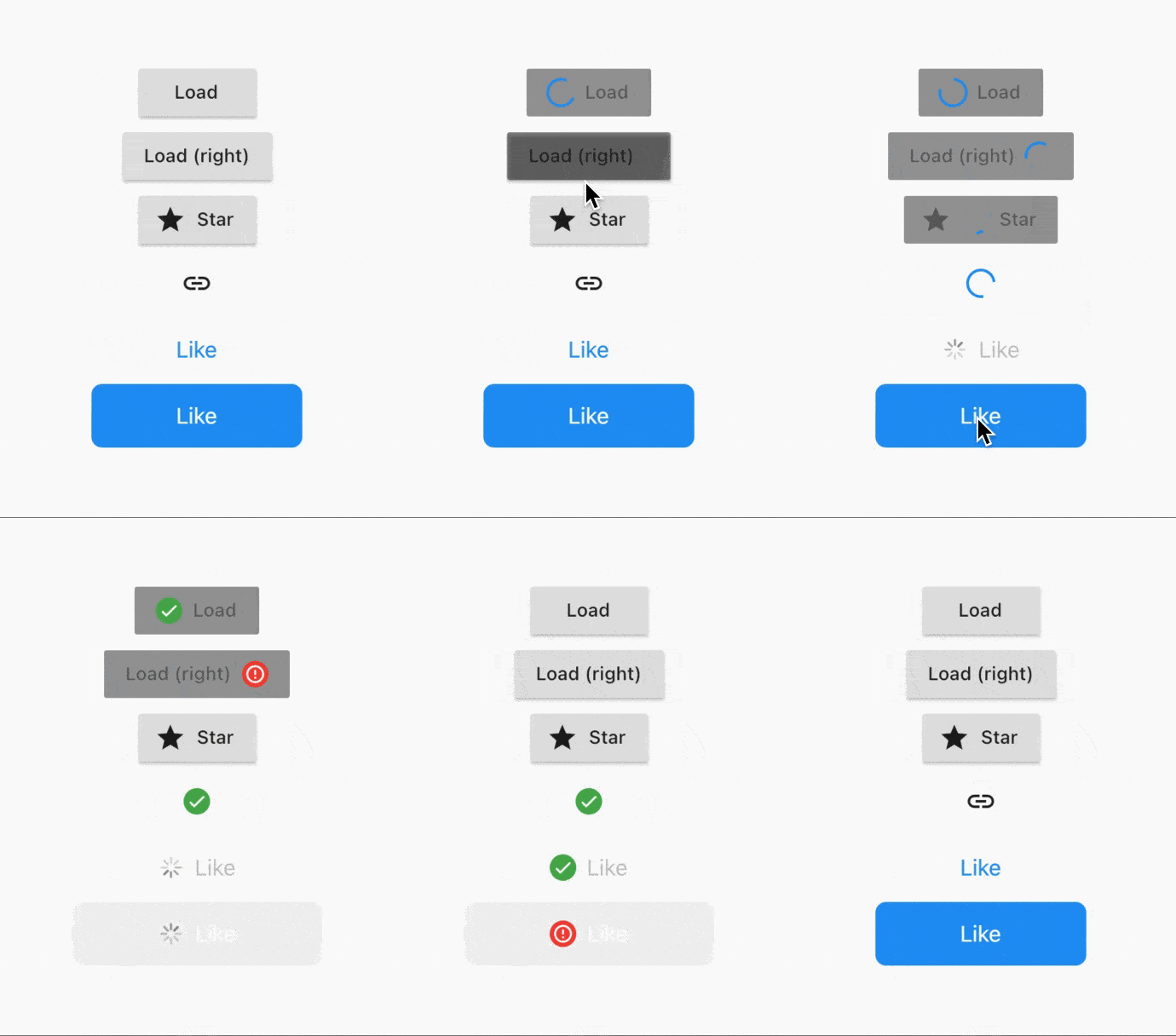
Usage is extremely simple - right now 5 types of buttons are supported:
CupertinoButton (normal + filled)FlatButton (normal + icon)IconButtonOutlineButton (normal + icon)RaisedButton (normal + icon)To convert a button to a FutureButton, just add a Future prefix and make sure that your onPressed callback is of type Future<void> Function(), instead of usual void Function().
Everything that the package does can be customized. Below is the list of all parameters:
/// The widget that's used as the progress indicator.
/// You can substitute it with your own progress indicator if necessary.
/// See [defaultMaterialProgressIndicatorBuilder] and[defaultCupertinoProgressIndicatorBuilder] for more info.
final WidgetBuilder progressIndicatorBuilder;

/// The location of progress indicator.
/// See [ProgressIndicatorLocation] for more info.
final ProgressIndicatorLocation progressIndicatorLocation;

/// Whether to show the result of the Future.
/// Will show [successIndicatorBuilder] if Future completes without errors.
/// Otherwise, will show [failureIndicatorBuilder].
final bool showResult;

/// Whether to animate the transitions using [AnimatedSwitcher].
/// Defaults to [true].
final bool animateTransitions;

/// Indicator to show when the Future is completed successfully.
/// Defaults to [defaultSuccessResultIndicatorBuilder].
final WidgetBuilder successIndicatorBuilder;

/// Indicator to show when the Future fails.
/// Defaults to [defaultFailureResultIndicatorBuilder].
final WidgetBuilder failureIndicatorBuilder;

/// For how long should the result be shown for.
/// Default to `Duration(seconds: 2)`.
final Duration resultIndicatorDuration;

/// Curve that's used to animate the button size.
/// Defaults to [Curves.easeInOut].
final Curve animationCurve;

/// Duration that's used to animate the button size.
/// Defaults to `Duration(milliseconds: 150)`.
final Duration animationDuration;
FutureRaisedButton.icon(
  icon: Icon(Icons.star),
  label: Text('Star'),
  onPressed: () async {
    // Do some background task
    await Future.delayed(Duration(seconds: 5));
  },
);
See example project for more details.
Add this to your package's pubspec.yaml file:
dependencies:
  future_button: ^0.1.1
You can install packages from the command line:
$ flutter pub get
Now in your Dart code, you can use:
import 'package:future_button/future_button.dart';
E-mail: kk.erzhan@gmail.com

依存関係一覧 3 件
{"sdk":"flutter"}^1.9.0{"sdk":"flutter"}用途で絞り込み、開発状況を比較し、採用前に元のリポジトリで要件を確認しましょう。
“A repository is the most basic element of GitHub.”
GitHub Docs — About repositories ↗