


 v0.0.1
modal_side_sheet
Flutter プロジェクトに Material サイドシートを使用するためのパッケージ。
70いいね 354030日間ダウンロード160Pub ポイント
AndroidiOSWebmacOSWindowsLinux
FlutterプロジェクトにMaterialサイドシートを使用するためのパッケージです。サイドシートについて詳しくはMaterial.ioをご覧ください。

以下は英語原文のスナップショットです。最新版は GitHub をご覧ください。
A package to use Material side sheet into your Flutter project. Learn more about side sheet at Material.io
| Android | iOS | MacOS | Web | Linux | Windows |
|---|---|---|---|---|---|
| ✔️ | ✔️ | ✔️ | ✔️ | ✔️ | ✔️ |
This package comes with two types of side sheets, Standard side sheet and Modal side sheet.
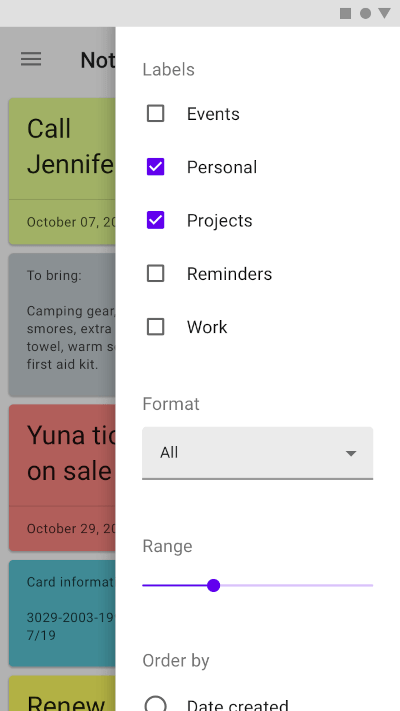
Modal side sheets present content while blocking interaction with the rest of the screen. This side sheet generally used in mobile devices as per recommended by Material Design by Google. See also : Modal Side Sheet
You can use it by calling showModalSideSheet() function into your Flutter project.
ElevatedButton(
    onPressed: () {
        showModalSideSheet(
            context: context,
            ignoreAppBar: false,
            body: ListView.builder(
                itemBuilder: (context, index) {
                    return ListTile(
                        leading: Icon(Icons.face),
                        title: Text("I am on $index index"),
                        trailing: Icon(Icons.safety_divider),
                    );
                },
            ));
        },
    child: Text("Show Modal Side Sheet")),
Standard side sheets co-exist with the screen’s primary UI region, which allows viewing and interaction with both surfaces. They are used only on tablet and desktop. See also: Standard Side Sheet
This side sheet can be used with BodyWithSideSheet widget.
Just place this widget into your Scaffold's body property.
@override
Widget build(BuildContext context){
    return Scaffold(
        appBar:AppBar(title:Text("Standard Side Sheet Demo")),
        body:BodyWithSideSheet(
            body:Container(
                child:Text("My App Body"),
            ),
            sheetBody:Container(
                child:Text("My Sheet Body"),
            ),
            show:true
        ),
    );
}
This is fully open source project so you are welcome to sontribute to any features or bug-fixing.
Don't forgot to star and fork the repository and make your first pull request.
Project released under MIT License.
依存関係一覧 2 件
{"sdk":"flutter"}{"sdk":"flutter"}用途で絞り込み、開発状況を比較し、採用前に元のリポジトリで要件を確認しましょう。
“A repository is the most basic element of GitHub.”
GitHub Docs — About repositories ↗