
キーボード回避
画面のソフトウェアキーボードを回避するためのScaffoldウィジェットの軽量な代替品。フォーカス時に隠れたTextField子要素を自動的に視界内にスクロールします。

- スター
- 124
- フォーク
- 41
- 最終プッシュ(UTC)
- 2024/05/15
- プロジェクト状態
- 公開中
元の README
以下は英語原文のスナップショットです。最新版は GitHub をご覧ください。
keyboard_avoider
A lightweight alternative to the Scaffold widget for avoiding the on-screen software keyboard. Automatically scrolls obscured TextField child widgets into view on focus.
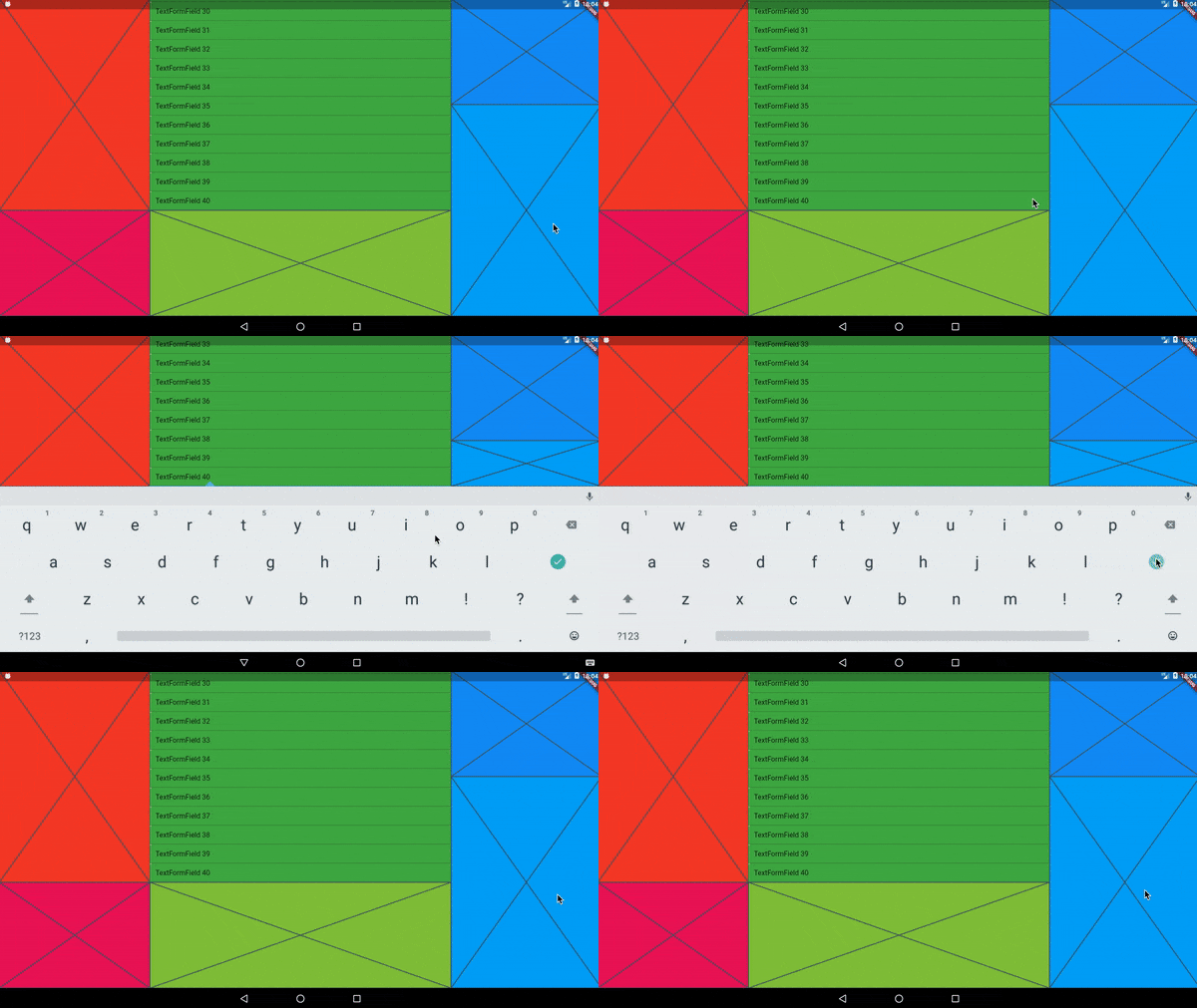
In the video above, every colored area is wrapped in its own KeyboardAvoider.
Examples
A basic Placeholder:
import 'package:keyboard_avoider/keyboard_avoider.dart';

class MyWidget extends StatelessWidget {
  @override
  Widget build(BuildContext context) {
    return KeyboardAvoider(
      child: Placeholder(),
    );
  }
}
A ListView containing multiple TextFields, with auto-scroll enabled:
import 'package:keyboard_avoider/keyboard_avoider.dart';

class MyWidget extends StatelessWidget {
  final ScrollController _scrollController = ScrollController();

  @override
  Widget build(BuildContext context) {
    return KeyboardAvoider(
      autoScroll: true,
      child: ListView.builder(
        controller: _scrollController,
        itemCount: 40,
        itemBuilder: (context, index) {
          return TextFormField(
            initialValue: 'TextFormField ${index + 1}',
          );
        },
      ),
    );
  }
}
Why not use a Scaffold?
Flutter comes with a built-in Scaffold widget that automatically adjusts the bottom padding of its body widget to accomodate the on-screen keyboard. However, it comes with 2 major caveats:
- It pushes all content up, which you may not want.
- It assumes that it fills the whole screen, which it may not.
In contrast, you can apply the KeyboardAvoider selectively to only certain widgets, and it only insets its bottom padding by the actual amount obscured by the keyboard.
Auto Scroll
To auto-scroll to a focused widget such as a TextField, set the autoScroll property to true. If child is not a ScrollView, it is automatically embedded in a SingleChildScrollView to make it scrollable.

Martin Rybak ↗
使用している依存関係
依存関係一覧 3 件
- flutter
{"sdk":"flutter"} - flutter_test開発用
{"sdk":"flutter"} - flutter_lints開発用
^4.0.0
プロジェクトに合うリポジトリを選ぶには?
用途で絞り込み、開発状況を比較し、採用前に元のリポジトリで要件を確認しましょう。
- 名前・作者・説明で検索し、技術トピックで絞り込みます。
- スター、フォーク、最近のプッシュを比較します。スターは関心の目安であり、品質の保証ではありません。
- 利用前に GitHub で README、ライセンス、Issues を確認します。
情報源と管理
“A repository is the most basic element of GitHub.”
GitHub Docs — About repositories ↗