
 v1.0.23
mnc_identifier_ocr
iOSおよびAndroidで高速かつ正確な本人確認を行うためのクロスプラットフォームKTPスキャン。
30いいね 9130日間ダウンロード130Pub ポイント
AndroidiOS
mncinnovation/mnc_identifier_ocr open-source repository details.

{"sdk":"flutter"}^0.13.1^4.1.3^2.1.2{"sdk":"flutter"}^1.0.0以下は英語原文のスナップショットです。最新版は GitHub をご覧ください。
banner_ocr
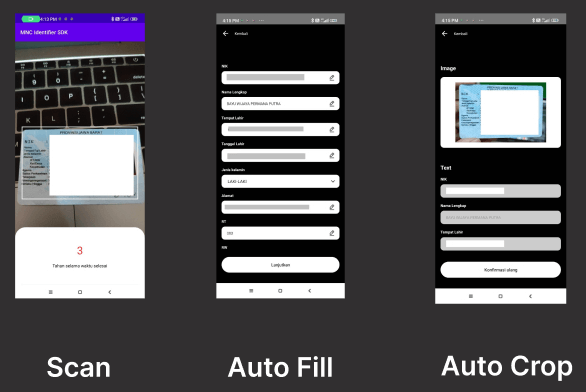
A Flutter plugin for Android and iOS for scanning KTP
You can use the command to add MNC Identifier OCR as a dependency with the latest stable version:
$ dart pub add mnc_identifier_ocr
Or you can manually add MNC Identifier OCR into the dependencies section in your pubspec.yaml:
dependencies:
  mnc_identifier_ocr: ^replace-with-latest-version
The latest version is: 1.0.22
This plugin requires Android SDK 21 or higher.
Add CaptureOCRActivity into your AndroidManifest.xml
<activity android:name="id.mncinnovation.ocr.CaptureOCRActivity" android:theme="@style/Theme.AppCompat.Light.NoActionBar" />
This plugin requires iOS 12.0 or higher and only working on real device.
Add NSCameraUsageDescription key to your info.plist file. Describe why your app needs access to the camera. This is called Privacy - Camera Usage Description in the visual editor.
import 'package:mnc_identifier_ocr/mnc_identifier_ocr.dart';
import 'package:mnc_identifier_ocr/model/ocr_result_model.dart';

Future<void> scanKtp() async {
  try {
    OcrResultModel res = await MncIdentifierOcr.startCaptureKtp(
      withFlash: true,
      cameraOnly: true,
    );
    debugPrint('result: ${res.toJson()}');
    debugPrint('KTP image path: ${res.imagePath}');
    debugPrint('Face image path: ${res.faceImagePath}');
    // Access KTP data fields
    debugPrint('NIK: ${res.ktp?.nik}');
    debugPrint('Nama: ${res.ktp?.nama}');
    // ...and so on
  } catch (e) {
    debugPrint('something goes wrong $e');
  }
}
imagePath contains the path to the full KTP image.faceImagePath contains the path to the cropped face image.ktp contains the extracted KTP data fields.Note: On iOS, this plugin only works on a real device.