
 v3.0.3
ruby_text
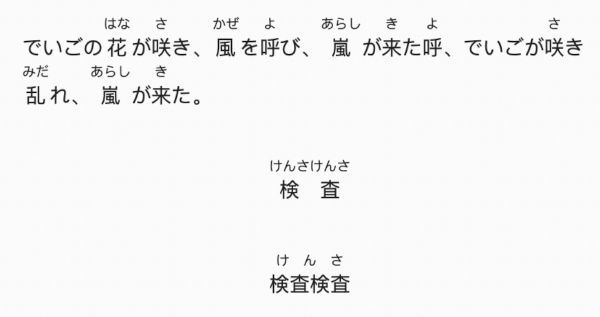
RubyTextウィジェット。このライブラリを使用すると、ふりがな効果を簡単に実現できます。
38いいね 80630日間ダウンロード150Pub ポイント
AndroidiOSWebmacOSWindowsLinux
Fujiten は Flutter フレームワークで作られた日本語辞書アプリケーションです

依存関係一覧 21 件
{"sdk":"flutter"}^2.4.0^2.2.0^9.0.1^2.0.0^1.8.0^10.3.3^9.1.1^2.1.6^5.10.0^4.0.7^2.1.0^3.0.3^0.1.1^1.8.1^1.1.0^0.7.0^2.4.2^1.16.5{"sdk":"flutter"}^6.0.0以下は英語原文のスナップショットです。最新版は GitHub をご覧ください。
Fujiten is an offline Japanese dictionary app built with the Flutter framework.
It provides fast and reliable access to Japanese definitions and kanji information, all available offline.
Dictionary data is sourced from the EDICT project, compiled as a database via the edict_database repository.
Get it on F-Droid Get it on Google Play
Or download the latest APK from the Releases Section.
Search Radicals Database Settings
Fujiten requires two databases to function properly:
You can download and install these databases directly from Fujiten via Settings → Databases,
or manually from the edict_database repository.
Opens the Settings menu, where you can:
| Icon | Function | Description |
|---|---|---|
<> |
Radicals | Finds kanji containing selected radicals |
Ⓚ |
Kanji | Matches any kanji character |
㋐ |
Kana | Matches any hiragana or katakana character |
.* |
Wildcard | Matches any sequence (regular expression syntax) |
If your device lacks a Japanese input keyboard, Fujiten can convert romaji (Latin characters) to kana:
Switch between:
{}), wildcards (.), and other regex syntax.<>) when you don’t know the full kanji but recognize its components, e.g. <化>..* at the beginning or end of your search term.flutter run --dart-define=FFI=true
When the dart flag FFI is true, sqflite_common_ffi will be used otherwise the sqflite package will be used
flutter run --dart-define=FFI=true
Desktop build must use FFI. The libsqlite3.so must be installed on the host.
<component name="ProjectRunConfigurationManager">
<configuration default="false" name="ffi" type="FlutterRunConfigurationType" factoryName="Flutter">
<option name="additionalArgs" value="--dart-define=FFI=true" />
<option name="filePath" value="$PROJECT_DIR$/lib/main.dart" />
<method v="2" />
</configuration>
</component>
Some build of sqlite do not include the regexp extension, in this case matches must be made using the GLOB operator.
Releases are built with:
flutter build apk --split-per-abi --dart-define=FFI=false
flutter build linux --dart-define=FFI=true --release
flutter build appbundle --dart-define=FFI=false