
 v0.0.1-dev.3
media_collection_previewer
画像、音声、動画などのメディアコレクションを効率的にプレビューおよび表示するための、多機能で使いやすいFlutterパッケージです。インタラクティブな機能も備えています。
8いいね 930日間ダウンロード125Pub ポイント
AndroidiOSWeb
saedkhaled/media_collection_previewer open-source repository details.

{"sdk":"flutter"}^2.0.5^3.2.3^0.0.1-dev.1^2.7.0^1.17.1^0.9.34^0.1.16^0.27.7^22.1.36^22.1.36{"sdk":"flutter"}^2.0.2以下は英語原文のスナップショットです。最新版は GitHub をご覧ください。
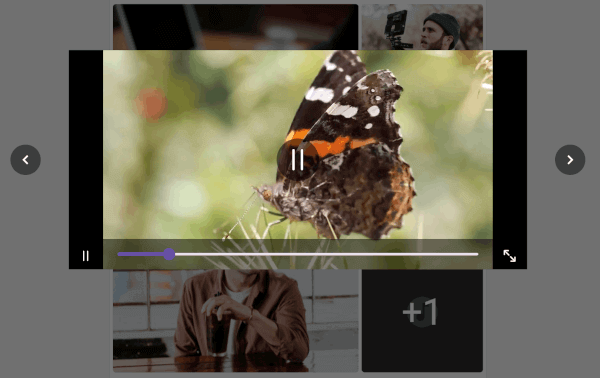
The media_collection_previewer is a versatile Flutter package designed to simplify the way you preview various media files, including images, audio, and video, within your Flutter applications. This package enables developers to open and interact with a comprehensive viewer for media files by simply clicking on them, thereby enhancing the user experience and the overall quality of your application.
PreviewNote: This package is still under development and is subject to change.
To use this package, add media_collection_previewer as a dependency in your pubspec.yaml file.
In your pubspec.yaml file within your Flutter Project add media_collection_previewer under dependencies:
dependencies:
  media_collection_previewer: <latest_version>
import 'package:media_collection_previewer/media_collection_previewer.dart';

List<Media> medias = [
  Media(
    id: 1,
    type: MediaType.image,
    path: imagePath,
  ),
  Media(
    id: 2,
    type: MediaType.video,
    url: url,
    thumbnailUrl: thumbnailUrl,
  ),
  Media(
    id: 3,
    type: MediaType.audio,
    path: audioPath,
  ),
];
MediaCollection widget and pass the list of media files to it.
final widget = MediaCollection(medias: medias);
This will create a previewer which shows your media files and allows them to be opened and viewed on click.
You can check out the example directory for a sample application using this package.
web_video_player is licensed under the New BSD License check the License for more details.