
 v1.2.9
share_social_network
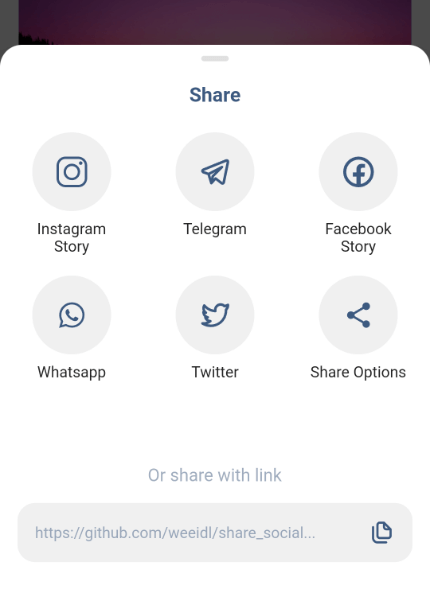
幅広い共有方法を提供する完成済みのプラットフォームです。特定の人気アプリケーションに直接アクセスを提供するか、組み込みのデフォルト共有機能を使用して共有する必要があります。
26いいね 1430日間ダウンロード105Pub ポイント
AndroidiOS
weeidl/share_social_network open-source repository details.

{"sdk":"flutter"}^2.0.51.1.0^1.2.3{"sdk":"flutter"}以下は英語原文のスナップショットです。最新版は GitHub をご覧ください。
A ready-made platform that provides a wide range of ways to share, you will need to provide access directly to certain popular applications or just share using the built-in default sharing.
Works on both platforms Android and iOS
| Image | Image | Image |
|---|---|---|
| Video | Photo | Video |
AndroidManifest.xml tag in the android/app/src/main/AndroidManifest.xml: `xmlns:tools="http://schemas.android.com/tools"`
        <manifest xmlns:android="http://schemas.android.com/apk/res/android"
         xmlns:tools="http://schemas.android.com/tools"
         package...
filepaths.xml in the app/src/main/res/xml folder and paste this code in the file :<?xml version="1.0" encoding="utf-8"?>
<paths xmlns:android="http://schemas.android.com/apk/res/android">
<cache-path name="image" path="/"/>
</paths>
manifest/application in the android/app/src/main/AndroidManifest.xml insert after meta-data: <provider
android:name="androidx.core.content.FileProvider"
android:authorities="${applicationId}.com.weeidl.share_social_network"
android:exported="false"
android:grantUriPermissions="true"
tools:replace="android:authorities">
<meta-data
android:name="android.support.FILE_PROVIDER_PATHS"
android:resource="@xml/filepaths" />
</provider>
Info.plist to use share on instagram and facebook story<key>LSApplicationQueriesSchemes</key>
<array>
<string>instagram-stories</string>
<string>facebook-stories</string>
<string>facebook</string>
<string>instagram</string>
<string>twitter</string>
<string>whatsapp</string>
<string>tg</string>
</array>
<key>FacebookAppID</key>
<string>xxxxxxxxxxxxxxx</string>
Add the package to your pubspec.yaml:
share_social_network: ^1.2.9
In your dart file, import the library:
import 'package:share_social_network/share_social_network.dart';
Instead of using a ShareSocialNetwork use ShareSocialNetwork.show Widget:
  ShareSocialNetwork.show(
    context: context,
    backgroundColor: Colors.white,
    pillColor: Colors.black12,
    transitionDuration: Duration(milliseconds: 300),
    screenshotController: screenshotController,
    copyToClipboard: "https://github.com/weeidl/share_social...",
    telegram: Telegram(
      content: "Hello World \n https://github.com/weeidl",
    ),
    instagram: Instagram(
      backgroundBottomColor: "#FF7391",
      backgroundTopColor: "#591E78",
      attributionURL: "https://deep-link-url",
      imagePath: imagePath,
    ),
    facebook: Facebook(
      backgroundTopColor: "#ffffff",
      attributionURL: "https://github.com/weeidl",
      backgroundBottomColor: "#000000",
      imagePath: imagePath,
      appId: "xxxxxxxxxxxxx",
    ),
    more: More(
      message: 'Hello World \n https://github.com/weeidl',
    ),
    twitter: Twitter(
      captionText: 'Share twitter',
      hashtags: ["hello", "world", "weeild", "artur"],
      url: 'https://github.com/weeidl',
      trailingText: " \nweeidl",
    ),
    whatsapp: Whatsapp(
      content: 'Hello World \n https://github.com/weeidl',
    ),
  );
 }
Example of how to send something to instagram:
ScreenshotController screenshotController = ScreenshotController();
void shareSocialNetwork(BuildContext context) async {
  String imagePath = await screenshotController.capture().then((image) async {
    final directory = await getApplicationDocumentsDirectory();
    final file = await File('${directory.path}/temp.png').create();
    await file.writeAsBytes(image!);
    return file.path;
  });
  ShareSocialNetwork.show(
    context: context,
    backgroundColor: Colors.white,
    pillColor: Colors.black12,
    transitionDuration: Duration(milliseconds: 300),
    screenshotController: screenshotController,
    copyToClipboard: "https://github.com/weeidl/share_social...",
    instagram: Instagram(
      backgroundBottomColor: "#FF7391",
      backgroundTopColor: "#591E78",
      attributionURL: "https://deep-link-url",
      imagePath: imagePath,
    ),
  );
}