
flutter-marquee-text
テキストを自動的にスクロールするためのFlutterウィジェットです。
GitHub で見る ↗アーカイブ済み

- スター
- 14
- フォーク
- 12
- 最終プッシュ(UTC)
- 2023/03/02
- プロジェクト状態
- アーカイブ済み
元の README
以下は英語原文のスナップショットです。最新版は GitHub をご覧ください。

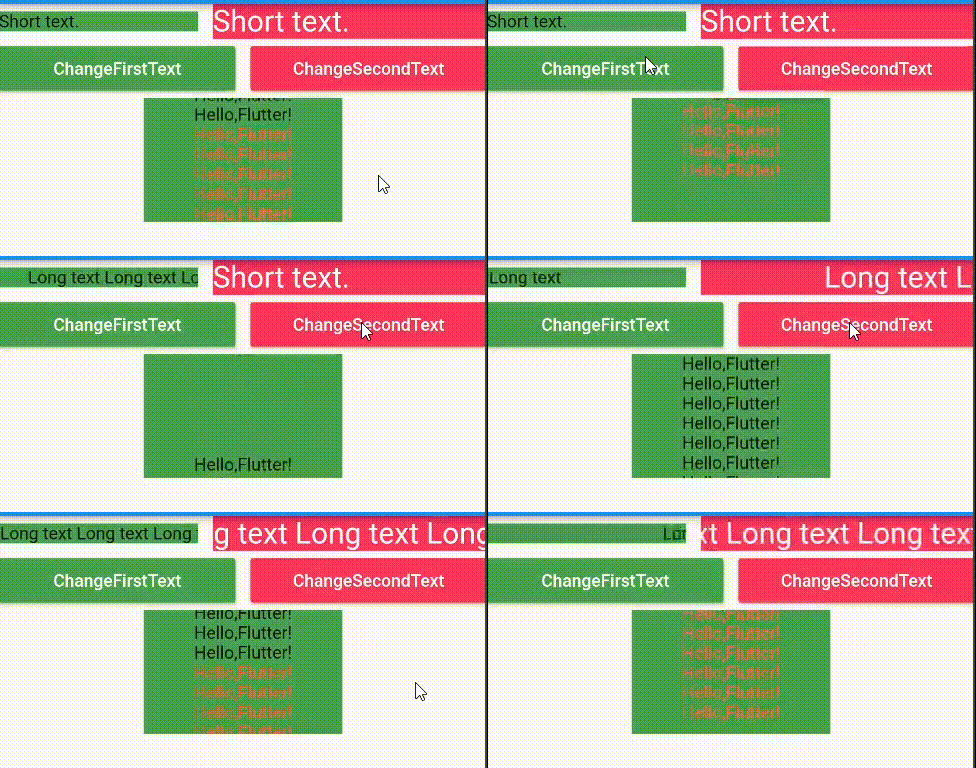
Screenshot
Usage
-
Add marquee_text as a dependency in your pubspec.yaml file.
dependencies: marquee_text: ^2.5.0+1 -
Now in your flutter project, you can use:
Container(
  width: 100,
  color: Colors.green
  child: Column(
    children: [
      /// horizontal marquee
      MarqueeText(
        text: TextSpan(
          text: 'This is long long long text...',
        ),
        style: TextStyle(
          fontSize: 24,
          color: Colors.white,
        ),
        speed: 30,
      ),

      /// vertical marquee
      VerticalMarqueeText(
        text: TextSpan(
          children: <InlineSpan>[
            TextSpan(
              text: '''
              This is long long long text...
              This is long long long text...
              This is long long long text...
              ''',
            ),
          ],
        ),
        style: TextStyle(
          fontSize: 24,
          color: Colors.white,
        ),
        speed: 30,
      ),
    ],
  ),
)
Properties
| Property | Type | Required | Default |
|---|---|---|---|
| text | String | true | / |
| style | TextStyle | false | / |
| speed | double | false | 50 |
| alwaysScroll | bool | false | false |
| textDirection | TextDirection | false | TextDirection.ltr |
| marqueeDirection | MarqueeDirection | false | MarqueeDirection.rtl |
| textAlign | TextAlign | false | TextAlign.start |

GitHub 作者
zhcode ↗
言語DartSwiftKotlinObjective-C
使用している依存関係
依存関係一覧 3 件
- flutter
{"sdk":"flutter"} - flutter_test開発用
{"sdk":"flutter"} - flutter_lints開発用
^1.0.4
プロジェクトに合うリポジトリを選ぶには?
用途で絞り込み、開発状況を比較し、採用前に元のリポジトリで要件を確認しましょう。
- 名前・作者・説明で検索し、技術トピックで絞り込みます。
- スター、フォーク、最近のプッシュを比較します。スターは関心の目安であり、品質の保証ではありません。
- 利用前に GitHub で README、ライセンス、Issues を確認します。
情報源と管理
“A repository is the most basic element of GitHub.”
GitHub Docs — About repositories ↗