
 v1.3.10
agora_uikit
몇 줄의 코드만으로 앱에 Agora 비디오 통화 또는 라이브 비디오 스트리밍을 간단히 통합할 수 있는 Flutter 플러그인입니다.
440좋아요 24530일 다운로드80Pub 점수
플랫폼 정보 없음
몇 줄의 코드만으로 앱에 Agora 비디오 통화 또는 라이브 비디오 스트리밍을 간단히 통합할 수 있는 Flutter 플러그인입니다.

^6.3.0^1.5.5{"sdk":"flutter"}>=0.13.1 <2.0.0>=1.0.1 <3.0.1^11.0.0{"sdk":"flutter"}아래는 영문 원문 스냅샷입니다. 최신 내용은 GitHub에서 확인하세요.
⚠️ This project is no longer maintained and has been archived.
Please note that this repository is now in a read-only state and will not receive any further updates or support.
We recommend migrating to the following alternatives:
For documentation and support, please visit the Agora Documentation.
https://img.shields.io/pub/likes/agora_uikit?logo=dart
https://img.shields.io/pub/popularity/agora_uikit?logo=dart
https://img.shields.io/pub/points/agora_uikit?logo=dart
Platform
GitHub Workflow Status
https://img.shields.io/pub/v/agora_uikit
License: MIT
https://img.shields.io/badge/slack-@RTE%20Dev-blue.svg?logo=slack
Instantly integrate Agora video calling or video streaming into your Flutter application.
NOTE: The Flutter VideoUIKit( >version 1.1.0) uses the latest version of the Agora 4.x SDK. To know more about the changes and the new features in the 4.x SDK, kindly take a look at the docs.
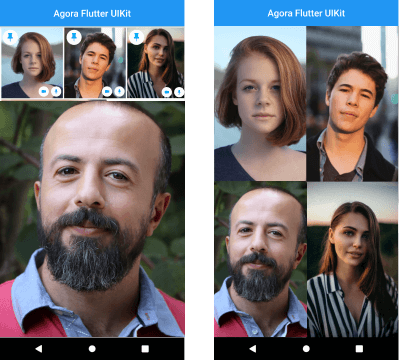
Agora Flutter VideoUIKit Layout Sample
In your Flutter application, add the agora_uikit as a dependency inside your pubspec.yaml file.
In your Android level build.gradle add this at the end of the repositories:
allprojects {
	repositories {
		...
		maven { url 'https://jitpack.io' }
	}
}
Agora Video SDK requires camera and microphone permission to start video call.
Open the AndroidManifest.xml file and add the required device permissions to the file.
<manifest>
...
<uses-permission  android:name="android.permission.READ_PHONE_STATE"/>
<uses-permission  android:name="android.permission.INTERNET"  />
<uses-permission  android:name="android.permission.RECORD_AUDIO"  />
<uses-permission  android:name="android.permission.CAMERA"  />
<uses-permission  android:name="android.permission.MODIFY_AUDIO_SETTINGS"  />
<uses-permission  android:name="android.permission.ACCESS_NETWORK_STATE"  />
<!-- The Agora SDK requires Bluetooth permissions in case users are using Bluetooth devices.-->
<uses-permission  android:name="android.permission.BLUETOOTH"  />
...
</manifest>
Open info.plist and add:
Privacy - Microphone Usage Description, and add a note in the Value column.Privacy - Camera Usage Description, and add a note in the Value column.Your application can still run the voice call when it is switched to the background if the background mode is enabled. Select the app target in Xcode, click the Capabilities tab, enable Background Modes, and check Audio, AirPlay, and Picture in Picture.
// Instantiate the client
final AgoraClient client = AgoraClient(
  agoraConnectionData: AgoraConnectionData(
    appId: "<--Add Your App Id Here-->",
    channelName: "test",
  ),
);

// Initialize the Agora Engine
@override
void initState() {
  super.initState();
  initAgora();
}

void initAgora() async {
  await client.initialize();
}

// Build your layout
@override
Widget build(BuildContext context) {
  return MaterialApp(
    home: Scaffold(
      body: SafeArea(
        child: Stack(
          children: [
            AgoraVideoViewer(client: client),
            AgoraVideoButtons(client: client),
          ],
        ),
      ),
    ),
  );
}
The plan is to grow this library and have similar offerings across all supported platforms. There are already similar libraries for Android, iOS, React Native, and Web React, so be sure to check them out.