
flutter-pdf-text
Flutter용 플러그인으로 PDF 문서의 텍스트 내용을 읽고 문자열로 변환할 수 있습니다.

- 스타
- 21
- 포크
- 68
- 최근 푸시(UTC)
- 2024. 8. 4.
- 프로젝트 상태
- 활성
원본 README
아래는 영문 원문 스냅샷입니다. 최신 내용은 GitHub에서 확인하세요.
PDF Text Plugin


This plugin for Flutter allows you to read the text content of PDF documents and convert it into strings. It works on iOS and Android. On iOS it uses Apple's PDFKit. On Android it uses Apache's PdfBox Android porting.
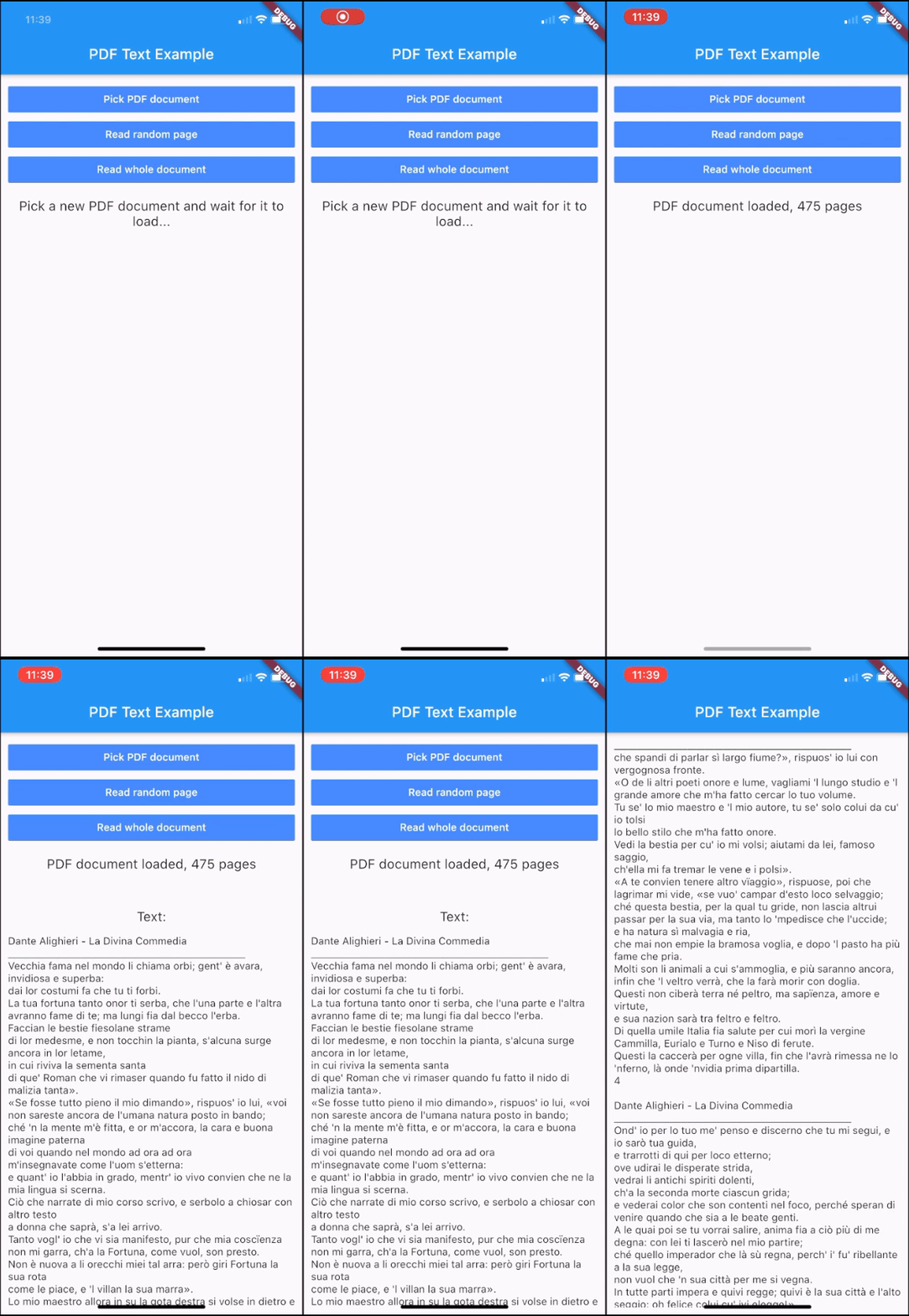
Getting Started
Add this to your package's pubspec.yaml file:
dependencies:
  pdf_text: ^0.5.0
Usage
Import the package with:
import 'package:pdf_text/pdf_text.dart';
Create a PDF document instance using a File object:
PDFDoc doc = await PDFDoc.fromFile(file);
or using a path string:
PDFDoc doc = await PDFDoc.fromPath(path);
or using a URL string:
PDFDoc doc = await PDFDoc.fromURL(url);
Pass a password for encrypted PDF documents:
PDFDoc doc = await PDFDoc.fromFile(file, password: password);
Read the text of the entire document:
String docText = await doc.text;
Retrieve the number of pages of the document:
int numPages = doc.length;
Access a page of the document:
PDFPage page = doc.pageAt(pageNumber);
Read the text of a page of the document:
String pageText = await page.text;
Read the information of the document:
PDFDocInfo info = doc.info;
Optionally, you can delete the file of a document when you no longer need it. This can be useful when you import a PDF document from outside the local file system (e.g using a URL), since it is automatically stored in the temporary directory of the app.
Delete the file of a single document:
doc.deleteFile();
or delete all the files of all the documents imported from outside the local file system:
PDFDoc.deleteAllExternalFiles();
Functioning
This plugin applies lazy loading for the text contents of the pages. The text is cached page per page. When you request the text of a page for the first time, it is parsed and stored in memory, so that the second access will be faster. Anyway, the text of pages that are not requested is not loaded. This mechanism allows you not to waste time loading text that you will probably not use. When you request the text content of the entire document, only the pages that have not been loaded yet are then loaded.
Public Methods
PDFDoc
| Return | Description |
|---|---|
| PDFPage | pageAt(int pageNumber) Gets the page of the document at the given page number. |
| static Future<PDFDoc> | fromFile(File file, {String password = ""}) Creates a PDFDoc object with a File instance. Optionally, takes a password for encrypted PDF documents. |
| static Future<PDFDoc> | fromPath(String path, {String password = ""}) Creates a PDFDoc object with a file path. Optionally, takes a password for encrypted PDF documents. |
| static Future<PDFDoc> | fromURL(String url, {String password = ""}) Creates a PDFDoc object with a url. Optionally, takes a password for encrypted PDF documents. |
| void | deleteFile() Deletes the file related to this PDFDoc. Throws an exception if the FileSystemEntity cannot be deleted. |
| static Future | deleteAllExternalFiles() Deletes all the files of the documents that have been imported from outside the local file system (e.g. using fromURL). |
Objects
class PDFDoc {
  int length; // Number of pages of the document
  List<PDFPage> pages; // Pages of the document
  PDFDocInfo info; // Info of the document
  Future<String> text; // Text of the document
}

class PDFPage {
  int number; // Number of the page in the document
  Future<String> text; // Text of the page
}

class PDFDocInfo {
  String author; // Author string of the document
  List<String> authors; // Authors of the document
  DateTime creationDate; // Creation date of the document
  DateTime modificationDate; // Modification date of the document
  String creator; // Creator of the document
  String producer; // Producer of the document
  List<String> keywords; // Keywords of the document
  String title; // Title of the document
  String subject; // Subject of the document
}
Contribute
If you have any suggestions, improvements or issues, feel free to contribute to this project. You can either submit a new issue or propose a pull request. Direct your pull requests into the dev branch.

Alessio Luciani ↗
분류
사용 중인 의존성
의존성 목록 5 개
- flutter
{"sdk":"flutter"} - path
^1.8.0 - path_provider
^2.0.1 - http
^0.13.0 - flutter_test개발 의존성
{"sdk":"flutter"}
프로젝트에 맞는 저장소를 선택하려면?
사용 목적에 따라 검색하고 개발 활동을 비교한 뒤 원본 저장소에서 요구 사항을 확인하세요.
- 이름, 작성자 또는 설명으로 검색하고 기술 주제로 범위를 좁힙니다.
- 스타, 포크, 최근 푸시를 함께 비교하세요. 스타는 관심의 지표이며 품질을 보장하지 않습니다.
- 사용하기 전에 GitHub에서 README, 라이선스, Issues를 확인하세요.
출처 및 관리
“A repository is the most basic element of GitHub.”
GitHub Docs — About repositories ↗