

 v3.0.1
simple_url_preview
URL 미리보기를 표시하는 Flutter 패키지입니다. 높이, 배경 및 텍스트 스타일, 그리고 줄 수를 사용자 정의할 수 있습니다.
77좋아요 10830일 다운로드60Pub 점수
플랫폼 정보 없음
Flutter용 간단한 URL 미리보기 패키지

아래는 영문 원문 스냅샷입니다. 최신 내용은 GitHub에서 확인하세요.
Flutter package to show url preview
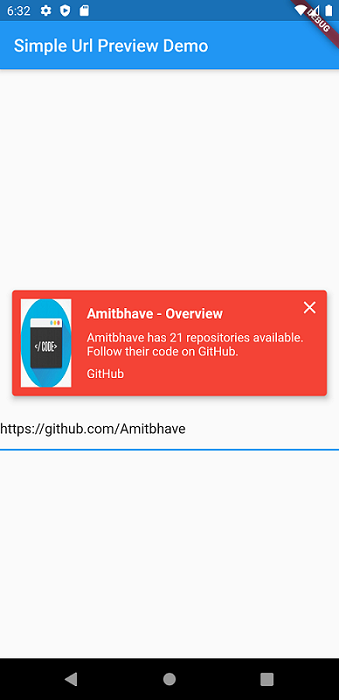
This shows url preview of a URL. (Now migrated to null-safety).
Currently only supports Open Graph Protocol
Please use latest version of the package.
Add simple_url_preview to pubspec.yaml, and hit command 'flutter pub get'
dependencies:
  ...
  simple_url_preview: ^3.0.1
SimpleUrlPreview(
  url: 'https://pub.dev/',
),
SimpleUrlPreview(
  url: 'https://pub.dev/',
  previewHeight: 200,
  previewContainerPadding: EdgeInsets.all(10),
),
Default bgColor = Theme.of(context).primaryColor
SimpleUrlPreview(
  url: 'https://pub.dev/',
  bgColor: Colors.red,
),
Default titleStyle = TextStyle( fontWeight: FontWeight.bold, fontSize: 16, color: Theme.of(context).accentColor )
Default descriptionStyle = TextStyle( fontSize: 14, color: Theme.of(context).accentColor )
Default siteNameStyle = TextStyle( fontSize: 14, color: Theme.of(context).accentColor )
SimpleUrlPreview(
  url: 'https://pub.dev/',
  titleStyle: TextStyle(
    fontSize: 16,
    fontWeight: FontWeight.bold,
    color: Colors.red,
  ),
  descriptionStyle: TextStyle(
    fontSize: 14,
    color: Theme.of(context).primaryColor,
  ),
  siteNameStyle: TextStyle(
    fontSize: 14,
    color: Theme.of(context).primaryColor,
  ),
),
SimpleUrlPreview(
  url: 'https://pub.dev/',
  isClosable: true,
),
Default and maximum title lines = 2 and description lines = 3.
SimpleUrlPreview(
  url: 'https://pub.dev/',
  titleLines: 1,
  descriptionLines: 2,
  imageLoaderColor: Colors.white,
),
By Default, will open URL in default browser.
SimpleUrlPreview(
  url: 'https://pub.dev/',
  onTap: () => print('Hello Flutter URL Preview'),
),
Would :heart: to see any contributions.
If you liked my work, show some :heart: by :star: repo.
Also you can appreciate by

|

|
의존성 목록 8 개
{"sdk":"flutter"}^0.13.3^0.15.0^6.0.6^0.3.0^3.0.0^1.15.0{"sdk":"flutter"}사용 목적에 따라 검색하고 개발 활동을 비교한 뒤 원본 저장소에서 요구 사항을 확인하세요.
“A repository is the most basic element of GitHub.”
GitHub Docs — About repositories ↗