

 v0.4.0
sweetsheet
빠르고 쉽게 아름다운 하단 시트를 확인 대화 상자로 표시합니다.
231좋아요 4830일 다운로드140Pub 점수
AndroidiOSWebmacOSWindowsLinux
빠르고 쉽게 아름다운 하단 시트를 확인 대화 상자로 표시합니다.

아래는 영문 원문 스냅샷입니다. 최신 내용은 GitHub에서 확인하세요.
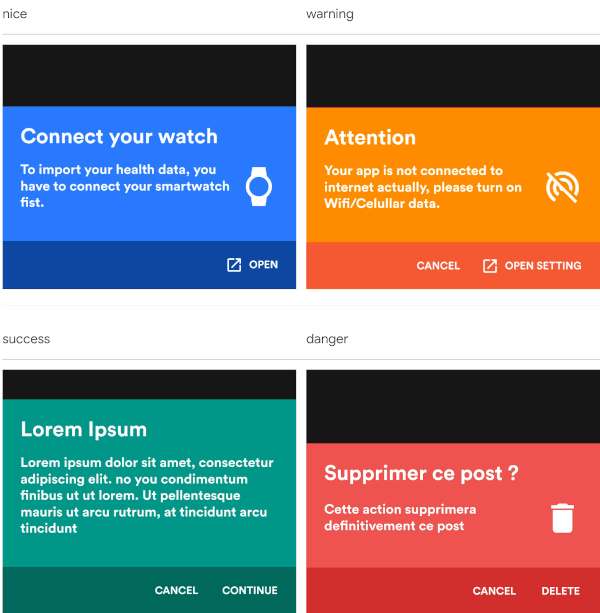
Show beautiful bottom sheet as confirmation dialog quickly and easily.
| nice | warning |
|---|---|
 |
 |
| success | danger |
|---|---|
 |
 |
and since version 0.2.0 , it is fully customizable.
| custom dark | custom light |
|---|---|
 |
 |
With increasingly large smartphones, it has become almost impossible to have good ergonomics in an application using confirmation dialogs. The SweetSheet package allows you to show beautiful bottoms sheets to replace your confirmation dialogs and maintain a good user experience.
Add this to your package's pubspec.yaml file:
dependencies:
  sweetsheet: ^0.4.0
And import it:
import 'package:sweetsheet/sweetsheet.dart';
to start using the sheets, you have to create the instance of the
SweetSheet class first.
final SweetSheet _sweetSheet = SweetSheet();
Now you can show the bottom sheet by calling the method show() on the instance.
This is the signature of the show method
  show({
    required BuildContext context,
    Text? title,
    required Text description,
    required CustomSheetColor color,
    required SweetSheetAction positive,
    EdgeInsets? contentPadding = const EdgeInsets.symmetric(horizontal: 24.0, vertical: 24.0),
    EdgeInsets? actionPadding = const EdgeInsets.all(8.0),
    SweetSheetAction? negative,
    IconData? icon,
    bool useRootNavigator = false,
    bool isDismissible = true,
  }) {}
This is the signature of the SweetSheetAction widget.
class SweetSheetAction extends StatelessWidget {
  final String title;
  final VoidCallback onPressed;
  final IconData icon;
  final Color color;

  SweetSheetAction({
    @required this.title,
    @required this.onPressed,
    this.icon,
    this.color = Colors.white,
  });
}
Attention : At least one action is required and the icons are IconData for uniformity purpose.
The SweetSheetColor is a class which have four static values and it determine the color of the sheet by creating a CustomSheetColor:
To customise, create a new instance of CustomSheetColor and pass it to the argument color when calling the method show.
signature of CustomSheetColor:
class CustomSheetColor {
  Color main;
  Color accent;
  Color icon;

  CustomSheetColor({@required this.main, @required this.accent, this.icon});
}
To customise the action, pass a new color to color argument of SweetSheetAction.
_sweetSheet.show(
    context: context,
    title: Text("Attention"),
    description: Text(
        'Your app is not connected to internet actually, please turn on Wifi/Celullar data.'),
    color: SweetSheetColor.WARNING,
    icon: Icons.portable_wifi_off,
    positive: SweetSheetAction(
      onPressed: () {
        Navigator.of(context).pop();
      },
      title: 'OPEN SETTING',
      icon: Icons.open_in_new,
    ),
    negative: SweetSheetAction(
      onPressed: () {
        Navigator.of(context).pop();
      },
      title: 'CANCEL',
    ),
);
_sweetSheet.show(
    context: context,
    description: Text(
      'Place your order. Please confirm the placement of your order : Iphone X 128GB',
      style: TextStyle(color: Color(0xff2D3748)),
    ),
    color: CustomSheetColor(
      main: Colors.white,
      accent: Color(0xff5A67D8),
      icon: Color(0xff5A67D8),
    ),
    icon: Icons.local_shipping,
    positive: SweetSheetAction(
      onPressed: () {
        Navigator.of(context).pop();
      },
      title: 'CONTINUE',
    ),
    negative: SweetSheetAction(
      onPressed: () {
        Navigator.of(context).pop();
      },
      title: 'CANCEL',
  ),
);
의존성 목록 2 개
{"sdk":"flutter"}{"sdk":"flutter"}사용 목적에 따라 검색하고 개발 활동을 비교한 뒤 원본 저장소에서 요구 사항을 확인하세요.
“A repository is the most basic element of GitHub.”
GitHub Docs — About repositories ↗