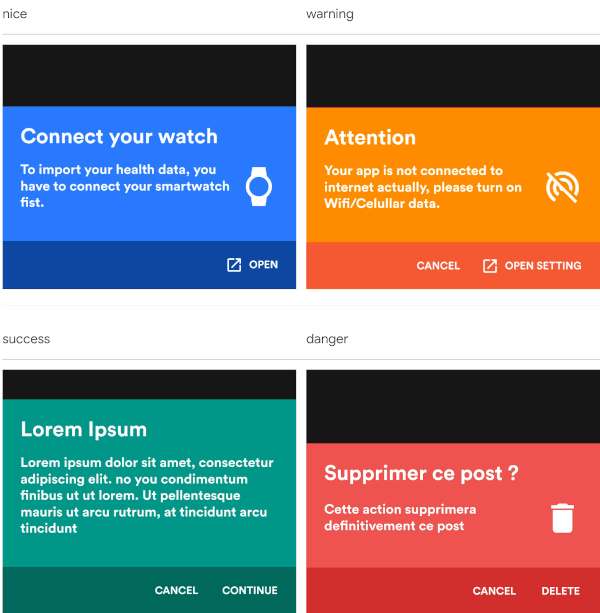
Sweetsheet은 개발자가 확인 대화 상자로 매력적인 하단 시트를 빠르고 쉽게 표시할 수 있도록 해주는 Flutter 패키지입니다. 최소한의 코드로 모달 하단 시트를 생성하는 과정을 단순화하며, 기본적으로 깔끔하고 현대적인 UI를 제공합니다. Android, iOS, Web, macOS, Windows, Linux 등 여러 플랫폼 간 원활한 통합을 위해 설계되었으며, 부드러운 애니메이션과 사용자 정의 가능한 레이아웃을 통해 사용자 경험을 향상시키면서도 디자인의 간결함과 일관성을 유지합니다.
사용 사례
빠른 확인 대화 상자
사용자 작업 프롬프트
양식 제출 확인
모달 탐색
간단한 팝업 인터페이스
주요 기능
사용하기 쉬운 API
아름다운 기본 스타일
크로스 플랫폼 지원
사용자 정의 가능한 콘텐츠
부드러운 애니메이션
최소한의 보일러플레이트
적합한 대상
빠른 바텀 시트 구현을 원하는 개발자
경량 확인 대화 상자 필요 프로젝트
일관된 UI 패턴을 가진 앱
개발 속도를 우선시하는 팀
Flutter 초보자가 바닥 시트 탐색 중
고려 사항
기본 스타일링을 넘어서는 사용자 정의가 제한적
복잡한 상호작용 시트에는 적합하지 않음
완전한 기능을 위해 외부 종속성에 의존합니다
고급 모달보다는 간단한 사용 사례에 적합
원본 README
연결된 소스 저장소의 README 원문 스냅샷입니다. 최신 내용은 저장소에서 확인하세요.
sweetsheet
Show beautiful bottom sheet as confirmation dialog quickly and easily.
nice
warning
success
danger
and since version 0.2.0 , it is fully customizable.
custom dark
custom light
Getting Started
With increasingly large smartphones, it has become almost impossible to have good ergonomics in an application using confirmation dialogs.
The SweetSheet package allows you to show beautiful bottoms sheets to replace your confirmation dialogs and maintain a good user experience.
How to use?
Add this to your package's pubspec.yaml file:
dependencies:sweetsheet:^0.4.0
And import it:
import'package:sweetsheet/sweetsheet.dart';
to start using the sheets, you have to create the instance of the
SweetSheet class first.
finalSweetSheet _sweetSheet = SweetSheet();
Now you can show the bottom sheet by calling the method show() on the instance.
This is the signature of the show method