

 v3.1.0
contextualactionbar
Flutter용 컨텍스트 액션 바(CAB) 대안. CAB은 앱 바를 대체하는 상단 앱 바로, 선택된 항목에 대한 컨텍스트 작업을 제공합니다.
66좋아요 12130일 다운로드150Pub 점수
AndroidiOSWebmacOSWindowsLinux
Flutter용 컨텍스트 액션 바 대안

아래는 영문 원문 스냅샷입니다. 최신 내용은 GitHub에서 확인하세요.
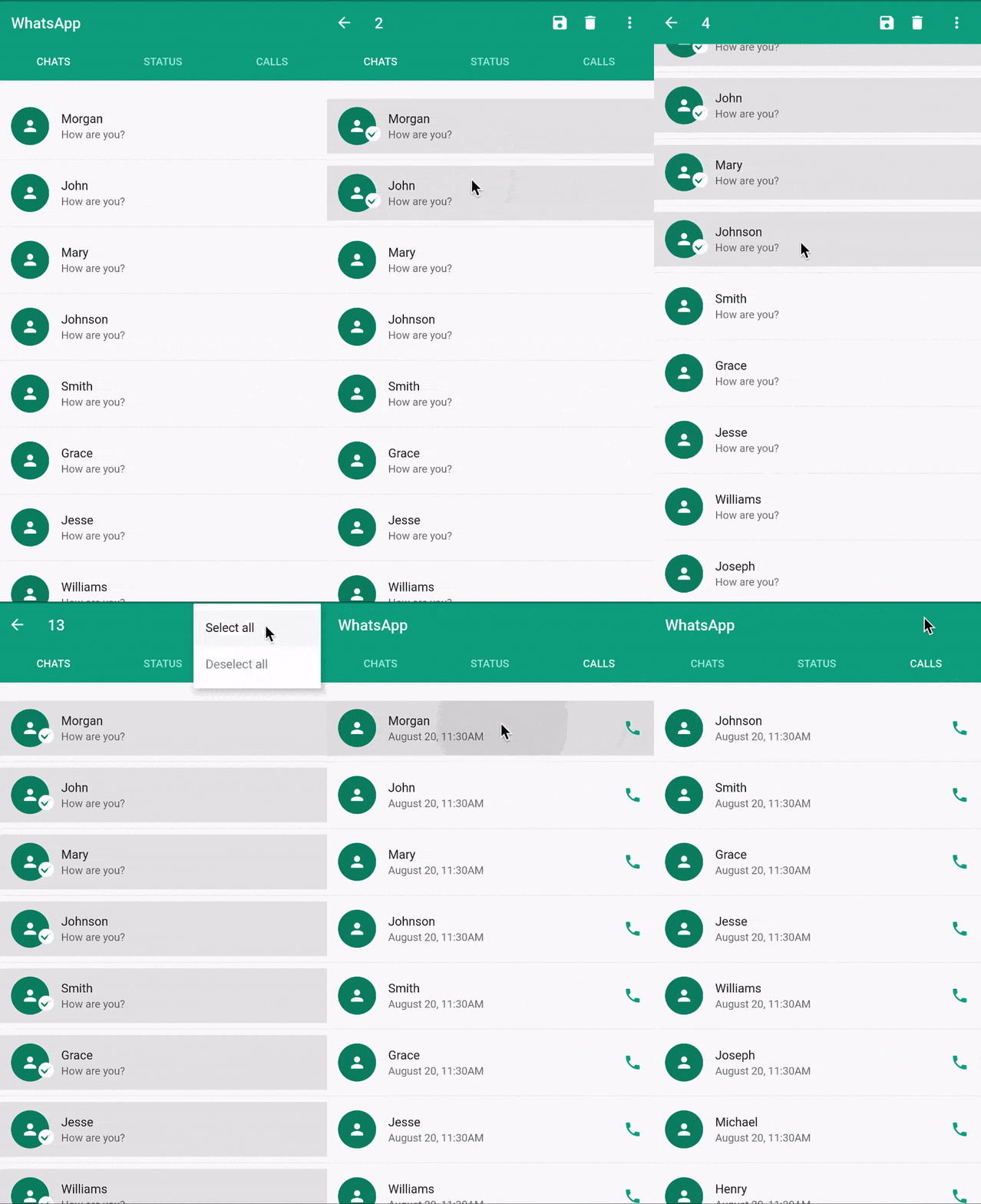
CAB is a top app bar that replace the application app bar to provide contextual actions to selected items. Check the material implementation and requirement here
Flutter does not natively support CAB yet. see issue Until CAB is natively supported, this package should provide you with an elegant way to implement the contextual action bar in flutter.
ContextualScaffoldContextualAppBarContextualActionContextualActionWidgetContextualScaffold<?>The ContextualScaffold<?> is similar to the normal material Scaffold except that it also takes
a required contextualAppBar.
ContextualScaffold<?>(
      contextualAppBar: ContextualAppBar(),
      appBar: AppBar(),
      body: Body(),
    )
You can provide multiple ContextualScaffold as needed
ContextualAppBar<?>The ContextualAppBar<?> is similar to the normal material Appbar but takes a counterBuilder instead of title and also a contextualActions instead of actions.
 ContextualAppBar(
      counterBuilder: (int itemsCount){
        return Text("$itemsCount Selected");
      },
      contextualActions: <ContextualAction>[],
    )
ContextualAction<?>The ContextualAction<?> allows you to take actions on the selected items, with the help of itemsHandler callback.
ContextualAction(
            itemsHandler: (List<?> items) {
              items.forEach((item) {
                Scaffold.of(context).showSnackBar(SnackBar(
                  content: Text("$item saved"),
                ));
              });
            },
            child: Icon(Icons.save),
          ),
ContextualActionWidget<?>You can use the ContextualActionWidget anywhere in the ContextualActionScaffold body to notify ContextualActionScaffold that an item have been selected in order to show the ContextualAppBar.
   ContextualActionWidget(
          data: ?,
          child: ChildWidget(),
        )
Note: It is important that the child widget does not handle onLongPress.
ContextualActionWidget<?>The ContextualActionWidget<?> takes other optional parameters like
selectedColorselectedWidgetunselectedWidgetThe selectedColor is the color of the background for the selected item, it defaults to the splash color, if not provided. The selectedColor works well with ListTile.
selectedWidget and unselectedWidget are stacked on top of the provided child widget. By default, they are positioned at the center of the provided child widget.
Since They are stacked, you can use Row, Align, Positioned Widget or any other combination of widgets to position them where desired.
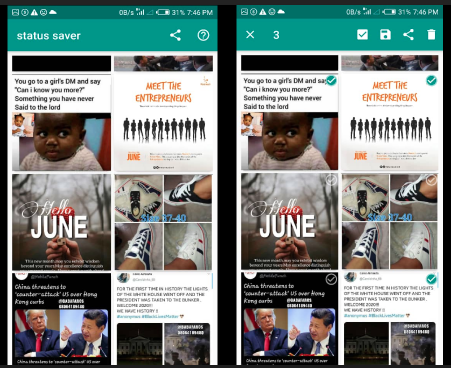
The selectedWidget is shown when the ActionMode is enabled and the item is selected, while the unselectedWidget is shown when ActionMode is enabled and the item is not selected. See example(status_saver) image below with both the selectedWidget and unselectedWidget aligned to the top-right corner.
This contextual action bar workaround does not support zero item in the ActionMode.
Use the ActionMode.addItem<?> to add an item to the selected items. If this is the first selection, the ActionMode is will be enabled.
Use the ActionMode.addItems<?> to add a list of items.
Use the ActionMode.disable<?> to disable and deselect all selected items.
Use the ActionMode.enabledStream<?> to emit true or false depending on if the Action mode is enabled or disabled respectively.
Note: In most cases, you won't need to use ActionMode.disable<?> because the package already do that for you where needed.
Study complete examples at example page. If you like the project, don't forget to star ⭐️
This package is licensed under the MIT license. See LICENSE for details.
의존성 목록 3 개
{"sdk":"flutter"}^6.0.5{"sdk":"flutter"}사용 목적에 따라 검색하고 개발 활동을 비교한 뒤 원본 저장소에서 요구 사항을 확인하세요.
“A repository is the most basic element of GitHub.”
GitHub Docs — About repositories ↗