


 v1.1.2
flutter_process_text
프로세스 텍스트 스트림을 수신하여 지속적인 프로세스 텍스트 인텐트 데이터를 얻기 위한 Flutter 플러그인입니다.
35좋아요 6030일 다운로드150Pub 점수
AndroidiOS
프로세스 텍스트 의도 스트림을 수신하는 Flutter 플러그인입니다.

아래는 영문 원문 스냅샷입니다. 최신 내용은 GitHub에서 확인하세요.


✅ Android
❌ iOS (active issue: iOS support)

Flutter Process Text Plugin is known for :
| Flutter Process Text | Flutter Process Text |
|---|---|
| Fast, performant & compatible | Free & Open-source |
| Production ready | Make App Reactive |
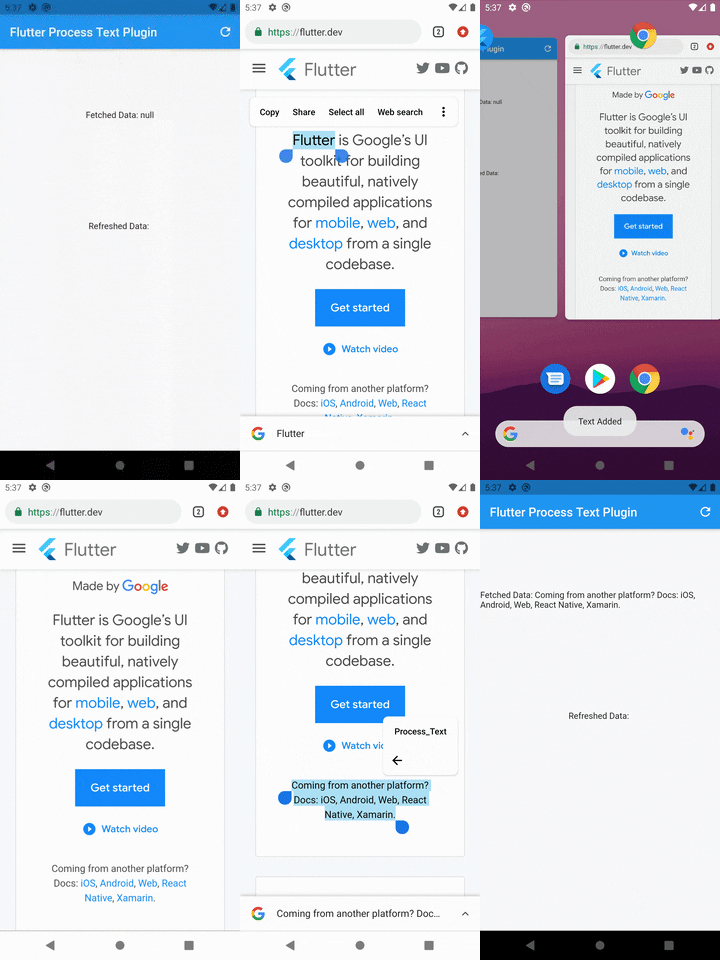
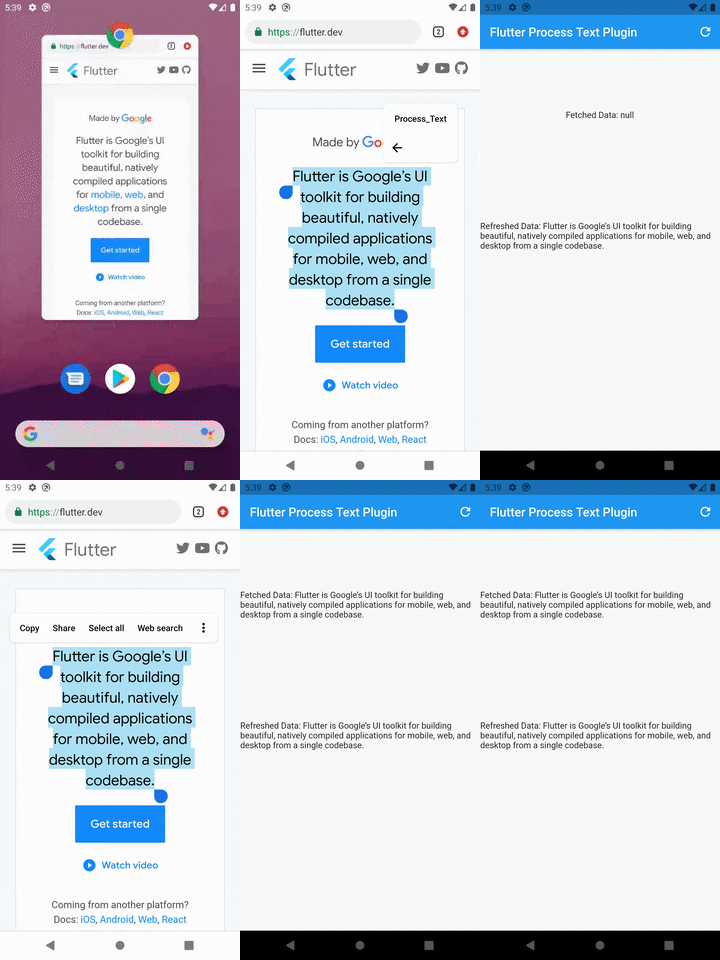
✅ Listen process text stream
✅ Open app from process text intent activity
✅ Get pending intent text
| App Running | App Not Running |
|---|
 |
 |
|---|
dependencies:
  flutter_process_text: <latest version>
Run pub get and get packages.
Add the below code to your AndroidManifest.xml in the android\app\src\main\ folder.
  <activity
        android:name=".ProcessTextActivity"
        android:label="Process_Text"
        android:theme="@android:style/Theme.NoDisplay">
          <intent-filter>
              <action android:name="android.intent.action.PROCESS_TEXT" />
              <data android:mimeType="text/plain"/>
              <category android:name="android.intent.category.DEFAULT" />
          </intent-filter>
  </activity>
Note: You may change the android:name from ProcessTextActivity to anything you want. also change the android:label from Process_Text to the process action text that you want to display.
Create a new Java/Kotlin file with the same name as android:name in step 2.
Copy the below code and paste in the newly created file.
package com.divyanshushekhar.flutter_process_text_example;

import com.divyanshushekhar.flutter_process_text.FlutterProcessTextPlugin;
import io.flutter.embedding.android.FlutterActivity;
import android.os.Bundle;

public class ProcessTextActivity extends FlutterActivity {

    @Override
    public void onCreate(Bundle savedInstanceState) {
        super.onCreate(savedInstanceState);
        boolean issAppRunning = MainActivity.getIsAppRunning();
        FlutterProcessTextPlugin.listenProcessTextIntent(issAppRunning);
    }
}
Note: Don't forget to change the package name in the above code.
Make the necessary changes in the MainActivity class.
package com.divyanshushekhar.flutter_process_text_example;

import io.flutter.embedding.android.FlutterActivity;

import android.app.ActivityManager;
import android.content.Context;
import android.os.Bundle;
import java.util.List;

public class MainActivity extends FlutterActivity {
   private static boolean isAppRunning;

   public static boolean getIsAppRunning() {
     return isAppRunning;
   }

   @Override
   public void onCreate(Bundle savedInstanceState) {
       super.onCreate(savedInstanceState);
        isAppRunning = isAppRunning(this);
   }

    public static boolean isAppRunning(Context context) {
        final String packageName = context.getPackageName();
        final ActivityManager activityManager = (ActivityManager) context.getSystemService(Context.ACTIVITY_SERVICE);
        final List<ActivityManager.RunningAppProcessInfo> processInfo = activityManager.getRunningAppProcesses();
        if (processInfo != null)
        {
            for (final ActivityManager.RunningAppProcessInfo info : processInfo) {
                if (info.processName.equals(packageName)) {
                    return true;
                }
            }
        }
        return false;
    }
}
First thing you need to do is to call the initialize method from the FlutterProcessText class in the initState() {} of the page.
FlutterProcessText.initialize();
OR
FlutterProcessText.initialize(
    showConfirmationToast: true,
    showRefreshToast: true,
    showErrorToast: true,
    confirmationMessage: "Text Added",
    refreshMessage: "Got all Text",
    errorMessage: "Some Error",
);
There are two ways to work with stream, either create a StreamSubscription to listen for the incoming data or store the Stream and use it in StreamBuilder.
  late final StreamSubscription _processText;
  String text? = '';

  @override
  void initState() {
    super.initState();
    FlutterProcessText.initialize(
      showToast: true,
      confirmationMessage: "Text Added",
      refreshMessage: "Got all Text",
      errorMessage: "Some Error",
    );

    _processText = FlutterProcessText.getProcessTextStream.listen((event) {
      setState(() {
        text = event;
      });
    });
  }

  @override
  void dispose() {
    super.dispose();
    _processText.cancel();
  }
OR
late final Stream<String> _processText;
_processText = FlutterProcessText.getProcessTextStream;
Now use the stream in the StreamBuilder.
StreamBuilder<String?>(
  stream: _processText,
  builder: (context, snapshot) {
    return Text('Fetched Data: ${snapshot.data}');
  },
),
Get the pending data by calling the refreshProcessText method in FlutterProcessText class.
String? text = await FlutterProcessText.refreshProcessText;



Code and documentation Copyright (c) 2021 Divyanshu Shekhar. Code released under the BSD 3-Clause License.
의존성 목록 2 개
{"sdk":"flutter"}{"sdk":"flutter"}사용 목적에 따라 검색하고 개발 활동을 비교한 뒤 원본 저장소에서 요구 사항을 확인하세요.
“A repository is the most basic element of GitHub.”
GitHub Docs — About repositories ↗