
 v0.0.5
cnic_scanner
CNIC 및 ID 카드와 기타 모든 종류의 카드를 스캔할 수 있는 패키지입니다. Android 및 iOS를 모두 지원하며 null 안전합니다.
66좋아요 3830일 다운로드140Pub 점수
AndroidiOS
Faiza-Farooqui/cnic_scanner open-source repository details.

{"sdk":"flutter"}^0.13.0^0.8.3+2^8.1.4+2^0.17.0^8.2.1{"sdk":"flutter"}아래는 영문 원문 스냅샷입니다. 최신 내용은 GitHub에서 확인하세요.
A Flutter package that let's you to scan your CNIC and ID cards and all types of other cards.
Add following dependency in pubspec.yaml file. And add this import to your file.
cnic_scanner: latest version
image_picker: latest version

import 'package:cnic_scanner/cnic_scanner.dart';
// create a obj of CnicModel
CnicModel _cnicModel = CnicModel();
// then call this method fron package, our package needs you to pass ImageSource as an argument
scanImage(imageSource: imageSource) from CnicScanner class
await CnicScanner().scanImage(imageSource: imageSource);
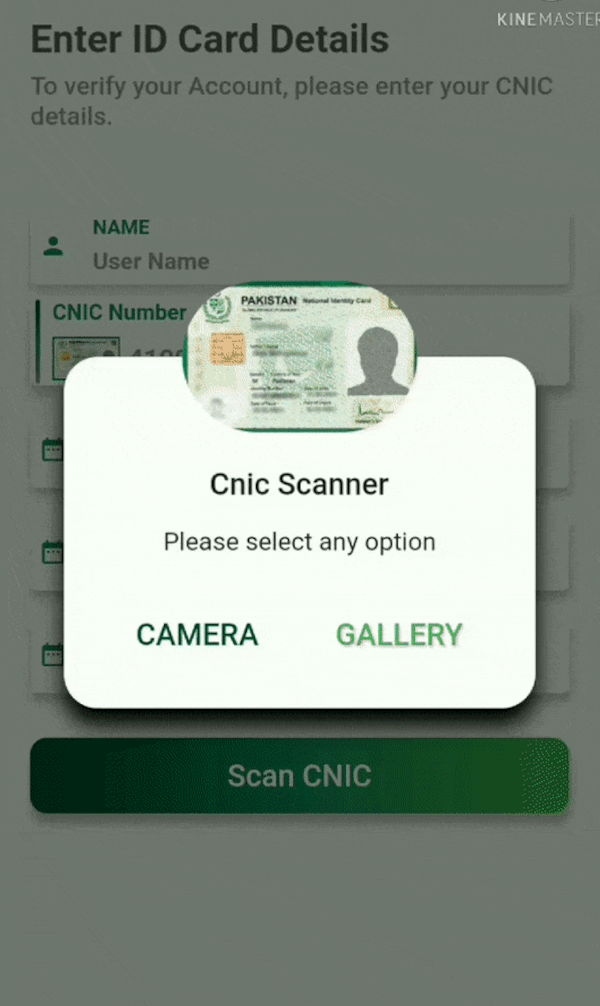
// I have created a custom dialog and passing ImageSource here in ths way. You can furture check it in example
CustomDialogBox(onCameraBTNPressed: () {
scanCnic(ImageSource.camera);
}, onGalleryBTNPressed: () {
scanCnic(ImageSource.gallery);
});
// this class will return these parameters.

class CardModel {
     String _cnicNumber = "";
     String _cnicIssueDate = "";
     String _cnicHolderName = "";
     String _cnicExpiryDate = "";
     String _cnicHolderDateOfBirth = "";
}
| Cnic Screen | Custom Dialog | Scanned Cnic Data |
|---|---|---|
| https://user-images.githubusercontent.com/36657067/129031524-4a83c099-cebc-495c-921b-319a49461a7f.jpeg?raw=true | https://user-images.githubusercontent.com/36657067/129031276-e42046a7-87cb-452b-8a8f-183e9b17c9a3.jpeg?raw=true | https://user-images.githubusercontent.com/36657067/129034069-93144d80-253e-4d55-94bb-8ab5f3dcfc6b.jpeg?raw=true |
| Scanned from Gallery | Scanned from Camera |
|---|---|
| https://user-images.githubusercontent.com/36657067/129146418-928ccbbf-152c-4c7d-8b8f-89c386dd4d1a.gif?raw=true | https://user-images.githubusercontent.com/36657067/129147338-58fc55f0-bd9b-477c-9187-09b3d7ec6c82.gif?raw=true |
Faiza Farooqui and Kamran Khan