
asuka
단일 제공자에서 스낵바, 대화 상자, 모달 시트를 표시합니다. 간단하고 깔끔합니다.

- 스타
- 84
- 포크
- 31
- 최근 푸시(UTC)
- 2025. 6. 13.
- 프로젝트 상태
- 보관됨
원본 README
아래는 영문 원문 스냅샷입니다. 최신 내용은 GitHub에서 확인하세요.
Asuka package is being discontinued
We would like to inform the community that the Asuka package will be discontinued. Since Flutter has evolved and the built-in ScaffoldMessenger now provides excellent support for snackbars and related UI messages, maintaining a separate solution is no longer necessary. Asuka was created to fill a gap in the early days of Flutter, but today the official APIs are more than capable. The package will no longer receive updates or bug fixes. The repository will remain available in read-only mode for historical reference. Thank you to everyone who supported and used Asuka over the years!
ASUKA - Snackbars, Dialogs and more, the simple way.

A Simple and Clean approach to Snackbars, Dialogs, ModalSheets and more in a single provider.
Explore the docs »
·
Report Bug
·
Request Feature




Table of Contents
About The Project
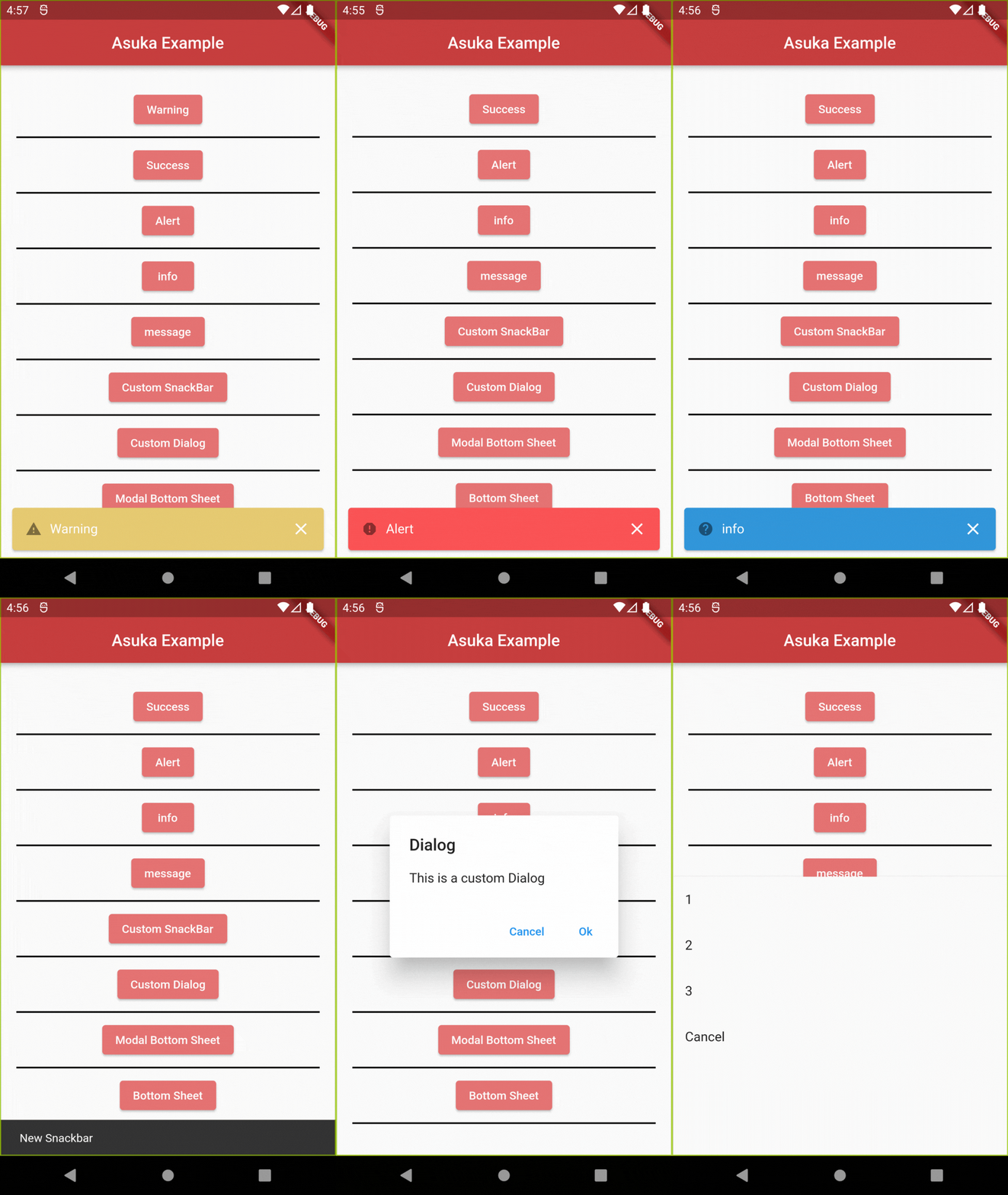
Asuka is a Dart package that aims to simplify and keep a clean approach when implementing some visual elements from Flutter like Snackbars, Dialogs and ModalSheets. With few and intuitive lines of code you can have those in your project without the hassle of having to code them from scratch, while having the option of quickly removing them if need be.
This project is distributed under the MIT License. See LICENSE.txt for more information.
Sponsors

Getting Started
To get Asuka in your project follow either of the instructions below:
a) Add Asuka as a dependency in your Pubspec.yaml:
dependencies:
  asuka: any
b) Use Dart Pub:
dart pub add asuka
How to Use
Add the following code where you call your Material App:
import 'package:asuka/asuka.dart';

MaterialApp(
    builder: Asuka.builder,
    navigatorObservers: [
       Asuka.asukaHeroController //This line is needed for the Hero widget to work
    ],
);
Now you just have to call the named constructors for each widget that you want to use:
import 'package:asuka/asuka.dart';

Asuka.showSnackBar(SnackBar(
    content: Text("Hello World"),
));

AsukaSnackbar.success("success").show();
For more examples, please refer to the Documentation
Features
- ✅ Snackbars
- ✅ Dialog
- ✅ BottomSheet
- ✅ ModalBottomSheet
- ✅ CupertinoModalPopup
- ✅ CupertinoDialog
- ✅ CupertinoDialogListener
- ✅ Overlay
Right now this package has concluded all his intended features. If you have any suggestions or find something to report, see below how to contribute to it.
Contributing
Contributions are what make the open source community such an amazing place to learn, inspire, and create. Any contributions you make are greatly appreciated.
If you have a suggestion that would make this better, please fork the repo and create a pull request. You can also simply open an issue with the appropriate tag. Don't forget to give the project a star! Thanks again!
- Fork the Project
- Create your Feature Branch (
git checkout -b feature/AmazingFeature) - Commit your Changes (
git commit -m 'Add some AmazingFeature') - Push to the Branch (
git push origin feature/AmazingFeature) - Open a Pull Request
Remember to include a tag, and to follow Conventional Commits and Semantic Versioning when uploading your commit and/or creating the issue.
Contact
Flutterando Community
Acknowledgements
Thank you to all the people who contributed to this project, without you, this project would not be here today.
Maintaned by

Built and maintained by Flutterando.

Flutterando ↗
사용 중인 의존성
의존성 목록 3 개
- flutter
{"sdk":"flutter"} - flutter_test개발 의존성
{"sdk":"flutter"} - flutterando_analysis개발 의존성
^0.0.2
프로젝트에 맞는 저장소를 선택하려면?
사용 목적에 따라 검색하고 개발 활동을 비교한 뒤 원본 저장소에서 요구 사항을 확인하세요.
- 이름, 작성자 또는 설명으로 검색하고 기술 주제로 범위를 좁힙니다.
- 스타, 포크, 최근 푸시를 함께 비교하세요. 스타는 관심의 지표이며 품질을 보장하지 않습니다.
- 사용하기 전에 GitHub에서 README, 라이선스, Issues를 확인하세요.
출처 및 관리
“A repository is the most basic element of GitHub.”
GitHub Docs — About repositories ↗