
 v0.0.3
fp_bt_printer
블루투스 열전사 프린터에서 영수증 인쇄하기(안드로이드 전용).
23좋아요 3430일 다운로드125Pub 점수
Android
열식 프린터에 연결하고 데이터를 인쇄하는 패키지

{"sdk":"flutter"}^0.4.0{"sdk":"flutter"}아래는 영문 원문 스냅샷입니다. 최신 내용은 GitHub에서 확인하세요.
This library allows printing receipts on bluetooth thermal printers (android only). Support 58mm and 80mm printer.
It allows to print QR, BarCode, Images RasterImages with the esc_pos_utils package.
Get list of bluetooth devices, it supports any version of bluetooth, not just BLE.
    List<PrinterDevice> devices = [];
    FpBtPrinter printer = FpBtPrinter();

    Future<void> getDevices() async {
        final response = await printer.scanBondedDevices();
        setState(() {
        devices = response;
        });
    }
You can check that the connection with the device is correct.
    Future<void> setConnet(PrinterDevice d) async {
        final response = await printer.checkConnection(d.address);
        print(response.message);
    }
This method recibe address of the printer and List of the data;
    FpBtPrinter printer = FpBtPrinter();
    final resp = await printer.printData(bytes, address: address);
    if (resp.success) {
     //print ok
    } else {
    print(resp.message); //print error
    }
List<int> getTicket() {
  final List<int> bytes = [];
  // Using default profile
  final profile = await CapabilityProfile.load();
    final generator = Generator(PaperSize.mm80, profile);
    List<int> bytes = [];

    // //  Print image:
    final ByteData data = await rootBundle.load('assets/wz.png');
    final Uint8List bytesImg = data.buffer.asUint8List();
    var image = decodePng(bytesImg);

    // resize
    var thumbnail =
        copyResize(image!, interpolation: Interpolation.nearest, height: 200);

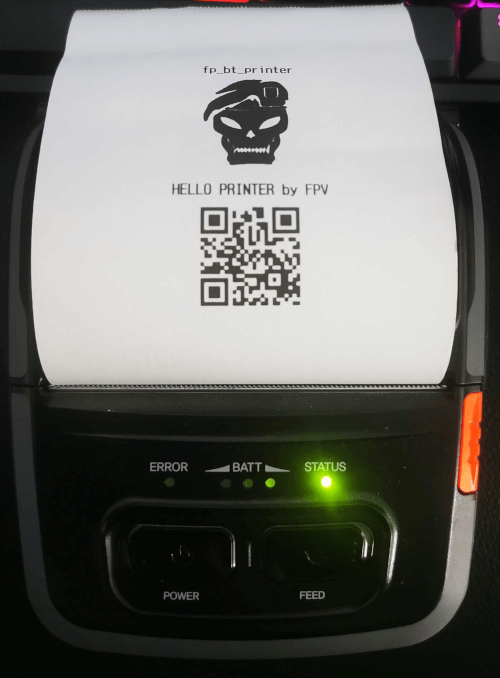
    bytes += generator.text("fp_bt_printer",
        styles: PosStyles(align: PosAlign.center, bold: true));

    bytes += generator.imageRaster(thumbnail, align: PosAlign.center);

    bytes += generator.reset();
    bytes += generator.setGlobalCodeTable('CP1252');
    bytes += generator.feed(1);
    bytes += generator.text("HELLO PRINTER by FPV",
        styles: PosStyles(align: PosAlign.center, bold: true));
    bytes += generator.qrcode("https://github.com/FranciscoPV94",
        size: QRSize.Size6);
    bytes += generator.feed(1);
    bytes += generator.feed(1);

    final resp = await printer.printData(bytes, address: address);
  return bytes;
}
Xprinter Portable Thermal Printer
Model: Bixolon SPP-R310
If you think that this project has helped you with your developments, you can support this project, any support is much appreciated. Paypal