v4.1.0
brick_build
Brick 컴포넌트용 코드 생성 라이브러리 및 인터페이스입니다. 어댑터용 시리얼라이즈 생성기 작성에 유용합니다.
1좋아요 3.9천30일 다운로드140Pub 점수
AndroidiOSmacOSWindowsLinux
Dart에서 지속 데이터를 다루는 직관적인 방법

아래는 영문 원문 스냅샷입니다. 최신 내용은 GitHub에서 확인하세요.

An intuitive way to work with persistent data in Dart.
Brick is an extensible query interface for Dart applications. It's an all-in-one solution responsible for representing business data in the application, regardless of where your data comes from. Using Brick, developers can focus on implementing the application, without concern for where the data lives. Brick was inspired by the need for applications to work offline first, even if an API represents your source of truth.
Add the packages:
dependencies:
  # Or brick_offline_first_with_graphql
  # Or brick_offline_first_with_supabase
  brick_offline_first_with_rest:
  sqflite: # optional
dev_dependencies:
  # Or brick_offline_first_with_graphql_build: any
  # Or brick_offline_first_with_supabase_build: any
  brick_offline_first_with_rest_build:
  build_runner:
Configure your app directory structure to match Brick's expectations:
mkdir -p lib/brick/adapters lib/brick/db;
Add models that contain your app logic. Models must be saved with the .model.dart suffix (i.e. lib/brick/models/person.model.dart).
Run dart run build_runner build to generate your models and sometimes migrations. Rerun after every new model change or dart run build_runner watch for automatic generations. You'll need to run this again after your first migration.
Extend an existing repository or create your own (Supabase has some exceptions):
// lib/brick/repository.dart
import 'package:brick_offline_first_with_rest/brick_offline_first_with_rest.dart';
import 'package:brick_rest/brick_rest.dart';
import 'package:brick_sqlite/brick_sqlite.dart';
import 'package:my_app/brick/brick.g.dart';
import 'package:sqflite/sqflite.dart' show databaseFactory;
import 'package:my_app/brick/db/schema.g.dart';
export 'package:brick_core/query.dart' show And, Or, Query, QueryAction, Where, WherePhrase;

class Repository extends OfflineFirstWithRestRepository {
  Repository()
      : super(
          migrations: migrations,
          restProvider: RestProvider(
            'http://0.0.0.0:3000',
            modelDictionary: restModelDictionary,
          ),
          sqliteProvider: SqliteProvider(
            _DB_NAME,
            databaseFactory: databaseFactory,
            modelDictionary: sqliteModelDictionary,
          ),
          offlineQueueManager: RestRequestSqliteCacheManager(
            'brick_offline_queue.sqlite',
            databaseFactory: databaseFactory,
          ),
        );
}
Profit.
Create a model as the app's business logic:
// brick/models/user.dart
@ConnectOfflineFirstWithRest()
class User extends OfflineFirstWithRestModel {}
And generate (de)serializing code to fetch to and from multiple providers:
$ (flutter) pub run build_runner build
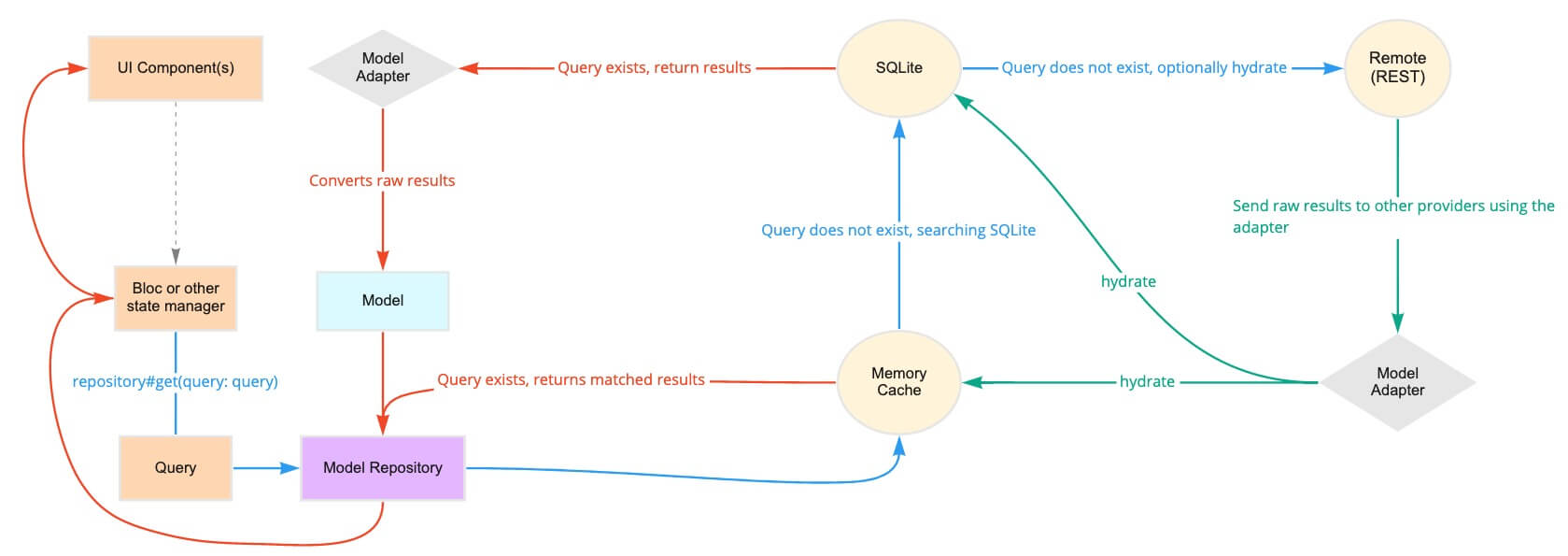
A repository fetches and returns data across multiple providers. It's the single access point for data in your app:
class MyRepository extends OfflineFirstWithRestRepository {
  MyRepository();
}

final repository = MyRepository();

// Now the models can be queried:
final users = await repository.get<User>();
Behind the scenes, this repository could poll a memory cache, then SQLite, then a REST API. The repository intelligently determines how and when to use each of the providers to return the fastest, most reliable data.
// Queries can be general:
final query = Query(where: [Where('lastName').contains('Muster')]);
final users = await repository.get<User>(query: query);

// Or singular:
final query = Query.where('email', 'user@example.com', limit1: true);
final user = await repository.get<User>(query: query);
Queries can also receive reactive updates. The subscribed stream receives all models from its query whenever the local copy is updated (e.g. when the data is hydrated in another part of the app):
final users = repository.subscribe<User>().listen((users) {})
Once a model has been created, it's sent to the repository and back out to each provider:
final user = User();
await repository.upsert<User>(user);
Repositories can support associations and automatic (de)serialization of child models.
class Hat extends OfflineFirstWithRestModel {
  final String color;
  Hat({this.color});
}
class User extends OfflineFirstWithRestModel {
  // user has many hats
  final List<Hat> hats;
}

final query = Query.where('hats', Where('color').isExactly('brown'));
final usersWithBrownHats = repository.get<User>(query: query);
Brick natively serializes primitives, associations, and more.
If it's still murky, check out Learn for videos, tutorials, and examples that break down Brick.
Brick 컴포넌트용 코드 생성 라이브러리 및 인터페이스입니다. 어댑터용 시리얼라이즈 생성기 작성에 유용합니다.
데이터 지속성 라이브러리인 Brick용 GraphQL 커넥터입니다. 주석, 어댑터, 모델 및 공급자를 포함합니다.
Brick의 GraphQL 공급자, 모델 및 어댑터를 위한 코드 생성 라이브러리
Brick의 JSON 유사 제공자, 모델 및 어댑터를 위한 코드 생성 라이브러리
로컬 제공자들을 통해 원격 제공자보다 먼저 데이터 가져오기를 라우팅하는 브릭 도메인입니다.
브릭 오프라인 우선 도메인을 위한 코드 생성 라이브러리
로컬 제공자들을 통해 GraphQL 제공자 전에 데이터 가져오기를 라우팅하는 브릭 도메인입니다.
GraphQL을 사용한 Brick 오프라인 우선 도메인용 코드 생성 라이브러리
로컬 제공자들을 통해 REST 제공자 전에 데이터 가져오기를 라우팅하는 브릭 도메인입니다.
REST를 사용한 브릭 오프라인 우선 도메인을 위한 코드 생성 라이브러리
로컬 제공자들을 통해 데이터 가져오기를 루팅하고, 그 다음에 Supabase 제공자로 이동하는 Brick 도메인입니다.
Brick(데이터 지속성 라이브러리)용 RESTful API 커넥터입니다. 애노테이션, 어댑터, 모델 및 공급자 포함.
사용 목적에 따라 검색하고 개발 활동을 비교한 뒤 원본 저장소에서 요구 사항을 확인하세요.
“A repository is the most basic element of GitHub.”
GitHub Docs — About repositories ↗