Brick Offline First는 데이터 가져오기 시 로컬 데이터 소스를 우선시하는 Flutter/Dart 패키지로, 원활한 오프라인 기능을 보장합니다. 요청은 원격 요청을 시도하기 전에 먼저 로컬 제공자들을 통해 라우팅되며, 이로 인해 앱의 반응성과 신뢰성을 향상시킵니다. 네트워크 가용성에 관계없이 일관된 사용자 경험을 필요로 하는 애플리케이션에 적합하며, 지속 가능한 NoSQL 데이터베이스와 통합되어 데이터 동기화를 효율적으로 관리합니다. 이 패키지는 Android, iOS, macOS, Windows 및 Linux 등 여러 플랫폼을 지원하여 크로스플랫폼 개발에 매우 유연합니다.
사용 사례
오프라인 우선 모바일 앱
장치 간 데이터 동기화
고신뢰성 데이터 액세스
프로그레시브 웹 애플리케이션
실시간 협업 도구
주요 기능
로컬 우선 데이터 라우팅
로컬 데이터로 자동 백업
크로스 플랫폼 지원
원격 소스와의 효율적인 동기화
NoSQL 지속성과의 통합
적합한 대상
오프라인 기능이 필요한 앱
데이터 회복력을 우선시하는 개발자
지속 저장소를 사용하는 프로젝트
실시간 기능을 구축하는 팀
간헐적인 연결을 가진 애플리케이션
고려 사항
로컬 데이터 공급자 설정이 필요합니다
사용자 정의 동기화 로직이 필요할 수 있습니다
새 사용자를 위한 학습 곡선
기반 노스칼라 구현에 따라 다름
분쟁 해결에서의 잠재적 복잡성
원본 README
연결된 소스 저장소의 README 원문 스냅샷입니다. 최신 내용은 저장소에서 확인하세요.
An intuitive way to work with persistent data in Dart.
Brick is an extensible query interface for Dart applications. It's an all-in-one solution responsible for representing business data in the application, regardless of where your data comes from. Using Brick, developers can focus on implementing the application, without concern for where the data lives. Brick was inspired by the need for applications to work offline first, even if an API represents your source of truth.
Quick Start
Add the packages:
dependencies:# Or brick_offline_first_with_graphql# Or brick_offline_first_with_supabasebrick_offline_first_with_rest:sqflite:# optionaldev_dependencies:# Or brick_offline_first_with_graphql_build: any# Or brick_offline_first_with_supabase_build: anybrick_offline_first_with_rest_build:build_runner:
Configure your app directory structure to match Brick's expectations:
mkdir -p lib/brick/adapters lib/brick/db;
Add models that contain your app logic. Models must be saved with the .model.dart suffix (i.e. lib/brick/models/person.model.dart).
Run dart run build_runner build to generate your models and sometimes migrations. Rerun after every new model change or dart run build_runner watch for automatic generations. You'll need to run this again after your first migration.
And generate (de)serializing code to fetch to and from multiple providers:
$ (flutter) pub run build_runner build
Fetching Data
A repository fetches and returns data across multiple providers. It's the single access point for data in your app:
classMyRepositoryextendsOfflineFirstWithRestRepository{
MyRepository();
}
final repository = MyRepository();
// Now the models can be queried:final users = await repository.get<User>();
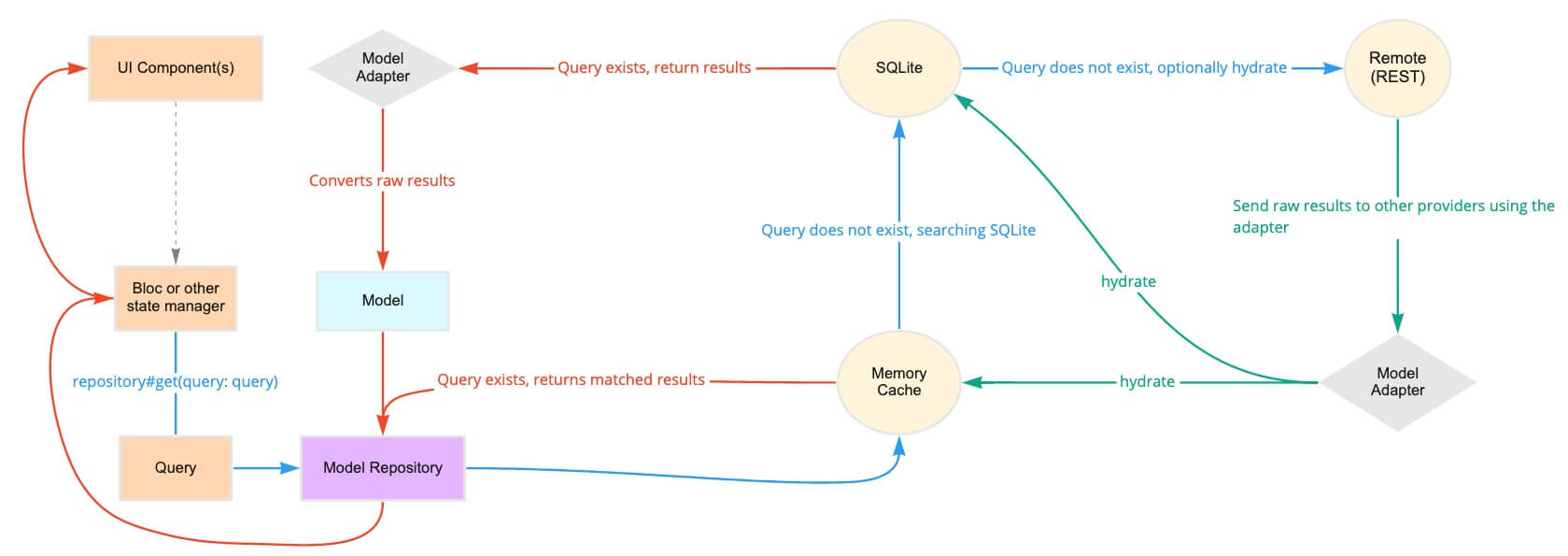
Behind the scenes, this repository could poll a memory cache, then SQLite, then a REST API. The repository intelligently determines how and when to use each of the providers to return the fastest, most reliable data.
// Queries can be general:final query = Query(where: [Where('lastName').contains('Muster')]);
final users = await repository.get<User>(query: query);
// Or singular:final query = Query.where('email', 'user@example.com', limit1: true);
final user = await repository.get<User>(query: query);
Queries can also receive reactive updates. The subscribed stream receives all models from its query whenever the local copy is updated (e.g. when the data is hydrated in another part of the app):
final users = repository.subscribe<User>().listen((users) {})
Mutating Data
Once a model has been created, it's sent to the repository and back out to each provider:
final user = User();
await repository.upsert<User>(user);
Associating Data
Repositories can support associations and automatic (de)serialization of child models.
classHatextendsOfflineFirstWithRestModel{
finalString color;
Hat({this.color});
}
classUserextendsOfflineFirstWithRestModel{
// user has many hatsfinalList<Hat> hats;
}
final query = Query.where('hats', Where('color').isExactly('brown'));
final usersWithBrownHats = repository.get<User>(query: query);