
 v1.0.6
flutter_2fa
앱에서 인증기와 함께 양자 요소 인증을 활성화할 수 있는 플러터 패키지입니다.
7좋아요 35630일 다운로드160Pub 점수
AndroidiOSWebmacOSWindowsLinux
🔐 이 패키지는 어떤 플러터 프로젝트에도 쉽게 양자 인증을 추가하는 데 도움을 줍니다。

{"sdk":"flutter"}^2.1.8^3.2.0^1.0.6^4.1.0^2.5.5^6.0.2^3.0.2^11.0.0{"sdk":"flutter"}^2.0.0아래는 영문 원문 스냅샷입니다. 최신 내용은 GitHub에서 확인하세요.
🔐 A Flutter package to add secure Two-Factor Authentication (2FA) via time-based one-time passwords (TOTP) to any Flutter application with ease.
2FA Overview Copy Key Verify OTP Success Feedback
pinput integration).flutter_secure_storage to secure secret keys and recovery codes.local_auth integration.Add flutter_2fa and its required biometric and secure storage backend packages to your pubspec.yaml:
dependencies:
  flutter_2fa: ^1.0.5
  local_auth: ^2.3.0
  flutter_secure_storage: ^9.2.4
Or install them directly:
flutter pub add flutter_2fa local_auth flutter_secure_storage
[!NOTE]
To support newer platform libraries and Dart 3.x, transitive dependency upgrades have been applied (specifically upgrading internal Windows helpers which removes deprecatedwin32 3.1.3conflicts).
To compile successfully with newer dependency versions (e.g. Kotlin 2.x and Java 21), make sure your Android project files are configured as follows:
8.14.0 or higher (gradle-wrapper.properties).8.11.1 or higher (settings.gradle).2.2.20 or higher (settings.gradle).34 or higher (app/build.gradle).Define a Flutter2FAConfig configuration object:
import 'package:flutter/material.dart';
import 'package:flutter_2fa/flutter_2fa_config.dart';

final twoFactorConfig = Flutter2FAConfig(
  useSecureStorage: true,   // Encrypts stored secret keys in Keychain/Keystore
  allowBiometrics: true,    // Enables Face ID/Touch ID quick unlock
  totpInterval: 30,         // TOTP step interval (in seconds)
  totpDigits: 6,            // OTP digit length
  totpAlgorithm: 'SHA1',    // Hashing algorithm

  // Custom Styles
  backgroundColor: Colors.grey[50],
  textColor: Colors.indigo[900],
  appBarColor: Colors.indigo,
  primaryButtonStyle: ElevatedButton.styleFrom(
    backgroundColor: Colors.indigo,
    foregroundColor: Colors.white,
  ),
);
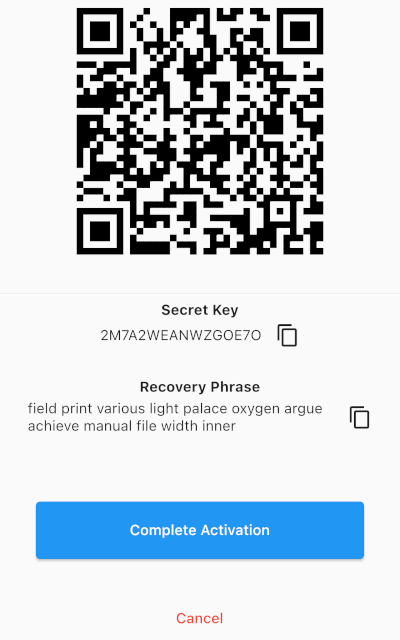
Trigger the initialization UI screen where the user is shown the secret seed key, the setup QR code, and collapsible backup recovery codes.
import 'package:flutter_2fa/flutter_2fa.dart';

void activateTwoFactor(BuildContext context) async {
  await Flutter2FA().activate(
    context: context,
    appName: "Your App Name",       // App name shown in Authenticator app
    email: "user@example.com",     // User email identifier for the account
    config: twoFactorConfig,       // Pass the custom config
  );
}
Trigger the OTP input, biometric verification prompt, or backup recovery code input.
import 'package:flutter_2fa/flutter_2fa.dart';

void verifyTwoFactor(BuildContext context) async {
  await Flutter2FA().verify(
    context: context,
    page: const DashboardScreen(),  // Redirect target widget upon successful validation
    config: twoFactorConfig,       // Pass the custom config
  );
}
Contributions, issues, and feature requests are very welcome! Feel free to open a pull request or file an issue.
This project is licensed under the MIT License - see the LICENSE file for details.