
 v2.2.0
client_information
이 플러그인은 애플리케이션 클라이언트의 기본 정보를 가져올 수 있게 해줍니다. 사용하기 쉽고 다양한 플랫폼(안드로이드, iOS, 웹)을 지원합니다.
53좋아요 5.2천30일 다운로드140Pub 점수
AndroidiOSWeb
Flutter 애플리케이션의 클라이언트에서 기본 정보를 가져오는 플러그인

{"sdk":"flutter"}{"sdk":"flutter"}^4.2.1{"sdk":"flutter"}^1.11.0아래는 영문 원문 스냅샷입니다. 최신 내용은 GitHub에서 확인하세요.
This is a plugin that lets you get basic information from your application's client. It's easy to use and supports different platforms (Android, iOS, and Web). There are four different information types: "application information", "software information", "operating system information", and "device information".
iOS screenshot
https://raw.githubusercontent.com/Kent1011/client_information/master/screens/ios_screenshot.png
Android screenshot
https://raw.githubusercontent.com/Kent1011/client_information/master/screens/android_screenshot.png
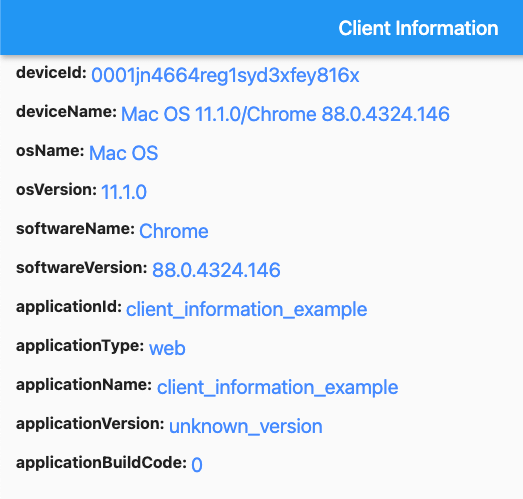
Web screenshot
https://raw.githubusercontent.com/Kent1011/client_information/master/screens/web_screenshot.png
There are 4 different types:
Application information is all about the application you build. And notice that applicationId is not supported for web applications.
| Attribute | iOS | Android | Web |
| applicationId String |
⭕ bundleIdentifier |
⭕ package name |
❌ default: application name |
| applicationType String (app/web) |
⭕ | ⭕ | ⭕ |
| applicationName String |
⭕ | ⭕ | ⭕ |
| applicationVersion String |
⭕ | ⭕ | ⭕ |
| applicationBuildCode String |
⭕ | ⭕ | ⭕ |
"Software" stands for the "software" that runs your application, such as "Operating System" for iOS/Android projects or "Browser" for web projects.
| Attribute | iOS | Android | Web |
| softwareName String |
⭕ OS name |
⭕ OS name |
⭕ Browser name |
| softwareVersion String |
⭕ OS version |
⭕ OS version |
⭕ Browser version |
OS information will show you the OS's name and version. Notice: Web projects may not get this information if the browser's user-agent doesn't contain any information about the operating system.
| Attribute | iOS | Android | Web |
| osName String |
⭕ OS name |
⭕ OS name |
⚠️ OS name (*unknown possible) |
| osVersion String |
⭕ OS version |
⭕ OS version |
⚠️ OS Version (*unknown possible) |
| osVersionCode String |
⭕ iOS version(number) |
⭕ Android API level |
⚠️ OS Version(number) (*unknown: -1) |
The device information will display device's ID and name. Note that web projects don't support real deviceId, so they will use the package uuid to generate a unique string and save to the browser's cookie.
| Attribute | iOS | Android | Web |
| deviceId String |
⭕ | ⭕ | ⭕ |
| deviceName String |
⭕ | ⭕ | ❌ default: osName osVersion / browserName browserVersion (e.g. iOS 14 / Chrome 88.0) |
In the pubspec.yaml of your flutter project, add the following dependency:
dependencies:
  ...
  client_information: ^2.2.0
In your project add the following import:
import 'package:client_information/client_information.dart';
Then, you can get information like this:
// Get client information
ClientInformation info = await ClientInformation.fetch();

print(info.deviceId); // EA625164-4XXX-XXXX-XXXXXXXXXXXX
print(info.osName); // iOS
Starting from version 2.1.0, you can customize some information by passing the decorators. Like below:
var information = await ClientInformation.fetch(
      // you can pass decorators to decoration the value before it return.
      decorators: ClientInformationDecorators(
        deviceId: (oriInfo, value) =>
            'prefix-$value-${oriInfo.applicationName}',
      ),
    );
Or, you can use extension method like this:
var information = await ClientInformation.fetch();
print('Original DeviceId: ${information.deviceId}');
// Original DeviceId: EA625164-4XXX-XXXX-XXXXXXXXXXXX

var decoratedInfo = information.decoration(deviceId: (oriInfo, value) => '$value-some-suffix-string-here');
print('Decorated DeviceId: ${decoratedInfo.deviceId}');
// Decorated DeviceId: EA625164-4XXX-XXXX-XXXXXXXXXXXX-some-suffix-string-here
Starting from version 1.0.2, you can mock data or enable "mockMode" to facilitate testing. Here is how to set it up:
In your test file:
setUp(() async {
  // Change to "MockMode" and set the default data you need.
  ClientInformation.mockOn(
      deviceId: 'mock_device_id', osName: 'MyCustomOS');
});

tearDown(() {
  // Close the "MockMode" in tearDown method
  ClientInformation.mockOff();
});

// Run your test
test('`deviceId` will be "mock_device_id"', () async {
  ClientInformation info = await ClientInformation.fetch();
  expect(info.deviceId, 'mock_device_id');
});