

 v6.7.3
month_picker_dialog
무한한 연도 목록에서 단일 월을 선택하기 위한 국제화 대화 상자입니다.
162좋아요 4.4만30일 다운로드160Pub 점수
AndroidiOSWebmacOSWindowsLinux
무한한 연도 목록에서 단일 월을 선택하기 위한 국제화 대화 상자입니다.
아래는 영문 원문 스냅샷입니다. 최신 내용은 GitHub에서 확인하세요.


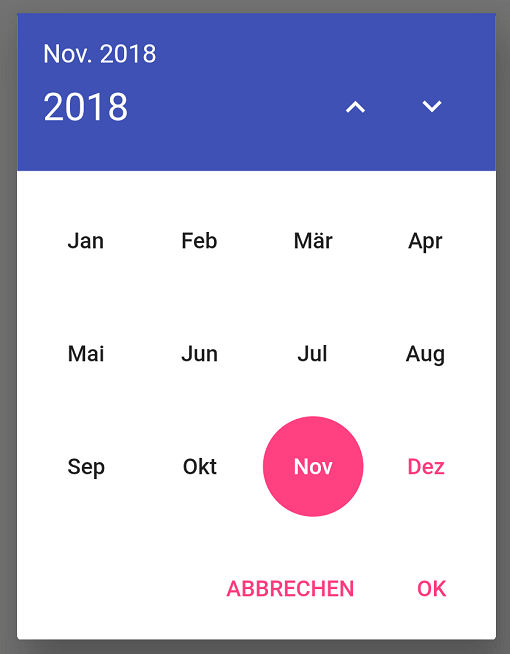
Internationalized material style dialog for picking a single month from an infinite list of years. This package makes use of the intl package and flutter's i18n abilities to provide labels in all languages known to flutter.
Setting up an internationalized app: the flutter localization package
Just add:
showMonthPicker() to select a single month;
showMonthRangePicker() to select a range of months;
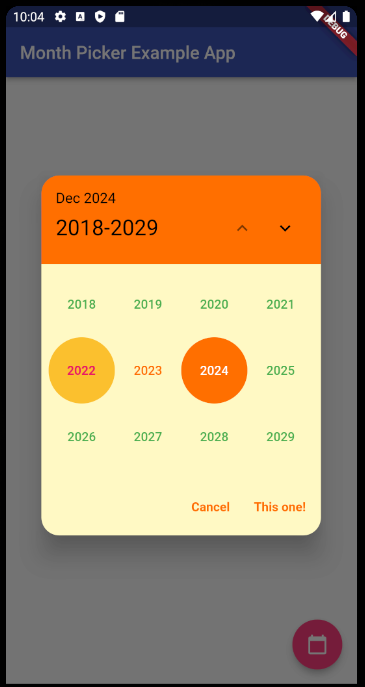
showYearPicker() to select only a year;
...inside your button function like a normal date picker dialog (context parameter is required):
FloatingActionButton(
    onPressed: () {
        showMonthPicker(
        context: context,
        initialDate: DateTime.now(),
        ).then((date) {
        if (date != null) {
            setState(() {
            selectedDate = date;
            });
        }
        });
    },
    child: Icon(Icons.calendar_today),
),

FloatingActionButton(
    onPressed: () {
        showMonthRangePicker(
        context: context,
        initialDate: DateTime.now(),
        rangeList: true,
        ).then((List<DateTime>? dates) {
        if (dates != null) {
            print(dates);
            print(dates.last.lastDayOfMonth());
        }
        });
    },
    child: Icon(Icons.calendar_today),
),

FloatingActionButton(
    onPressed: () {
        showYearPicker(
        context: context,
        initialDate: DateTime.now(),
        ).then((year) {
        if (year != null) {
            setState(() {
            selectedYear = year;
            });
        }
        });
    },
    child: Icon(Icons.calendar_today),
),
Starting with version 5.0.0 of the package, everything related to the behavior/style of it that isn't a function, date parameter or custom widget is now under the new MonthPickerDialogSettings class.
It contains three subclasses:
PickerDialogSettings to customize the dialog part of the package;
PickerHeaderSettings to customize the header part of the package;
PickerButtonsSettings to customize the buttons part of the package;
And will be used like this:
FloatingActionButton(
    onPressed: () {
        showMonthPicker(
        context: context,
        initialDate: DateTime.now(),
        monthPickerDialogSettings: const MonthPickerDialogSettings(
            headerSettings: PickerHeaderSettings(
                headerCurrentPageTextStyle: TextStyle(fontSize: 14),
                headerSelectedIntervalTextStyle: TextStyle(fontSize: 16),
            ),
            dialogSettings: PickerDialogSettings(
                locale: const Locale('en'),
                dialogRoundedCornersRadius: 20,
                dialogBackgroundColor: Colors.blueGrey[50],
            ),
            buttonsSettings: PickerButtonsSettings(
                buttonBorder: const RoundedRectangleBorder(),
                selectedMonthBackgroundColor: Colors.amber[900],
                selectedMonthTextColor: Colors.white,
                unselectedMonthsTextColor: Colors.black,
                currentMonthTextColor: Colors.green,
                yearTextStyle: const TextStyle(
                    fontSize: 10,
                ),
                monthTextStyle: const TextStyle(
                    fontWeight: FontWeight.bold,
                    fontSize: 18,
                ),
            ),
        ),
        ).then((date) {
        if (date != null) {
            setState(() {
            selectedDate = date;
            });
        }
        });
    },
    child: Icon(Icons.calendar_today),
),
If you have any doubts on how to use this new settings class (that the sample app can't solve), please feel free to open an issue on the github project.
Dimitri Krivoj (the original creator of the package)

의존성 목록 5 개
{"sdk":"flutter"}^6.1.5+1—{"sdk":"flutter"}^6.0.0사용 목적에 따라 검색하고 개발 활동을 비교한 뒤 원본 저장소에서 요구 사항을 확인하세요.
“A repository is the most basic element of GitHub.”
GitHub Docs — About repositories ↗