

 v1.0.0
ncscolor
NCS(자연 색상 시스템) 색상을 RGB, HSL, HEX 형식으로 변환하는 포괄적인 Dart 패키지이며, 추가 RGB 변환 유틸리티도 제공합니다.
4좋아요 2230일 다운로드150Pub 점수
AndroidiOSWebmacOSWindowsLinux
NCS 색상을 RGB, HSL, HEX 값으로 변환하는 간단한 Dart 패키지이며, RGB에서 HSL 및 RGB에서 HEX로 변환하는 데 사용됩니다.

아래는 영문 원문 스냅샷입니다. 최신 내용은 GitHub에서 확인하세요.


A comprehensive Dart package for converting NCS (Natural Color System) colors to RGB, HSL, and HEX formats, with additional RGB conversion utilities. Perfect for Flutter apps and Dart projects that need to work with NCS color specifications.
🚀 Try the Interactive Web Demo
Experience NCSColor in action with our live Flutter web demo! Test color conversions, explore the NCS color system, and see real-time previews of your color transformations.
Add this to your package's pubspec.yaml file:
dependencies:
  ncscolor: ^1.0.0
Then run:
flutter pub get
import 'package:ncscolor/ncscolor.dart';
// Create an NCS color instance
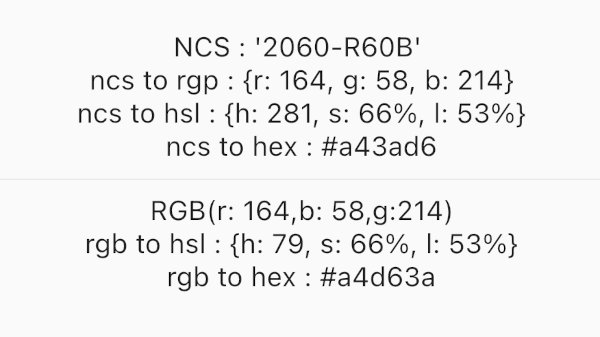
final ncsColor = NCSColor(ncsCode: '2060-R60B');

// Convert to RGB
final rgb = ncsColor.toRgb();
print(rgb); // {r: 164, g: 58, b: 214}

// Convert to HSL
final hsl = ncsColor.toHsl();
print(hsl); // {h: 281, s: 66%, l: 53%}

// Convert to HEX
final hex = ncsColor.toHex();
print(hex); // #a43ad6
// RGB to HSL
final hsl = ColorConvert.rgbToHsl(r: 164, g: 58, b: 214);
print(hsl); // {h: 281, s: 66%, l: 53%}

// RGB to HEX
final hex = ColorConvert.rgbToHex(r: 164, g: 58, b: 214);
print(hex); // #a43ad6
final ncsColor = NCSColor(ncsCode: '2060-R60B');
final rgb = ncsColor.toRgb();

// Create a Flutter Color
final flutterColor = Color.fromRGBO(
  rgb['r']!,
  rgb['g']!,
  rgb['b']!,
  1.0,
);

// Use in your widgets
Container(
  color: flutterColor,
  child: Text('Hello NCS!'),
)
The Natural Color System (NCS) uses a specific format for color codes:
####-[RGBY][##[RGBY]]2060-R60B (Red-Blue with 20% blackness, 60% chromaticness, 60% blue)1050-Y90R (Yellow-Red with 10% blackness, 50% chromaticness, 90% red)0505-B (Blue with 5% blackness, 5% chromaticness)Check out the /example folder for a complete Flutter app demonstrating all features:

NCSColor({required String ncsCode})
Map<String, int> toRgb() - Returns RGB valuesMap<String, String> toHsl() - Returns HSL valuesString toHex() - Returns hex color codeString toString() - String representationbool operator ==(Object other) - Equality comparisonint get hashCode - Hash codeMap<String, String> rgbToHsl({required int r, required int g, required int b})String rgbToHex({required int r, required int g, required int b})The package provides clear error messages for invalid NCS codes:
try {
  final ncsColor = NCSColor(ncsCode: 'invalid-code');
  final rgb = ncsColor.toRgb();
} catch (e) {
  print(e); // ArgumentError: Invalid NCS color format...
}
Run the test suite:
flutter test
Contributions are welcome! Please feel free to submit a Pull Request. For major changes, please open an issue first to discuss what you would like to change.
git checkout -b feature/amazing-feature)git commit -m 'Add some amazing feature')git push origin feature/amazing-feature)This project is licensed under the MIT License - see the LICENSE file for details.
Made with Flutter 💙
의존성 목록 3 개
{"sdk":"flutter"}{"sdk":"flutter"}^3.0.0사용 목적에 따라 검색하고 개발 활동을 비교한 뒤 원본 저장소에서 요구 사항을 확인하세요.
“A repository is the most basic element of GitHub.”
GitHub Docs — About repositories ↗