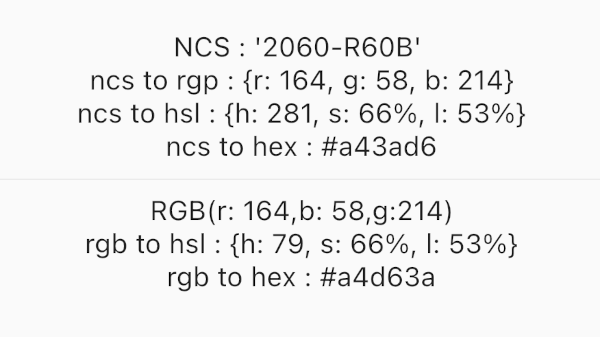
ncscolor는 NCS(Natural Color System) 색상과 RGB, HSL, HEX와 같은 일반적인 형식 간의 원활한 변환을 가능하게 하는 Dart 패키지입니다. 디자인 및 개발 워크플로우에서 정확한 색상 표현이 필요한 경우 필수적인 정밀한 색상 변환 기능을 제공합니다. 또한 RGB 조작을 위한 보조 유틸리티도 포함되어 있어 UI/UX 애플리케이션에서의 활용도를 높였습니다. 크로스 플랫폼 사용을 위해 설계되었으며 Android, iOS, Web, macOS, Windows, Linux를 지원합니다.
사용 사례
디자인 시스템 구현
디지털 인터페이스에서의 색상 매칭
크리에이티브 도구 개발
접근성 호환 색상 선택
UI 프로토타이핑
주요 기능
NCS에서 RGB/HSL/HEX로 변환
RGB 유틸리티 함수
고정밀 색상 계산
크로스 플랫폼 호환성
간단한 API 통합
적합한 대상
NCS 색상 기준을 사용하는 디자이너
색상 선택기 개발자
정확한 색상 번역이 필요한 응용 프로그램
디자인 시스템을 사용하는 프론트엔드 팀
NCS 통합 창의적 소프트웨어
고려 사항
NCS 색상 모델에 대한 이해가 필요합니다
색상 형식 변환에 제한됨
내장된 색상 선택기 UI 없음
디자인 도구와 함께 사용할 때 가장 효과적입니다
실시간 색상 편집에 최적화되지 않음
원본 README
연결된 소스 저장소의 README 원문 스냅샷입니다. 최신 내용은 저장소에서 확인하세요.
NCSColor 🎨
A comprehensive Dart package for converting NCS (Natural Color System) colors to RGB, HSL, and HEX formats, with additional RGB conversion utilities. Perfect for Flutter apps and Dart projects that need to work with NCS color specifications.
Experience NCSColor in action with our live Flutter web demo! Test color conversions, explore the NCS color system, and see real-time previews of your color transformations.
✨ Features
🎯 NCS to RGB conversion - Convert NCS color codes to RGB values
🌈 NCS to HSL conversion - Get HSL representation of NCS colors
🎨 NCS to HEX conversion - Generate hex color codes from NCS
🔄 RGB to HSL conversion - Convert RGB values to HSL format
🔄 RGB to HEX conversion - Convert RGB values to hex format
✅ Input validation - Proper NCS format validation with clear error messages
📱 Flutter ready - Works seamlessly with Flutter Color widgets
🚀 Modern Dart - Built with latest Dart features and null safety
🚀 Installation
Add this to your package's pubspec.yaml file:
dependencies:ncscolor:^1.0.0
Then run:
flutter pub get
📖 Usage
Import the package
import'package:ncscolor/ncscolor.dart';
NCS Color Conversions
// Create an NCS color instancefinal ncsColor = NCSColor(ncsCode: '2060-R60B');
// Convert to RGBfinal rgb = ncsColor.toRgb();
print(rgb); // {r: 164, g: 58, b: 214}// Convert to HSLfinal hsl = ncsColor.toHsl();
print(hsl); // {h: 281, s: 66%, l: 53%}// Convert to HEXfinal hex = ncsColor.toHex();
print(hex); // #a43ad6
Map<String, String> rgbToHsl({required int r, required int g, required int b})
String rgbToHex({required int r, required int g, required int b})
⚠️ Error Handling
The package provides clear error messages for invalid NCS codes:
try {
  final ncsColor = NCSColor(ncsCode: 'invalid-code');
  final rgb = ncsColor.toRgb();
} catch (e) {
  print(e); // ArgumentError: Invalid NCS color format...
}
🧪 Testing
Run the test suite:
flutter test
🤝 Contributing
Contributions are welcome! Please feel free to submit a Pull Request. For major changes, please open an issue first to discuss what you would like to change.
Fork the repository
Create your feature branch (git checkout -b feature/amazing-feature)
Commit your changes (git commit -m 'Add some amazing feature')
Push to the branch (git push origin feature/amazing-feature)