
 v5.5.3
quick_log
Dart용 간편하고 확장 가능한 로깅 패키지입니다. 특히 라이브러리에서 사용할 때 유용하며, 애플리케이션이 가져온 라이브러리의 로깅을 제어할 수 있게 해줍니다.
21좋아요 5.1천30일 다운로드150Pub 점수
AndroidiOSWebmacOSWindowsLinux
MohiuddinM/log open-source repository details.
아래는 영문 원문 스냅샷입니다. 최신 내용은 GitHub에서 확인하세요.
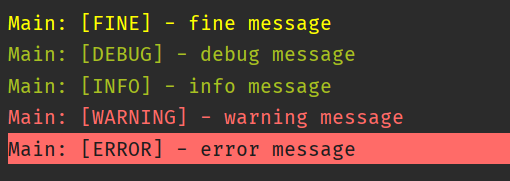
An easy to use and extendable logging package for Dart. Especially useful for use in libraries, as it allows application to control logging from the imported libraries.

A simple usage example:
import 'package:quick_log/quick_log.dart';

void main() {
  const log = Logger('LogExample');

  log.debug('this is a debug message');
  log.info('this is an info message');
}
Configuring logger output:
import 'package:quick_log/quick_log.dart';

void main() {
  const log = Logger('LogExample');

  Logger.writer = ConsolePrinter(minLevel: LogLevel.info);

  log.d('this is a debug message');
  log.i('this is an info message');
}
Ignoring logs:
import 'package:quick_log/quick_log.dart';

class ExampleLogger extends Logger {
  const ExampleLogger(String name) : super(name, 'ExampleLogger');
}

void main() {
  const log = ExampleLogger('LogExample');

  Logger.writer = ConsolePrinter(onlyTags: []);
  // Or
  Logger.writer = ConsolePrinter(exceptTags: [log.name]);

  // These messages won't be printed
  log.d('this is a debug message');
  log.i('this is an info message');
}
Can be used in tests by using the LogStreamWriter:
import 'package:quick_log/quick_log.dart';

test('test', () {
  const log = Logger('LogExample');
  final writer = LogStreamWriter();
  Logger.writer = writer;

  log.i('this line was executed');

  expect(writer.pastMessages.length, 1);
  expect(writer.lastMessage.message, 'this is an info message');
});
Please file feature requests and bugs at the issue tracker.

사용 목적에 따라 검색하고 개발 활동을 비교한 뒤 원본 저장소에서 요구 사항을 확인하세요.
“A repository is the most basic element of GitHub.”
GitHub Docs — About repositories ↗