
v1.0.1
dynamic_theme
런타임 중 테마를 변경하고 재시작 간에 밝기 설정을 유지합니다
136좋아요 87530일 다운로드40Pub 점수
플랫폼 정보 없음
번거로움 없이 동적으로 테마를 변경하세요
아래는 영문 원문 스냅샷입니다. 최신 내용은 GitHub에서 확인하세요.
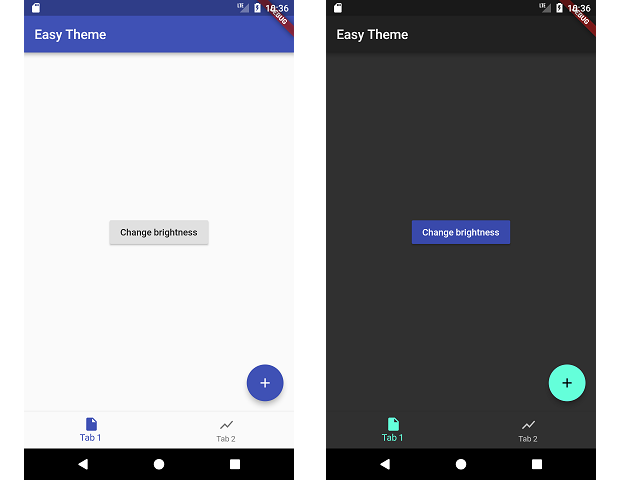
This packages manages changing your theme during runtime and persiting that theme.
dependencies:
  dynamic_theme: ^1.0.1
run packages get and import it
import 'package:dynamic_theme/dynamic_theme.dart';
if you want the dialog:
import 'package:dynamic_theme/theme_switcher_widgets.dart';
Wrap your material app like this:
class MyApp extends StatelessWidget {
  @override
  Widget build(BuildContext context) {
    return new DynamicTheme(
      defaultBrightness: Brightness.light,
      data: (brightness) => new ThemeData(
        primarySwatch: Colors.indigo,
        brightness: brightness,
      ),
      themedWidgetBuilder: (context, theme) {
        return new MaterialApp(
          title: 'Flutter Demo',
          theme: theme,
          home: new MyHomePage(title: 'Flutter Demo Home Page'),
        );
      }
    );
  }
}
Change the theme like this:
  void changeBrightness() {
    DynamicTheme.of(context).setBrightness(Theme.of(context).brightness == Brightness.dark? Brightness.light: Brightness.dark);
  }

  void changeColor() {
    DynamicTheme.of(context).setThemeData(new ThemeData(
        primaryColor: Theme.of(context).primaryColor == Colors.indigo? Colors.red: Colors.indigo
    ));
  }
When changing the brightness with setBrightness, it is additionally stored in the shared preferences.
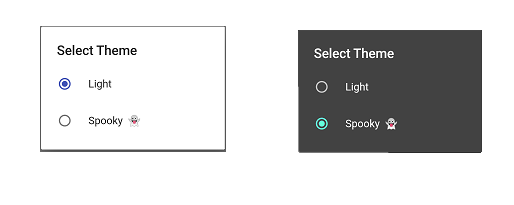
For help getting started with Flutter, view our online documentation.
For help on editing package code, view the documentation.

의존성 목록 3 개
{"sdk":"flutter"}^2.0.5{"sdk":"flutter"}사용 목적에 따라 검색하고 개발 활동을 비교한 뒤 원본 저장소에서 요구 사항을 확인하세요.
“A repository is the most basic element of GitHub.”
GitHub Docs — About repositories ↗