연결된 소스 저장소의 README 원문 스냅샷입니다. 최신 내용은 저장소에서 확인하세요.
dynamic_theme
Dynamically changing your theme without hassle
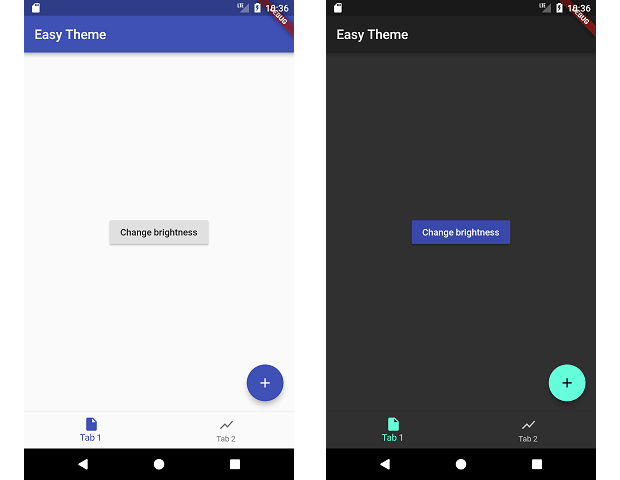
This packages manages changing your theme during runtime and persiting that theme.
I wrote a medium post about this, check it out here!
Include in your project
dependencies:
  dynamic_theme: ^1.0.1
run packages get and import it
import 'package:dynamic_theme/dynamic_theme.dart';
if you want the dialog:
import 'package:dynamic_theme/theme_switcher_widgets.dart';
Usage
Wrap your material app like this:
class MyApp extends StatelessWidget {
  @override
  Widget build(BuildContext context) {
    return new DynamicTheme(
      defaultBrightness: Brightness.light,
      data: (brightness) => new ThemeData(
        primarySwatch: Colors.indigo,
        brightness: brightness,
      ),
      themedWidgetBuilder: (context, theme) {
        return new MaterialApp(
          title: 'Flutter Demo',
          theme: theme,
          home: new MyHomePage(title: 'Flutter Demo Home Page'),
        );
      }
    );
  }
}
Change the theme like this:
  void changeBrightness() {
    DynamicTheme.of(context).setBrightness(Theme.of(context).brightness == Brightness.dark? Brightness.light: Brightness.dark);
  }

  void changeColor() {
    DynamicTheme.of(context).setThemeData(new ThemeData(
        primaryColor: Theme.of(context).primaryColor == Colors.indigo? Colors.red: Colors.indigo
    ));
  }
When changing the brightness with setBrightness, it is additionally stored in the shared preferences.
Also included
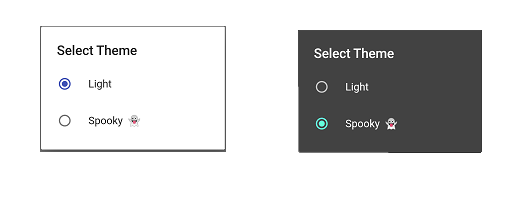
A dialog widget to change the brightness!
Getting Started
For help getting started with Flutter, view our online documentation.
For help on editing package code, view the documentation.
