


 v1.0.2
flutter_gradient_animation_text
텍스트, 색상 및 애니메이션 지속 시간을 입력하여 매우 쉽게 애니메이션 그라데이션 텍스트를 생성하세요.
42좋아요 1.1천30일 다운로드140Pub 점수
AndroidiOSWebmacOSWindowsLinux
사힐 샤의 개발로 만든 그라데이션 애니메이션 텍스트용 Flutter 패키지

아래는 영문 원문 스냅샷입니다. 최신 내용은 GitHub에서 확인하세요.



This package lets you make animated gradient texts without any hassle.
Just pass the text, colors, the duration of the animation and you're done!
Using the transform and reverse, you can achieve amazing effects.
For More info read the docs below.
Install the package using the following command:
flutter pub add flutter_gradient_animation_text
Import the package in your dart file using the following code:
import 'package:flutter_gradient_animation_text/flutter_gradient_animation_text.dart';
And you are good to go!
Create your animated gradient text. The 3 required arguments are:
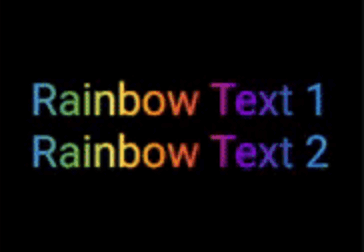
text(Text): The text.colors(List<Colors>): List of colors you want in your gradient.duration(Duration): Duration for which a single gradient animation runs.// rainbow text
GradientAnimationText(
text: Text(
'Rainbow Text 1',
style: TextStyle(
fontSize: 50,
),
),
colors: [
Color(0xff8f00ff), // violet
Colors.indigo,
Colors.blue,
Colors.green,
Colors.yellow,
Colors.orange,
Colors.red,
],
duration: Duration(seconds: 5),
),

Reverse the animation.
This plays the animation backwards when a single iteration of the forward animation is completed.
You set reverse to true to enable this.
// rainbow text with reverse
GradientAnimationText(
    text: Text(
        'Rainbow Text 1',
        style: TextStyle(
            fontSize: 50,
        ),
    ),
    colors: [
        Color(0xff8f00ff),  // violet
        Colors.indigo,
        Colors.blue,
        Colors.green,
        Colors.yellow,
        Colors.orange,
        Colors.red,
    ],
    duration: Duration(seconds: 5),
    reverse: true,  // reverse
),

Play with colors.
It is possible to use the same color more than once to increase the area it covers.
Gold Text Example:
The following 2 Gold Text animations have different number of Colors.amber color.
// gold text 1
GradientAnimationText(
    text: Text(
        'Gold Text 1',
        style: TextStyle(
            fontSize: 50,
            fontWeight: FontWeight.bold,
        ),
    ),
    colors: [
        Colors.amber,   // 1
        Colors.white,
    ],
    duration: Duration(seconds: 5),
    reverse: true,
),
// gold text 2
GradientAnimationText(
    text: Text(
        'Gold Text 2',
        style: TextStyle(
            fontSize: 50,
            fontWeight: FontWeight.bold,
        ),
    ),
    colors: [
        Colors.amber,   // 1
        Colors.amber,   // 2
        Colors.amber,   // 3
        Colors.white,
    ],
    duration: Duration(seconds: 5),
    reverse: true,
),

Transform your gradient.
You can transform your gradient using transform property.
Use GradientTranform classes such as SweepGradient, and GradientRotation to tranform.
// Tranform Text
GradientAnimationText(
    text: Text(
    'Tranform Text',
        style: TextStyle(
            fontSize: 90,
            fontWeight: FontWeight.bold,
        ),
    ),
    colors: [
        Color(0xFF061A9C),
        Color(0xff92effd),
    ],
    duration: Duration(seconds: 5),
    transform: GradientRotation(math.pi / 4),   // tranform
),

| Property | Type | Description |
|---|---|---|
text |
Text | The text to be used in the animation. |
colors |
List | Colors of the animation. |
duration |
Duration | Duration for which a single gradient animation runs. |
reverse |
bool? | If you want to reverse the animation. |
transform |
GradientTransform? | You can transform your gradient. |
This package is developed by Sahil Shah.
의존성 목록 3 개
{"sdk":"flutter"}{"sdk":"flutter"}^2.0.0사용 목적에 따라 검색하고 개발 활동을 비교한 뒤 원본 저장소에서 요구 사항을 확인하세요.
“A repository is the most basic element of GitHub.”
GitHub Docs — About repositories ↗