패키지, 저장소 및 앱 카테고리 검색

flutter_gradient_animation_text 표지
패키지 상세v1.0.2

flutter_gradient_animation_text

텍스트, 색상 및 애니메이션 지속 시간을 입력하여 매우 쉽게 애니메이션 그라데이션 텍스트를 생성하세요.

AndroidiOSWebmacOSWindowsLinux
30일 다운로드
1.1천
좋아요
42
Pub 점수
140

패키지 설치

flutter pub add flutter_gradient_animation_text

패키지 개요

공개 정보를 바탕으로 생성한 선택 가이드입니다.

텍스트 내용, 그라데이션 색상 및 애니메이션 지속 시간을 지정함으로써 개발자가 쉽게 애니메이션 그라데이션 텍스트를 생성할 수 있도록 해주는 플러터 패키지입니다. 다양한 플랫폼에서 앱에 시각적으로 매력적이고 동적인 텍스트 효과를 추가하는 과정을 간소화합니다. 이 패키지는 가볍고 최소한의 설정으로 기존 플러터 프로젝트에 원활하게 통합됩니다. 복잡한 사용자 정의 애니메이션 없이도 매력적인 타이포그래피로 UI를 강화하는 데 이상적입니다.

사용 사례

  • 애니메이션 그라디언트 제목 추가
  • 인상적인 앱 헤더 만들기
  • 스플래시 화면 개선
  • 인터랙티브 UI 요소 설계
  • 온보딩 흐름에서 텍스트 애니메이션

주요 기능

  • 텍스트 및 색상 입력을 가진 간단한 API
  • 사용자 정의 애니메이션 지속 시간
  • 크로스 플랫폼 지원
  • 부드러운 그라데이션 전환
  • 최소한의 보일러플레이트 코드

적합한 대상

  • 시각적 매력이 필요한 UI 디자이너
  • 현대적인 앱 인터페이스를 개발하는 개발자
  • 애니메이션 타이포그래피가 필요한 프로젝트
  • Flutter 애니메이션을 배우는 초보자
  • 동적 또는 상호작용 텍스트 요소를 가진 앱

고려 사항

  • 많은 애니메이션 텍스트로 인한 성능 영향
  • 그라데이션과 지속 시간 외에 맞춤 설정이 제한적
  • 저사양 기기용 최적화가 필요할 수 있습니다
  • 애니메이션 동작은 플랫폼 간에 약간 다를 수 있습니다
  • 정적 텍스트 디자인에 적합하지 않습니다

원본 README

연결된 소스 저장소의 README 원문 스냅샷입니다. 최신 내용은 저장소에서 확인하세요.

Static Badge Static Badge Static Badge Static Badge

This package lets you make animated gradient texts without any hassle. Just pass the text, colors, the duration of the animation and you're done! Using the transform and reverse, you can achieve amazing effects. For More info read the docs below.

Getting started

Install the package using the following command:

flutter pub add flutter_gradient_animation_text

Import the package in your dart file using the following code:

import 'package:flutter_gradient_animation_text/flutter_gradient_animation_text.dart';

And you are good to go!

Usage

Create your animated gradient text. The 3 required arguments are:

  1. text(Text): The text.
  2. colors(List<Colors>): List of colors you want in your gradient.
  3. duration(Duration): Duration for which a single gradient animation runs.
// rainbow text
GradientAnimationText(
    text: Text(
        'Rainbow Text 1',
        style: TextStyle(
            fontSize: 50,
        ),
    ),
    colors: [
        Color(0xff8f00ff),  // violet
        Colors.indigo,
        Colors.blue,
        Colors.green,
        Colors.yellow,
        Colors.orange,
        Colors.red,
    ],
    duration: Duration(seconds: 5),
),

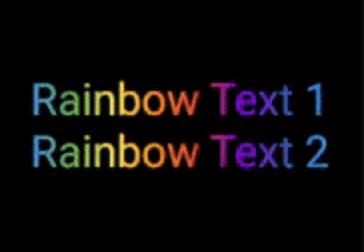
Rainbow Text 1

Reverse the animation. This plays the animation backwards when a single iteration of the forward animation is completed. You set reverse to true to enable this.

// rainbow text with reverse
GradientAnimationText(
    text: Text(
        'Rainbow Text 1',
        style: TextStyle(
            fontSize: 50,
        ),
    ),
    colors: [
        Color(0xff8f00ff),  // violet
        Colors.indigo,
        Colors.blue,
        Colors.green,
        Colors.yellow,
        Colors.orange,
        Colors.red,
    ],
    duration: Duration(seconds: 5),
    reverse: true,  // reverse
),

Rainbow Text 2

Play with colors. It is possible to use the same color more than once to increase the area it covers. Gold Text Example: The following 2 Gold Text animations have different number of Colors.amber color.

// gold text 1
GradientAnimationText(
    text: Text(
        'Gold Text 1',
        style: TextStyle(
            fontSize: 50,
            fontWeight: FontWeight.bold,
        ),
    ),
    colors: [
        Colors.amber,   // 1
        Colors.white,
    ],
    duration: Duration(seconds: 5),
    reverse: true,
),
// gold text 2
GradientAnimationText(
    text: Text(
        'Gold Text 2',
        style: TextStyle(
            fontSize: 50,
            fontWeight: FontWeight.bold,
        ),
    ),
    colors: [
        Colors.amber,   // 1
        Colors.amber,   // 2
        Colors.amber,   // 3
        Colors.white,
    ],
    duration: Duration(seconds: 5),
    reverse: true,
),

Gold Text

Transform your gradient. You can transform your gradient using transform property. Use GradientTranform classes such as SweepGradient, and GradientRotation to tranform.

// Tranform Text
GradientAnimationText(
    text: Text(
    'Tranform Text',
        style: TextStyle(
            fontSize: 90,
            fontWeight: FontWeight.bold,
        ),
    ),
    colors: [
        Color(0xFF061A9C),
        Color(0xff92effd),
    ],
    duration: Duration(seconds: 5),
    transform: GradientRotation(math.pi / 4),   // tranform
),

Tranform Text

Available Properties

Property Type Description
text Text The text to be used in the animation.
colors List Colors of the animation.
duration Duration Duration for which a single gradient animation runs.
reverse bool? If you want to reverse the animation.
transform GradientTransform? You can transform your gradient.

Author

This package is developed by Sahil Shah.

카테고리

소스 저장소

이 패키지를 사용하는 프로젝트

아직 데이터가 없습니다.