

v4.1.2
http_parser
HTTP 형식을 파싱하고 직렬화하기 위한 플랫폼 독립형 패키지입니다.
271좋아요 1290만30일 다운로드160Pub 점수
AndroidiOSWebmacOSWindowsLinux
커스텀 업로더는 Android 기기용으로 플러터로 구축된 간단하고 가볍고 사용하기 쉬운 파일 업로더로, 원하는 파일 호스트에 파일을 업로드할 수 있습니다.
아래는 영문 원문 스냅샷입니다. 최신 내용은 GitHub에서 확인하세요.



Custom Uploader is a user-friendly file uploading tool that makes it easy for you to transfer files to your preferred hosting service. It is designed to be lightweight and efficient, with a straightforward interface that allows you to upload files quickly and easily. With Custom Uploader, you can upload a variety of different file types, including documents, images, videos, and more. The versatile tool is perfect for anyone who needs a reliable and convenient way to upload files for storage or sharing. Whenever you are a business owner, a student, or a professional, Custom Uploader can help you manage and share your files with ease.


You can also get the latest version of the app from the releases page.
Minimum supported Android version for this app is 5.0 (Lolipop).
See BUILDING.MD for details
Like the app? Consider donating to support the development of the app.

HTTP 형식을 파싱하고 직렬화하기 위한 플랫폼 독립형 패키지입니다.
 v7.0.0
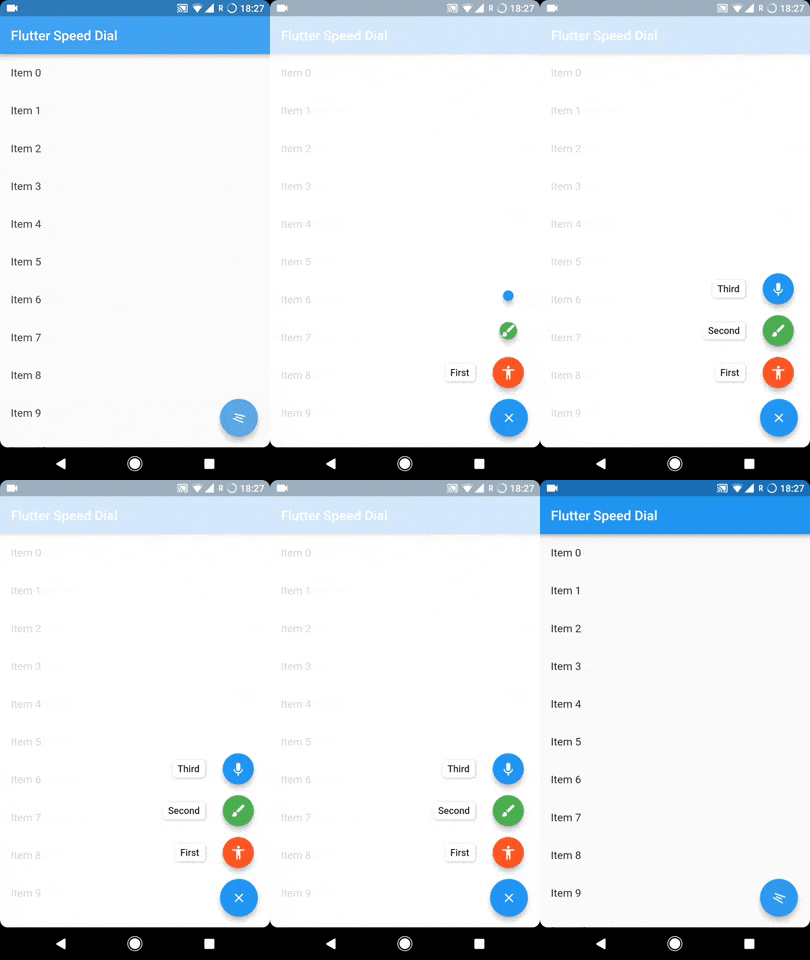
레이블, 애니메이션 아이콘, 다중 방향 자식 등과 함께 아름답고 동적인 마테리얼 디자인 스피드 다이얼을 구현하는 Flutter 플러그인.
HTTP 지시사항을 준수하거나 무시하는 여러 저장소를 지원하는 Dio HTTP 캐시 인터셉터.
데스크톱 및 웹에서 키보드로 제어할 수 있는 데이터 그리드입니다. 물론 안드로이드와 IOS에서도 잘 작동합니다. (DataGrid, DataTable, 데이터 그리드, 데이터 테이블, 스티키)
intl_utils는 ARB 파일에서 Dart 로컬라이제이션 코드를 생성하는 Dart 라이브러리입니다. 생성된 코드는 Intl 라이브러리에 의존합니다.
Flutter 앱이 다른 앱에서 사진, 비디오, 텍스트, URL 또는 기타 파일 유형을 수신할 수 있도록 해주는 플러터 플러그인입니다.
의존성 목록 29 개
{"sdk":"flutter"}{"sdk":"flutter"}any^5.9.0^4.0.3^10.3.2^4.2.5^6.3.0^2.2.3^1.1.0^2.0.0^2.0.4^6.3.2^12.0.1^12.3.0^9.0.0^3.1.2^2.0.0^4.1.2^2.0.1^0.7.5^7.0.0^12.0.1^2.1.0{"sdk":"flutter"}^6.0.0^2.0.0^2.4.13^2.8.2사용 목적에 따라 검색하고 개발 활동을 비교한 뒤 원본 저장소에서 요구 사항을 확인하세요.
“A repository is the most basic element of GitHub.”
GitHub Docs — About repositories ↗