


v0.0.6
flutter_paginator
Flutter용 사용자 정의 가능한 페이지네이션 패키지입니다. 이 패키지는 API에서 페이지 단위로 데이터를 가져와 표시하는 데 사용할 수 있습니다.
27좋아요 5230일 다운로드40Pub 점수
플랫폼 정보 없음
Flutter용 사용자 정의 가능한 페이지네이션 패키지

아래는 영문 원문 스냅샷입니다. 최신 내용은 GitHub에서 확인하세요.
A customizable pagination package for Flutter. This package can be used to fetch and display data from an API page by page.
dependencies:
  flutter_paginator: ^0.0.6
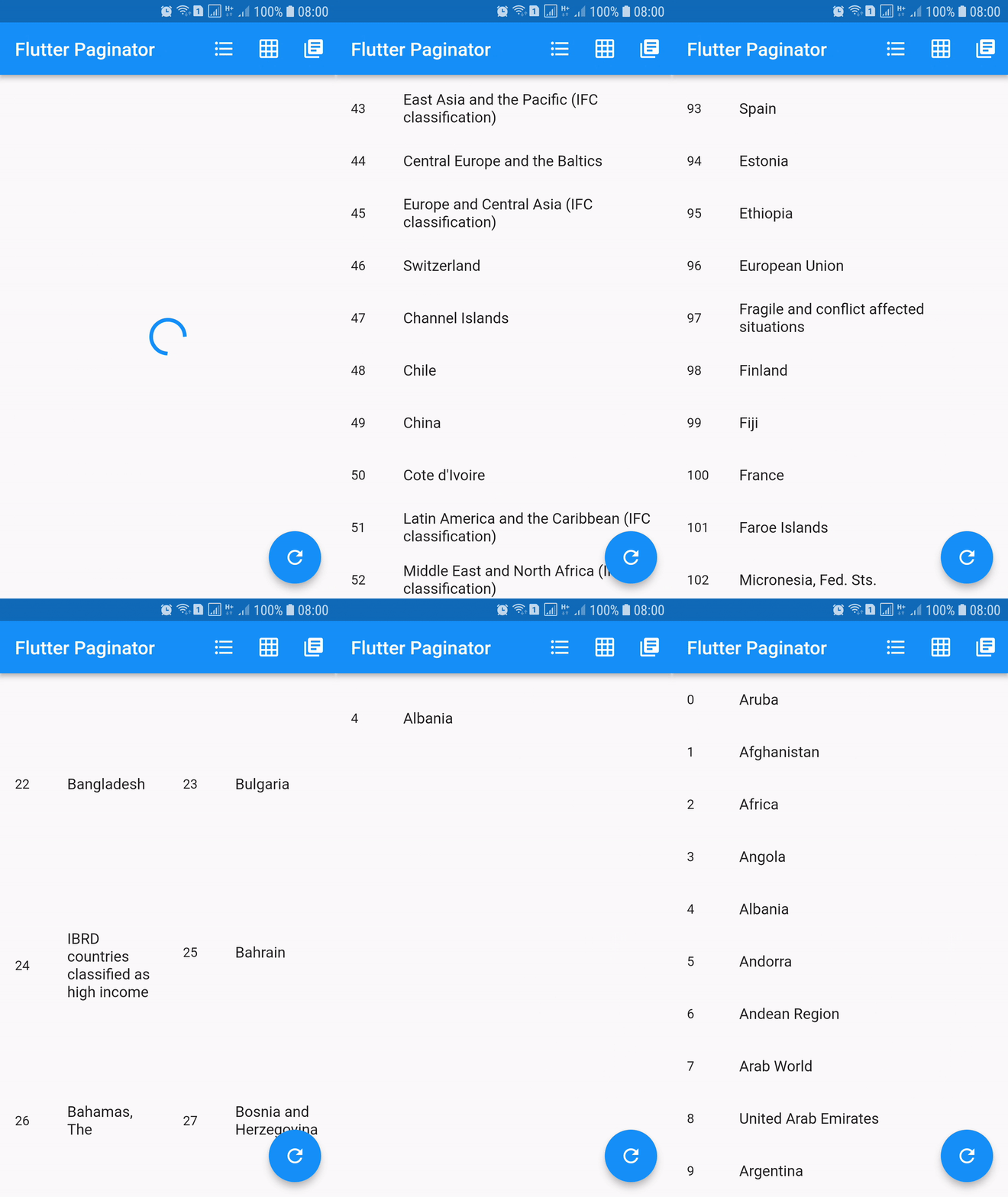
Paginator extends StatefulWidget has 3 constructors namely Paginator.listView, Paginator.gridView and Paginator.pageView. Paginator.listView, Paginator.gridView and Paginator.pageView are descendants of ListView, GridView and PageView. Paginator.listView, Paginator.gridView and Paginator.pageView got all the features of their ancestors and they are need to provide additional functions that are essential in doing their task.
PageLoadFutureFuture.PageItemsGetterPageLoadFuture.ListItemBuilderWidget.LoadingWidgetBuilderWidget.ErrorWidgetBuilderWidget.EmptyListWidgetBuilderWidget.TotalItemsGetterPageErrorCheckerimport 'dart:async';
import 'dart:convert';
import 'dart:io';
import 'package:flutter/material.dart';
import 'package:http/http.dart' as http;
import 'package:flutter_paginator/flutter_paginator.dart';
import 'package:flutter_paginator/enums.dart';
void main() => runApp(MyApp());
class MyApp extends StatelessWidget {
@override
Widget build(BuildContext context) {
return MaterialApp(
title: 'Flutter Paginator',
home: HomePage(),
);
}
}
class HomePage extends StatefulWidget {
@override
State<StatefulWidget> createState() {
return HomeState();
}
}
class HomeState extends State<HomePage> {
GlobalKey<PaginatorState> paginatorGlobalKey = GlobalKey();
@override
Widget build(BuildContext context) {
return Scaffold(
appBar: AppBar(
title: Text('Flutter Paginator'),
actions: <Widget>[
IconButton(
icon: Icon(Icons.format_list_bulleted),
onPressed: () {
paginatorGlobalKey.currentState
.changeState(listType: ListType.LIST_VIEW);
},
),
IconButton(
icon: Icon(Icons.grid_on),
onPressed: () {
paginatorGlobalKey.currentState.changeState(
listType: ListType.GRID_VIEW,
gridDelegate: SliverGridDelegateWithFixedCrossAxisCount(
crossAxisCount: 2),
);
},
),
IconButton(
icon: Icon(Icons.library_books),
onPressed: () {
paginatorGlobalKey.currentState
.changeState(listType: ListType.PAGE_VIEW);
},
),
],
),
body: Paginator.listView(
key: paginatorGlobalKey,
pageLoadFuture: sendCountriesDataRequest,
pageItemsGetter: listItemsGetter,
listItemBuilder: listItemBuilder,
loadingWidgetBuilder: loadingWidgetMaker,
errorWidgetBuilder: errorWidgetMaker,
emptyListWidgetBuilder: emptyListWidgetMaker,
totalItemsGetter: totalPagesGetter,
pageErrorChecker: pageErrorChecker,
scrollPhysics: BouncingScrollPhysics(),
),
floatingActionButton: FloatingActionButton(
onPressed: () {
paginatorGlobalKey.currentState.changeState(
pageLoadFuture: sendCountriesDataRequest, resetState: true);
},
child: Icon(Icons.refresh),
),
);
}
Future<CountriesData> sendCountriesDataRequest(int page) async {
try {
String url = Uri.encodeFull(
'http://api.worldbank.org/v2/country?page=$page&format=json');
http.Response response = await http.get(url);
return CountriesData.fromResponse(response);
} catch (e) {
if (e is IOException) {
return CountriesData.withError(
'Please check your internet connection.');
} else {
print(e.toString());
return CountriesData.withError('Something went wrong.');
}
}
}
List<dynamic> listItemsGetter(CountriesData countriesData) {
List<String> list = [];
countriesData.countries.forEach((value) {
list.add(value['name']);
});
return list;
}
Widget listItemBuilder(value, int index) {
return ListTile(
leading: Text(index.toString()),
title: Text(value),
);
}
Widget loadingWidgetMaker() {
return Container(
alignment: Alignment.center,
height: 160.0,
child: CircularProgressIndicator(),
);
}
Widget errorWidgetMaker(CountriesData countriesData, retryListener) {
return Column(
mainAxisAlignment: MainAxisAlignment.center,
children: <Widget>[
Padding(
padding: const EdgeInsets.all(16.0),
child: Text(countriesData.errorMessage),
),
FlatButton(
onPressed: retryListener,
child: Text('Retry'),
)
],
);
}
Widget emptyListWidgetMaker(CountriesData countriesData) {
return Center(
child: Text('No countries in the list'),
);
}
int totalPagesGetter(CountriesData countriesData) {
return countriesData.total;
}
bool pageErrorChecker(CountriesData countriesData) {
return countriesData.statusCode != 200;
}
}
class CountriesData {
List<dynamic> countries;
int statusCode;
String errorMessage;
int total;
int nItems;
CountriesData.fromResponse(http.Response response) {
this.statusCode = response.statusCode;
List jsonData = json.decode(response.body);
countries = jsonData[1];
total = jsonData[0]['total'];
nItems = countries.length;
}
CountriesData.withError(String errorMessage) {
this.errorMessage = errorMessage;
}
}
의존성 목록 2 개
{"sdk":"flutter"}{"sdk":"flutter"}사용 목적에 따라 검색하고 개발 활동을 비교한 뒤 원본 저장소에서 요구 사항을 확인하세요.
“A repository is the most basic element of GitHub.”
GitHub Docs — About repositories ↗