패키지, 저장소 및 앱 카테고리 검색

패키지 상세v0.0.6

flutter_paginator

Flutter용 사용자 정의 가능한 페이지네이션 패키지입니다. 이 패키지는 API에서 페이지 단위로 데이터를 가져와 표시하는 데 사용할 수 있습니다.

30일 다운로드
52
좋아요
27
Pub 점수
40

패키지 설치

flutter pub add flutter_paginator

패키지 개요

공개 정보를 바탕으로 생성한 선택 가이드입니다.

Flutter용 사용자 정의 가능한 페이지네이션 패키지로, API에서 페이지 단위로 데이터를 효율적으로 로드하고 표시할 수 있습니다. 하단으로 당기기 리프레시 및 무한 스크롤 상호작용을 지원하여 대규모 데이터셋을 가진 리스트 기반 애플리케이션에 적합합니다. 이 패키지는 UI, 로딩 인디케이터, 오류 상태 등을 사용자 정의할 수 있도록 유연하게 설계되어 있으며, 비동기 데이터 가져오기와 원활하게 통합되어 빈 결과나 네트워크 실패와 같은 예외 상황도 처리합니다.

사용 사례

  • 리스트에 대규모 데이터셋 로드
  • 무한 스크롤 구현
  • REST API에서 데이터 가져오기
  • 페이지inated 검색 결과 표시
  • 뉴스 또는 소셜 미디어 피드 구축

주요 기능

  • 사용자 정의 가능한 UI 컴포넌트
  • 당기기로 새로 고침 지원
  • 무한 스크롤 통합
  • 오류 및 빈 상태 처리
  • 사용자 정의 가능한 로딩 표시기

적합한 대상

  • 광범위한 데이터 목록을 가진 앱
  • API 기반 콘텐츠 표시
  • 지연로딩이 필요한 사용자 인터페이스
  • 재사용 가능한 페이징 로직을 찾는 개발자
  • 반응형 페이지네이션 사용자 경험을 필요로 하는 프로젝트

고려 사항

  • 수동 API 요청 처리가 필요합니다
  • 제한된 내장 캐시
  • 매우 높은 빈도의 업데이트에 최적화되지 않음
  • 외부 상태 관리에 의존
  • 복잡한 레이아웃의 경우 추가 스타일링이 필요할 수 있습니다

원본 README

연결된 소스 저장소의 README 원문 스냅샷입니다. 최신 내용은 저장소에서 확인하세요.

Flutter Paginator

pub package

A customizable pagination package for Flutter. This package can be used to fetch and display data from an API page by page.

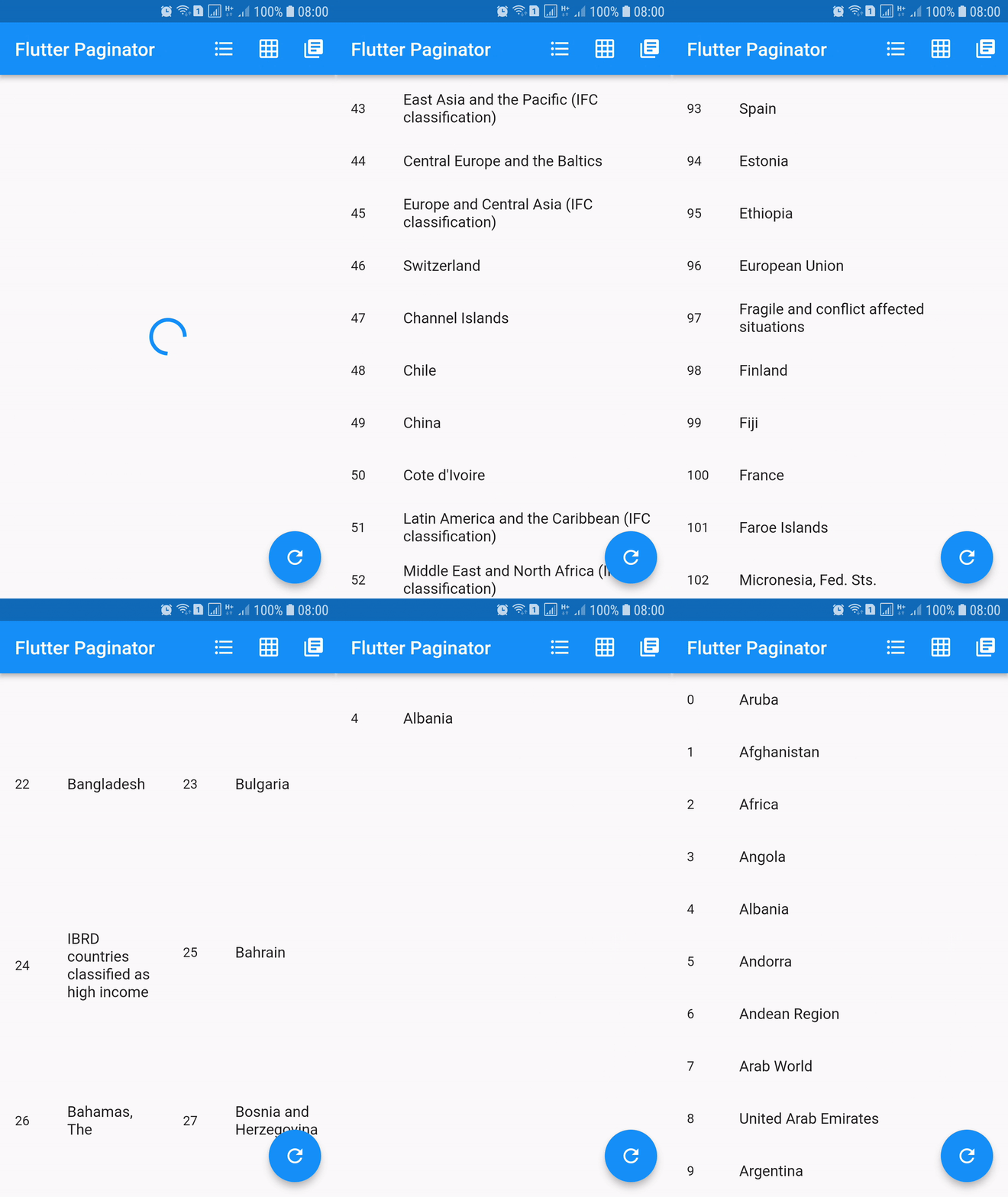
Screenshots

Installing

dependencies:
  flutter_paginator: ^0.0.6

Description

Paginator extends StatefulWidget has 3 constructors namely Paginator.listView, Paginator.gridView and Paginator.pageView. Paginator.listView, Paginator.gridView and Paginator.pageView are descendants of ListView, GridView and PageView. Paginator.listView, Paginator.gridView and Paginator.pageView got all the features of their ancestors and they are need to provide additional functions that are essential in doing their task.

PageLoadFuture
  • Loads the page asynchronously when the page number is given.
  • This should return an instance of a Future.
  • Called when the next page is needed to be loaded.
PageItemsGetter
  • This function should return list of page item data when page data is given.
  • This is called after successful completion of PageLoadFuture.
  • The page items returned by this method is added to the list of all the page items.
ListItemBuilder
  • Builds list item when item data and item index are given.
  • This should return an instance of a Widget.
LoadingWidgetBuilder
  • Builds loading widget.
  • This should return an instance of a Widget.
ErrorWidgetBuilder
  • Builds error widget when page data and error callback are given.
  • This should return an instance of a Widget.
EmptyListWidgetBuilder
  • Builds empty list widget.
  • This is displayed when the total number of list items is zero.
  • This should return an instance of a Widget.
TotalItemsGetter
  • This should return total number of list items when page data is given.
PageErrorChecker
  • This should return true if page has error else false, when page data is given.

Using

import 'dart:async';
import 'dart:convert';
import 'dart:io';

import 'package:flutter/material.dart';
import 'package:http/http.dart' as http;

import 'package:flutter_paginator/flutter_paginator.dart';
import 'package:flutter_paginator/enums.dart';

void main() => runApp(MyApp());

class MyApp extends StatelessWidget {
  @override
  Widget build(BuildContext context) {
    return MaterialApp(
      title: 'Flutter Paginator',
      home: HomePage(),
    );
  }
}

class HomePage extends StatefulWidget {
  @override
  State<StatefulWidget> createState() {
    return HomeState();
  }
}

class HomeState extends State<HomePage> {
  GlobalKey<PaginatorState> paginatorGlobalKey = GlobalKey();

  @override
  Widget build(BuildContext context) {
    return Scaffold(
      appBar: AppBar(
        title: Text('Flutter Paginator'),
        actions: <Widget>[
          IconButton(
            icon: Icon(Icons.format_list_bulleted),
            onPressed: () {
              paginatorGlobalKey.currentState
                  .changeState(listType: ListType.LIST_VIEW);
            },
          ),
          IconButton(
            icon: Icon(Icons.grid_on),
            onPressed: () {
              paginatorGlobalKey.currentState.changeState(
                listType: ListType.GRID_VIEW,
                gridDelegate: SliverGridDelegateWithFixedCrossAxisCount(
                    crossAxisCount: 2),
              );
            },
          ),
          IconButton(
            icon: Icon(Icons.library_books),
            onPressed: () {
              paginatorGlobalKey.currentState
                  .changeState(listType: ListType.PAGE_VIEW);
            },
          ),
        ],
      ),
      body: Paginator.listView(
        key: paginatorGlobalKey,
        pageLoadFuture: sendCountriesDataRequest,
        pageItemsGetter: listItemsGetter,
        listItemBuilder: listItemBuilder,
        loadingWidgetBuilder: loadingWidgetMaker,
        errorWidgetBuilder: errorWidgetMaker,
        emptyListWidgetBuilder: emptyListWidgetMaker,
        totalItemsGetter: totalPagesGetter,
        pageErrorChecker: pageErrorChecker,
        scrollPhysics: BouncingScrollPhysics(),
      ),
      floatingActionButton: FloatingActionButton(
        onPressed: () {
          paginatorGlobalKey.currentState.changeState(
              pageLoadFuture: sendCountriesDataRequest, resetState: true);
        },
        child: Icon(Icons.refresh),
      ),
    );
  }

  Future<CountriesData> sendCountriesDataRequest(int page) async {
    try {
      String url = Uri.encodeFull(
          'http://api.worldbank.org/v2/country?page=$page&format=json');
      http.Response response = await http.get(url);
      return CountriesData.fromResponse(response);
    } catch (e) {
      if (e is IOException) {
        return CountriesData.withError(
            'Please check your internet connection.');
      } else {
        print(e.toString());
        return CountriesData.withError('Something went wrong.');
      }
    }
  }

  List<dynamic> listItemsGetter(CountriesData countriesData) {
    List<String> list = [];
    countriesData.countries.forEach((value) {
      list.add(value['name']);
    });
    return list;
  }

  Widget listItemBuilder(value, int index) {
    return ListTile(
      leading: Text(index.toString()),
      title: Text(value),
    );
  }

  Widget loadingWidgetMaker() {
    return Container(
      alignment: Alignment.center,
      height: 160.0,
      child: CircularProgressIndicator(),
    );
  }

  Widget errorWidgetMaker(CountriesData countriesData, retryListener) {
    return Column(
      mainAxisAlignment: MainAxisAlignment.center,
      children: <Widget>[
        Padding(
          padding: const EdgeInsets.all(16.0),
          child: Text(countriesData.errorMessage),
        ),
        FlatButton(
          onPressed: retryListener,
          child: Text('Retry'),
        )
      ],
    );
  }

  Widget emptyListWidgetMaker(CountriesData countriesData) {
    return Center(
      child: Text('No countries in the list'),
    );
  }

  int totalPagesGetter(CountriesData countriesData) {
    return countriesData.total;
  }

  bool pageErrorChecker(CountriesData countriesData) {
    return countriesData.statusCode != 200;
  }
}

class CountriesData {
  List<dynamic> countries;
  int statusCode;
  String errorMessage;
  int total;
  int nItems;

  CountriesData.fromResponse(http.Response response) {
    this.statusCode = response.statusCode;
    List jsonData = json.decode(response.body);
    countries = jsonData[1];
    total = jsonData[0]['total'];
    nItems = countries.length;
  }

  CountriesData.withError(String errorMessage) {
    this.errorMessage = errorMessage;
  }
}

카테고리

소스 저장소

이 패키지를 사용하는 프로젝트

아직 데이터가 없습니다.