


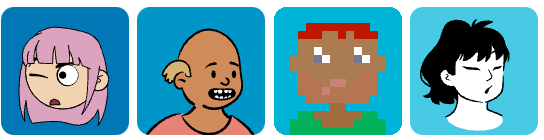
 v1.0.4
dice_bear
DiceBear API 래퍼. DiceBear는 디자이너와 개발자를 위한 아바타 라이브러리입니다. 무작위 아바타 프로필 사진을 생성하세요!
46좋아요 2천30일 다운로드130Pub 점수
AndroidiOSWebmacOSWindowsLinux
DiceBear API 래퍼. DiceBear는 디자이너와 개발자를 위한 아바타 라이브러리입니다. 무작위 아바타 프로필 사진을 생성하세요!

아래는 영문 원문 스냅샷입니다. 최신 내용은 GitHub에서 확인하세요.
A fully-typed Dart/Flutter wrapper for the DiceBear API (v9.x) that generates unique avatar profile pictures with extensive customization options.
DiceBear is an avatar library for designers and developers. Generate random, deterministic avatar profile pictures from seeds, supporting 30+ unique art styles with fine-grained style-specific customization.

✨ Full Type Safety — Every style option is a dedicated Dart class with compile-time validation
🎯 30+ Avatar Styles — Support for all DiceBear styles including Adventurer, Avataaars, PixelArt, and more
🔧 Style-Specific Customization — Each style has its own set of customization options (eyes, mouth, accessories, etc.)
📦 Flexible Output — Get SVG URLs, rendered Flutter widgets, or raw SVG bytes
🎲 Deterministic & Random — Generate consistent avatars from a seed or random ones each time
Add to your pubspec.yaml:
dependencies:
  dice_bear: ^1.0.0
Then run flutter pub get.
import 'package:dice_bear/dice_bear.dart';

// Create a simple avatar request
final request = DiceBearRequest(
  style: DiceBearStyle.adventurer,
  coreOptions: DiceBearCoreOptions(
    seed: 'john_doe', // Deterministic: same seed = same avatar
  ),
);

// Render as Flutter widget
Widget widget = request.toImage(width: 200, height: 200);

// Get the SVG URL
Uri svgUrl = request.uri;

// Get raw SVG bytes
Uint8List? svgBytes = await request.fetchBytes();
// Generate a new random avatar each time
final request = DiceBearRequest(
  style: DiceBearStyle.random,
  coreOptions: DiceBearCoreOptions(
    seed: DateTime.now().millisecondsSinceEpoch.toString(),
  ),
);
Each DiceBear style has its own options class for fine-grained control:
// Adventurer style with custom eye and mouth options
final request = DiceBearRequest<DiceBearAdventurerOptions>(
  style: DiceBearStyle.adventurer,
  coreOptions: DiceBearCoreOptions(
    seed: 'user123',
  ),
  styleOptions: DiceBearAdventurerOptions(
    eyes: ['variant01', 'variant05'],
    mouth: ['variant10'],
    glasses: ['variant02'],
    glassesProbability: 50,  // 50% chance of glasses
  ),
);
final request = DiceBearRequest<DiceBearPixelArtOptions>(
  style: DiceBearStyle.pixelArt,
  coreOptions: DiceBearCoreOptions(
    seed: 'pixel_user',
  ),
  styleOptions: DiceBearPixelArtOptions(
    accessories: ['variant01', 'variant02'],
    beard: ['variant03'],
    clothingColor: ['ff5733', 'fbf5e6'],
    eyesColor: ['647b90'],
  ),
);
| Parameter | Type | Example | Notes |
|---|---|---|---|
backgroundColor |
Color? |
Color(0xFF3ECAF5) |
Applied to SVG background |
radius |
int |
10 |
Border radius (0-20) |
scale |
int |
100 |
Scale factor (0-200) |
rotate |
int |
45 |
Rotation in degrees (0-360) |
flip |
bool |
true |
Flip horizontally |
translateX, translateY |
int |
10, -5 |
Translation offsets (-100 to 100) |
size |
int |
256 |
SVG size in pixels |
When calling .toImage(), you can pass additional Flutter parameters:
widget = request.toImage(
  width: 200,
  height: 200,
  fit: BoxFit.contain,
  alignment: Alignment.center,
  placeholderBuilder: (context) => CircularProgressIndicator(),
  semanticsLabel: 'User avatar for John Doe',
);
| Parameter | Type | Default |
|---|---|---|
width |
double? |
— |
height |
double? |
— |
fit |
BoxFit |
BoxFit.contain |
alignment |
Alignment |
Alignment.center |
placeholderBuilder |
WidgetBuilder? |
— |
color |
Color? |
— |
semanticsLabel |
String? |
— |
clipBehavior |
Clip |
Clip.hardEdge |
theme |
SvgTheme? |
— |
The library maintains a clean, semantically organized structure:
lib/
├── dice_bear.dart (main entry point)
└── src/
    └── style_options/
        ├── character_style_options.dart (abstract base)
        ├── adventurer_options.dart
        ├── avataaars_options.dart
        ├── big_ears_options.dart
        ├── big_smile_options.dart
        ├── bottts_options.dart
        ├── pixel_art_options.dart
        ├── persons_options.dart
        ├── rings_options.dart
        ├── shapes_options.dart
        └── ... (30 style option classes total)
DiceBearCharacterStyleOptions for humanoid styles with eyes and mouth fieldsDiceBearStyleOptionsRequires Dart SDK >= 2.17.0 (supports super parameters syntax for cleaner inheritance)
class UserAvatar extends StatelessWidget {
  final String userId;
  final double size;

  const UserAvatar({
    required this.userId,
    this.size = 100,
  });

  @override
  Widget build(BuildContext context) {
    final request = DiceBearRequest(
      style: DiceBearStyle.avataaars,
      coreOptions: DiceBearCoreOptions(
        seed: userId,
        backgroundColor: DiceBearCoreOptions.fromColor(Colors.blue.shade100!),
      ),
    );

    return request.toImage(width: size, height: size);
  }
}
ListView.builder(
  itemCount: 10,
  itemBuilder: (context, index) {
    final request = DiceBearRequest(
      style: DiceBearStyle.random,
      coreOptions: DiceBearCoreOptions(
        seed: index.toString(),
      ),
    );
    return request.toImage(width: 100, height: 100);
  },
)
The package includes comprehensive unit tests covering all style options and API interactions.
flutter test
This package is licensed under the MIT License. See LICENSE for details.
Contributions are welcome! Please feel free to submit a pull request to the repository.
Found an issue? Have a feature request? Open an issue on GitHub.
의존성 목록 5 개
{"sdk":"flutter"}^2.2.4^1.6.0{"sdk":"flutter"}^6.0.0사용 목적에 따라 검색하고 개발 활동을 비교한 뒤 원본 저장소에서 요구 사항을 확인하세요.
“A repository is the most basic element of GitHub.”
GitHub Docs — About repositories ↗