패키지, 저장소 및 앱 카테고리 검색

dice_bear 표지
패키지 상세v1.0.4

dice_bear

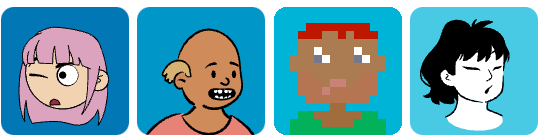
DiceBear API 래퍼. DiceBear는 디자이너와 개발자를 위한 아바타 라이브러리입니다. 무작위 아바타 프로필 사진을 생성하세요!

AndroidiOSWebmacOSWindowsLinux
30일 다운로드
2.7천
좋아요
47
Pub 점수
130

패키지 설치

flutter pub add dice_bear

패키지 개요

공개 정보를 바탕으로 생성한 선택 가이드입니다.

DiceBear는 DiceBear API를 래핑하는 Flutter/Dart 패키지로, 개발자가 고유하고 무작위의 프로필 아바타 이미지를 생성할 수 있도록 해줍니다. 다양한 스타일과 맞춤 설정 옵션을 지원하여 사용자 프로필, 채팅 인터페이스, 소셜 앱에 이상적입니다. Android, iOS, Web, macOS, Windows, Linux 등 모든 주요 플랫폼에서 작동합니다. pub add를 통해 간편하게 통합할 수 있으며, 개인화된 아바타로 UI를 원활하게 강화할 수 있습니다.

사용 사례

  • 사용자 프로필 이미지
  • 채팅 헤드 아바타
  • 소셜 미디어 앱 UI
  • 대시보드 사용자 지표
  • 게임 플레이어 아바타

주요 기능

  • 랜덤 아바타 생성
  • 다양한 아바타 스타일
  • 사용자 정의 가능한 외관
  • 크로스 플랫폼 지원
  • pub를 통한 간편한 통합
  • API 기반 디자인

적합한 대상

  • 빠른 아바타를 찾는 앱 개발자
  • 일관된 아바타가 필요한 디자이너
  • 채팅 또는 소셜 앱
  • 현실적인 사용자 시각을 활용한 프로토타이핑
  • 최소한의 설정이 필요한 프로젝트

고려 사항

  • 아바타 생성을 위해 인터넷 연결이 필요합니다
  • 사전 정의된 DiceBear 스타일로 제한됨
  • 외부 API 사용 가능 여부에 따라 다름
  • 오프라인 아바타 생성 없음
  • 스타일 사용자 정의는 API 제약으로 인해 제한됨

원본 README

연결된 소스 저장소의 README 원문 스냅샷입니다. 최신 내용은 저장소에서 확인하세요.


dice_bear
Flutter Package

A fully-typed Dart/Flutter wrapper for the DiceBear API (v9.x) that generates unique avatar profile pictures with extensive customization options.

DiceBear is an avatar library for designers and developers. Generate random, deterministic avatar profile pictures from seeds, supporting 30+ unique art styles with fine-grained style-specific customization.

GitHub stars pub package

Features

✨ Full Type Safety — Every style option is a dedicated Dart class with compile-time validation

🎯 30+ Avatar Styles — Support for all DiceBear styles including Adventurer, Avataaars, PixelArt, and more

🔧 Style-Specific Customization — Each style has its own set of customization options (eyes, mouth, accessories, etc.)

📦 Flexible Output — Get SVG URLs, rendered Flutter widgets, or raw SVG bytes

🎲 Deterministic & Random — Generate consistent avatars from a seed or random ones each time

Installation

Add to your pubspec.yaml:

dependencies:
  dice_bear: ^1.0.0

Then run flutter pub get.

Quick Start

Basic Usage
import 'package:dice_bear/dice_bear.dart';

// Create a simple avatar request
final request = DiceBearRequest(
  style: DiceBearStyle.adventurer,
  coreOptions: DiceBearCoreOptions(
    seed: 'john_doe', // Deterministic: same seed = same avatar
  ),
);

// Render as Flutter widget
Widget widget = request.toImage(width: 200, height: 200);

// Get the SVG URL
Uri svgUrl = request.uri;

// Get raw SVG bytes
Uint8List? svgBytes = await request.fetchBytes();
Random Avatar
// Generate a new random avatar each time
final request = DiceBearRequest(
  style: DiceBearStyle.random,
  coreOptions: DiceBearCoreOptions(
    seed: DateTime.now().millisecondsSinceEpoch.toString(),
  ),
);

Advanced Usage

Style-Specific Customization

Each DiceBear style has its own options class for fine-grained control:

// Adventurer style with custom eye and mouth options
final request = DiceBearRequest<DiceBearAdventurerOptions>(
  style: DiceBearStyle.adventurer,
  coreOptions: DiceBearCoreOptions(
    seed: 'user123',
  ),
  styleOptions: DiceBearAdventurerOptions(
    eyes: ['variant01', 'variant05'],
    mouth: ['variant10'],
    glasses: ['variant02'],
    glassesProbability: 50,  // 50% chance of glasses
  ),
);
PixelArt with Customization
final request = DiceBearRequest<DiceBearPixelArtOptions>(
  style: DiceBearStyle.pixelArt,
  coreOptions: DiceBearCoreOptions(
    seed: 'pixel_user',
  ),
  styleOptions: DiceBearPixelArtOptions(
    accessories: ['variant01', 'variant02'],
    beard: ['variant03'],
    clothingColor: ['ff5733', 'fbf5e6'],
    eyesColor: ['647b90'],
  ),
);
Common Customization Parameters
Parameter Type Example Notes
backgroundColor Color? Color(0xFF3ECAF5) Applied to SVG background
radius int 10 Border radius (0-20)
scale int 100 Scale factor (0-200)
rotate int 45 Rotation in degrees (0-360)
flip bool true Flip horizontally
translateX, translateY int 10, -5 Translation offsets (-100 to 100)
size int 256 SVG size in pixels

Available Styles

Character-Based Styles (with eyes & mouth customization)
  • Adventurer / Adventurer Neutral — D&D-inspired characters
  • Avataaars / Avataaars Neutral — Cartoonish avatars
  • Big Ears / Big Ears Neutral — Quirky big-eared characters
  • Big Smile — Always happy expressions
  • Bottts / Bottts Neutral — Robot-like avatars
  • Croodles / Croodles Neutral — Minimalist faces
  • Fun Emoji — Expressive emoji style
  • Lorelei / Lorelei Neutral — Artistic character design
  • Micah — Stylized character portraits
  • Miniavs — Tiny avatar style
  • Personas — Professional-looking character avatars
  • Pixel Art / Pixel Art Neutral — 8-bit style avatars
  • Thumbs — Thumbs-up styled avatars
  • Toon Head — Cartoon character avatars
Geometric & Abstract Styles
  • Dylan — Gradient-based geometric design
  • Glass — Glassy geometric patterns
  • Icons — Icon-based avatars
  • Identicon — Hash-based geometric avatars
  • Initials — Two-letter initials display
  • Notionists / Notionists Neutral — Notion-inspired design
  • Open Peeps — Open-source character art
  • Rings — Concentric ring patterns
  • Shapes — Geometric shape arrangements

Widget Parameters

When calling .toImage(), you can pass additional Flutter parameters:

widget = request.toImage(
  width: 200,
  height: 200,
  fit: BoxFit.contain,
  alignment: Alignment.center,
  placeholderBuilder: (context) => CircularProgressIndicator(),
  semanticsLabel: 'User avatar for John Doe',
);
Parameter Type Default
width double? —
height double? —
fit BoxFit BoxFit.contain
alignment Alignment Alignment.center
placeholderBuilder WidgetBuilder? —
color Color? —
semanticsLabel String? —
clipBehavior Clip Clip.hardEdge
theme SvgTheme? —

Architecture

The library maintains a clean, semantically organized structure:

lib/
├── dice_bear.dart (main entry point)
└── src/
    └── style_options/
        ├── character_style_options.dart (abstract base)
        ├── adventurer_options.dart
        ├── avataaars_options.dart
        ├── big_ears_options.dart
        ├── big_smile_options.dart
        ├── bottts_options.dart
        ├── pixel_art_options.dart
        ├── persons_options.dart
        ├── rings_options.dart
        ├── shapes_options.dart
        └── ... (30 style option classes total)
Design Pattern
  • Abstract Base Class: DiceBearCharacterStyleOptions for humanoid styles with eyes and mouth fields
  • Standalone Implementations: Geometric and abstract styles directly implement DiceBearStyleOptions
  • Validation: Each style class validates its options before sending to the API
  • Composability: Mix and match styles with global and style-specific options

Minimum SDK

Requires Dart SDK >= 2.17.0 (supports super parameters syntax for cleaner inheritance)

Examples

Profile Picture Builder
class UserAvatar extends StatelessWidget {
  final String userId;
  final double size;
  
  const UserAvatar({
    required this.userId,
    this.size = 100,
  });
  
  @override
  Widget build(BuildContext context) {
    final request = DiceBearRequest(
      style: DiceBearStyle.avataaars,
      coreOptions: DiceBearCoreOptions(
        seed: userId,
        backgroundColor: DiceBearCoreOptions.fromColor(Colors.blue.shade100!),
      ),
    );
    
    return request.toImage(width: size, height: size);
  }
}
Random Avatar Gallery
ListView.builder(
  itemCount: 10,
  itemBuilder: (context, index) {
    final request = DiceBearRequest(
      style: DiceBearStyle.random,
      coreOptions: DiceBearCoreOptions(
        seed: index.toString(),
      ),
    );
    return request.toImage(width: 100, height: 100);
  },
)

Testing

The package includes comprehensive unit tests covering all style options and API interactions.

flutter test

License

This package is licensed under the MIT License. See LICENSE for details.

Contributing

Contributions are welcome! Please feel free to submit a pull request to the repository.

Support

Found an issue? Have a feature request? Open an issue on GitHub.

카테고리

의존성

의존성 목록 2 개

소스 저장소

이 패키지를 사용하는 프로젝트

아직 데이터가 없습니다.