
 v1.2.1
decorated_icon
가벼우면서도 효율적인 아이콘 위젯으로 그림자 효과 목록을 지원합니다.
80좋아요 6.2천30일 다운로드150Pub 점수
AndroidiOSWebmacOSWindowsLinux
Flutter용 위젯으로 아이콘에 그림자 효과를 추가할 수 있습니다

{"sdk":"flutter"}{"sdk":"flutter"}아래는 영문 원문 스냅샷입니다. 최신 내용은 GitHub에서 확인하세요.
The best-performing shadowed icon widget for Flutter!
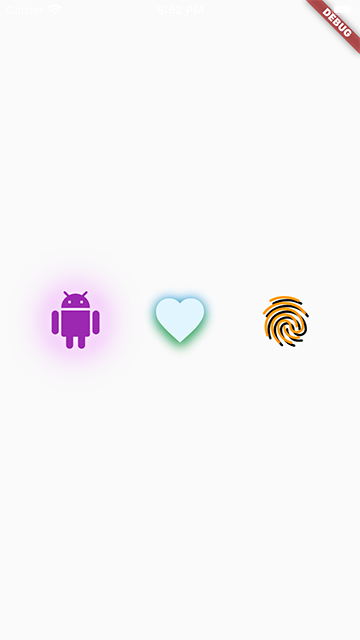
DecoratedIcon is a super lightweight Icon that supports shadow decorations.
No complicated hacks or multiple widgets, just List<Shadow> shadows like a TextStyle!
This widget is able to achieve the most efficient implementation of an icon with a shadow because it is uses a single Text widget to display the icon and apply the shadows.
It even supports debugging and Semantics.
One thing to keep in mind when using multiple shadows is the order of stacking by Flutter: the first shadow in the list will be painted at the bottom. (Similar to how the Stack widget draws its children.)
Also note that due to Flutter's current limitation, achieving an "outer glow" effect is not currently possible. You can read more here.
To use this package, add decorated_icon as a dependency in your pubspec.yaml file.
snapshot
Import the library.
import 'package:decorated_icon/decorated_icon.dart';
Then use DecoratedIcon as you would an Icon:
final decoratedIcons = Row(
  mainAxisAlignment: MainAxisAlignment.spaceEvenly,
  children: const [
    DecoratedIcon(
      Icons.android,
      color: Colors.purple,
      size: 60.0,
      shadows: [
        BoxShadow(
          blurRadius: 42.0,
          color: Colors.purpleAccent,
        ),
        BoxShadow(
          blurRadius: 12.0,
          color: Colors.white,
        ),
      ],
    ),
    DecoratedIcon(
      Icons.favorite,
      color: Colors.lightBlue.shade50,
      size: 60.0,
      shadows: [
        BoxShadow(
          blurRadius: 12.0,
          color: Colors.blue,
        ),
        BoxShadow(
          blurRadius: 12.0,
          color: Colors.green,
          offset: Offset(0, 6.0),
        ),
      ],
    ),
    DecoratedIcon(
      Icons.fingerprint,
      color: Colors.orange,
      size: 60.0,
      shadows: [
        BoxShadow(
          color: Colors.black,
          offset: Offset(3.0, 3.0),
        ),
      ],
    ),
  ],
);