

 v2.1.0
popup_menu
Flutter 팝업 메뉴. 순수한 Dart로 작성되었으며 iOS 및 Android를 모두 지원합니다.
157좋아요 2.4천30일 다운로드135Pub 점수
AndroidiOSWebmacOSWindowsLinux
🔥Flutter 팝업 메뉴입니다. Pub 지원.

아래는 영문 원문 스냅샷입니다. 최신 내용은 GitHub에서 확인하세요.


This project was written completely in dart, and it supports both iOS and Android.


You can find the demo at the 'example' folder.
First, you should set the context at somewhere in you code. Like below:
PopupMenu.context = context;
PopupMenu menu = PopupMenu(
      items: [
        MenuItem(title: 'Copy', image: Image.asset('assets/copy.png')),
        MenuItem(title: 'Home', image: Icon(Icons.home, color: Colors.white,)),
        MenuItem(title: 'Mail', image: Icon(Icons.mail, color: Colors.white,)),
        MenuItem(title: 'Power', image: Icon(Icons.power, color: Colors.white,)),
        MenuItem(title: 'Setting', image: Icon(Icons.settings, color: Colors.white,)),
        MenuItem(title: 'Traffic', image: Icon(Icons.traffic, color: Colors.white,))],
      onClickMenu: onClickMenu,
      onShow: onShow,
      onDismiss: onDismiss);

menu.show(rect: rect);
or
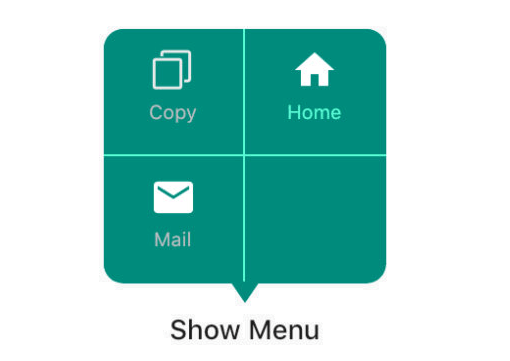
PopupMenu menu = PopupMenu(
        backgroundColor: Colors.teal,
        lineColor: Colors.tealAccent,
        maxColumn: 3,
        items: [
          MenuItem(title: 'Copy', image: Image.asset('assets/copy.png')),
          MenuItem(
              title: 'Home',
              textStyle: TextStyle(fontSize: 10.0, color: Colors.tealAccent),
              image: Icon(
                Icons.home,
                color: Colors.white,
              )),
          MenuItem(
              title: 'Mail',
              image: Icon(
                Icons.mail,
                color: Colors.white,
              )),
          MenuItem(
              title: 'Power',
              image: Icon(
                Icons.power,
                color: Colors.white,
              )),
          MenuItem(
              title: 'Setting',
              image: Icon(
                Icons.settings,
                color: Colors.white,
              )),
          MenuItem(
              title: 'PopupMenu',
              image: Icon(
                Icons.menu,
                color: Colors.white,
              ))
        ],
        onClickMenu: onClickMenu,
        onDismiss: onDismiss);
    menu.show(widgetKey: btnKey2);
의존성 목록 2 개
{"sdk":"flutter"}{"sdk":"flutter"}사용 목적에 따라 검색하고 개발 활동을 비교한 뒤 원본 저장소에서 요구 사항을 확인하세요.
“A repository is the most basic element of GitHub.”
GitHub Docs — About repositories ↗