
 v1.1.2
paginated_search_bar
항목을 검색하고 결과 목록에서 페이징할 수 있는 검색 바 라이브러리입니다.
52좋아요 8030일 다운로드60Pub 점수
플랫폼 정보 없음
항목을 검색하고 결과 목록에서 페이징할 수 있는 검색 바 라이브러리입니다.

{"sdk":"flutter"}^1.5.2^0.27.2^1.1.1{"sdk":"flutter"}^1.0.0^0.10.0아래는 영문 원문 스냅샷입니다. 최신 내용은 GitHub에서 확인하세요.
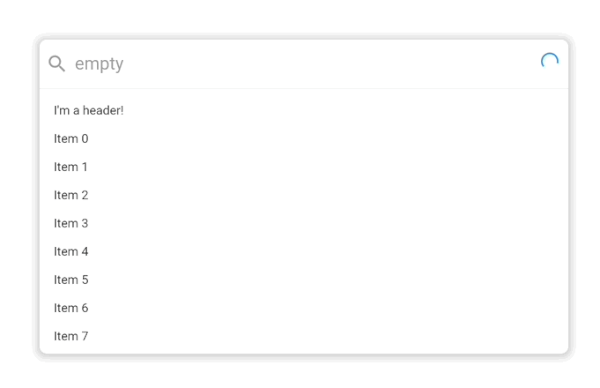
A search bar library that let's you search for items and paginate them in a results list. By default it looks like this:
Basic demo gif.
It supports extensive customization with custom styling, headers, placeholders, footers and more powered by the Endless infinite scroll view library.
Advanced demo gif
class ExampleItem {
  final String title;

  ExampleItem({
    required this.title,
  });
}

PaginatedSearchBar<ExampleItem>(
  onSearch: ({
    required pageIndex,
    required pageSize,
    required searchQuery,
  }) async {
    // Call your search API to return a list of items
    return [
      ExampleItem(title: 'Item 0'),
      ExampleItem(title: 'Item 1'),
    ];
  },
  itemBuilder: (
    context, {
    required item,
    required index,
  }) {
    return Text(item.title);
  },
);
In this basic usage, all you need to get started is an onSearch function for fetching data and an itemBuilder for how it should be displayed in the search results list.
PaginatedSearchBar<ExampleItem>(
  maxHeight: 300,
  hintText: 'Search',
  headerBuilderState: PaginatedSearchBarBuilderStateProperty.empty((context) {
    return const Text("I'm a header that only shows when the results are empty!");
  }),
  emptyBuilder: (context) {
    return const Text("I'm an empty state!");
  },
  paginationDelegate: EndlessPaginationDelegate(
    pageSize: 20,
    maxPages: 3,
  ),
  onSearch: ({
    required pageIndex,
    required pageSize,
    required searchQuery,
  }) async {
    return Future.delayed(const Duration(milliseconds: 1000), () {
      if (searchQuery == "empty") {
        return [];
      }

      return [
        ExampleItem(title: 'Page $pageIndex item 1'),
        ExampleItem(title: 'Page $pageIndex item 2'),
      ];
    });
  },
  itemBuilder: (
    context, {
    required item,
    required index,
  }) {
    return Text(item.title);
  },
);
In this more advanced example, we've provided a few more customization options including an emptyBuilder and headerBuilderState. All of the builder functions like emptyBuilder provide the current BuildContext and return a widget to display. Each builder function additionally has a corresponding StateProperty builder like we see with headerBuilderState. The PaginatedSearchBar library uses the State property pattern for customizing the display of the widget based on the state of the system.
The complete list of paginated search bar states are:
enum PaginatedSearchBarState {
  /// Present when the search bar is searching for items. Triggered when they update their search
  /// query in the input.
  searching,

  /// Present when the search bar is fetching a page of items either as a result of a modified search query
  /// or by scrolling to the bottom of the list view and triggering the next page load.
  loading,

  /// Present when the search bar has no matching items for the current search query.
  empty,

  /// Present when the search bar has no more items to fetch for the current search query. Triggered
  /// when the [PaginatedSearchBar.onSearch] function returns fewer than [PaginatedSearchBar.pageLimit]
  /// items or [EndlessPaginationDelegate.maxPage] has been reached and no more items can be fetched.
  done,

  /// Present the input is currently focused.
  focused,
}
State properties builders then let us customize what we build based on these states. In the above example with headerBuilderState, we specified that it should only build the widget when the search results are empty.
If we instead wanted it show be shown when the search results are empty or done, we could use the state property resolveWith builder:
PaginatedSearchBar<ExampleItem>(
  headerBuilderState: PaginatedSearchBarBuilderStateProperty.resolveWith((context, states) {
    if (states.contain(PaginatedSearchBarState.empty) || states.contain(PaginatedSearchBarState.done)) {
      return const Text("I'm a header that only shows when the results are empty or done!");
    }
  }),
  onSearch: ({
    required pageIndex,
    required pageSize,
    required searchQuery,
  }) async {
    return Future.delayed(const Duration(milliseconds: 1000), () {
      if (searchQuery == "empty") {
        return [];
      }

      return [
        ExampleItem(title: 'Page $pageIndex item 1'),
        ExampleItem(title: 'Page $pageIndex item 2'),
      ];
    });
  },
  itemBuilder: (
    context, {
    required item,
    required index,
  }) {
    return Text(item.title);
  },
);
The state properties are available for builders and style properties of the [PaginatedSearchBar].
Let us know if there are any additional features or customization options you'd like to see to make a helpful search bar.