
 v1.0.0
find_dropdown
아이템 검색 기능을 갖춘 간단하고 견고한 FindDropdown로 오프라인 항목 목록 또는 필터링 URL을 사용하여 쉽게 맞춤설정할 수 있습니다.
82좋아요 15430일 다운로드70Pub 점수
플랫폼 정보 없음
아이템 검색 기능을 갖춘 간단하고 강력한 드롭다운으로, 오프라인 항목 목록이나 필터링 URL을 사용하여 쉽게 맞춤 설정할 수 있습니다.

의존성 목록 3 개
^2.0.1{"sdk":"flutter"}{"sdk":"flutter"}아래는 영문 원문 스냅샷입니다. 최신 내용은 GitHub에서 확인하세요.
Simple and robust FindDropdown with item search feature, making it possible to use an offline item list or filtering URL for easy customization.
https://github.com/davidsdearaujo/find_dropdown/blob/master/screenshots/Screenshot_4.png?raw=true
https://github.com/davidsdearaujo/find_dropdown/blob/master/screenshots/GIF_Simple.gif?raw=true https://github.com/davidsdearaujo/find_dropdown/blob/master/screenshots/GIF_Custom_Layout.gif?raw=true https://user-images.githubusercontent.com/16373553/94360038-f0c22000-0080-11eb-8687-d5e8af02ed7b.png
If you use rxdart in your project in a version lower than 0.23.x, use version 0.1.7+1 of this package. Otherwise, you can use the most current version!
Null Safety Version: 1.0.0 or more
Non Null Safety Version: 0.2.3 or less
RxDart 0.23.x or less: 0.1.7+1
find_dropdown: <lastest version>
import 'package:find_dropdown/find_dropdown.dart';
FindDropdown(
  items: ["Brasil", "Itália", "Estados Unidos", "Canadá"],
  label: "País",
  onChanged: (String item) => print(item),
  selectedItem: "Brasil",
);
FindDropdown<String>.multiSelect(
  items: ["Brasil", "Itália", "Estados Unidos", "Canadá"],
  label: "País",
  onChanged: (List<String> items) => print(items),
  selectedItems: ["Brasil"],
);
FindDropdown(
  items: ["Brasil", "Itália", "Estados Unidos", "Canadá"],
  label: "País",
  onChanged: (String item) => print(item),
  selectedItem: "Brasil",
  validate: (String item) {
    if (item == null)
      return "Required field";
    else if (item == "Brasil")
      return "Invalid item";
    else
      return null; //return null to "no error"
  },
);
FindDropdown<UserModel>(
  label: "Nome",
  onFind: (String filter) async {
    var response = await Dio().get(
        "http://5d85ccfb1e61af001471bf60.mockapi.io/user",
        queryParameters: {"filter": filter},
    );
    var models = UserModel.fromJsonList(response.data);
    return models;
  },
  onChanged: (UserModel data) {
    print(data);
  },
);
var countriesKey = GlobalKey<FindDropdownState>();

Column(
  children: [
    FindDropdown<String>(
      key: countriesKey,
      items: ["Brasil", "Itália", "Estados Unidos", "Canadá"],
      label: "País",
      selectedItem: "Brasil",
      showSearchBox: false,
      onChanged: (selectedItem) => print("country: $selectedItem"),
    ),
    RaisedButton(
      child: Text('Limpar Países'),
      color: Theme.of(context).primaryColor,
      textColor: Theme.of(context).primaryIconTheme.color,
      onPressed: () => countriesKey.currentState?.clear(),
    ),
  ],
)
var countriesKey = GlobalKey<FindDropdownState>();

Column(
  children: [
    FindDropdown<UserModel>(
      label: "Nome",
      onFind: (String filter) => getData(filter),
      searchBoxDecoration: InputDecoration(
        hintText: "Search",
        border: OutlineInputBorder(),
      ),
      onChanged: (UserModel data) {
        print(data);
        countriesKey.currentState.setSelectedItem("Brasil");
      },
    ),
    FindDropdown<String>(
      key: countriesKey,
      items: ["Brasil", "Itália", "Estados Unidos", "Canadá"],
      label: "País",
      selectedItem: "Brasil",
      showSearchBox: false,
      onChanged: (selectedItem) => print("country: $selectedItem"),
    ),
  ],
)
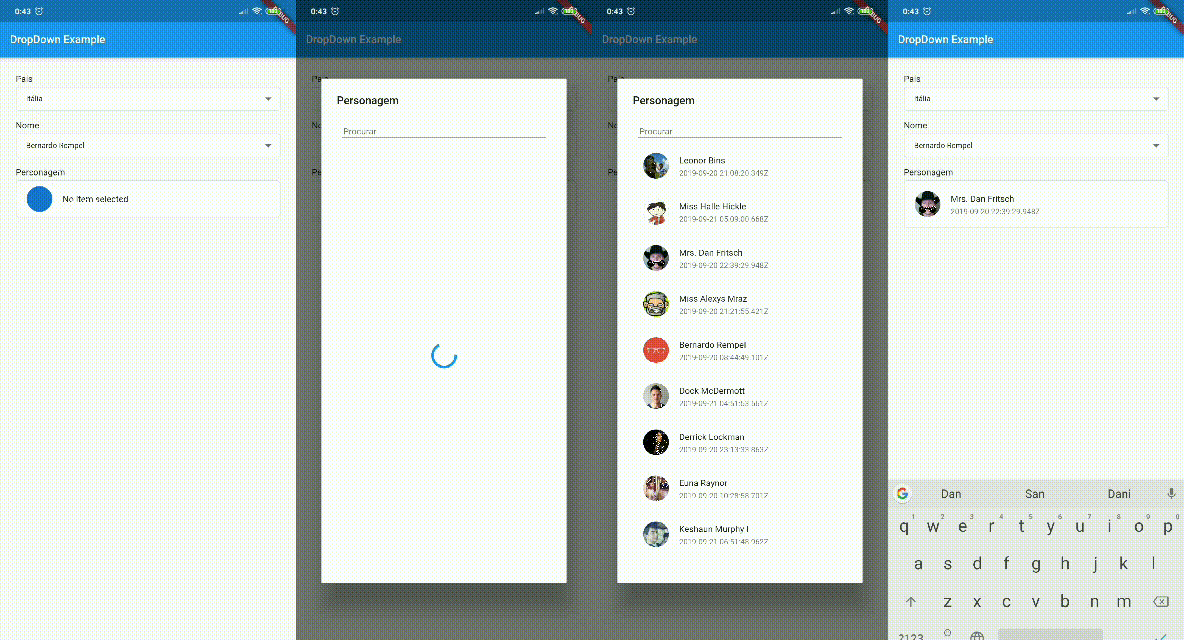
You can customize the layout of the FindDropdown and its items. EXAMPLE
To customize the FindDropdown, we have the dropdownBuilder property, which takes a function with the parameters:
BuildContext context: current context;T item: Current item, where T is the type passed in the FindDropdown constructor.To customize the items, we have the dropdownItemBuilder property, which takes a function with the parameters:
BuildContext context: current context;T item: Current item, where T is the type passed in the FindDropdown constructor.bool isSelected: Boolean that tells you if the current item is selected.To use a template as an item type, you need to implement toString, equals and hashcode, as shown below:
class UserModel {
  final String id;
  final DateTime createdAt;
  final String name;
  final String avatar;

  UserModel({this.id, this.createdAt, this.name, this.avatar});

  @override
  String toString() => name;

  @override
  operator ==(o) => o is UserModel && o.id == id;

  @override
  int get hashCode => id.hashCode^name.hashCode^createdAt.hashCode;

}