


 v3.0.1
chips_choice
smart_select 패키지의 경량 버전으로, 종속성이 없으며 단일 또는 다중 선택 칩을 쉽게 제공할 수 있습니다.
337좋아요 1.1만30일 다운로드150Pub 점수
AndroidiOSWebmacOSWindowsLinux
smart_select 패키지의 경량 버전으로, 종속성이 없으며 단일 또는 다중 선택 칩을 쉽게 제공할 수 있습니다.

아래는 영문 원문 스냅샷입니다. 최신 내용은 GitHub에서 확인하세요.


[!IMPORTANT]
Hi everyone,
I'm sorry to announce that I'm no longer maintaining the chips_choice package. It's been a great project, but it's become too difficult to maintain.
In its place, I've released a new package called choice. The combination to smart_select and chips_choice with cleaner, more flexible, and composable API for creating inline or prompted choice widgets with single or multiple selection.
I hope you'll check out choice. I think you'll find it to be a great replacement for chips_choice.
Thanks for your understanding.
Lite version of smart_select package, zero dependencies, an easy way to provide a single or multiple choice chips.
FlexiChip nowFlexiChipStyleChipsChoice.choiceActiveStyle and C2Choice.activeStyle since the C2ChipStyle can be an event driven propertiesC2ChoiceStyle.useCheckmark, changed to ChipsChoice.choiceCheckmarkChipsChoice.choiceAvatarBuilderChipsChoice.choiceLeadingBuilderChipsChoice.choiceTrailingBuilderC2Choice.deleteC2Choice.avatarImageC2Choice.avatarText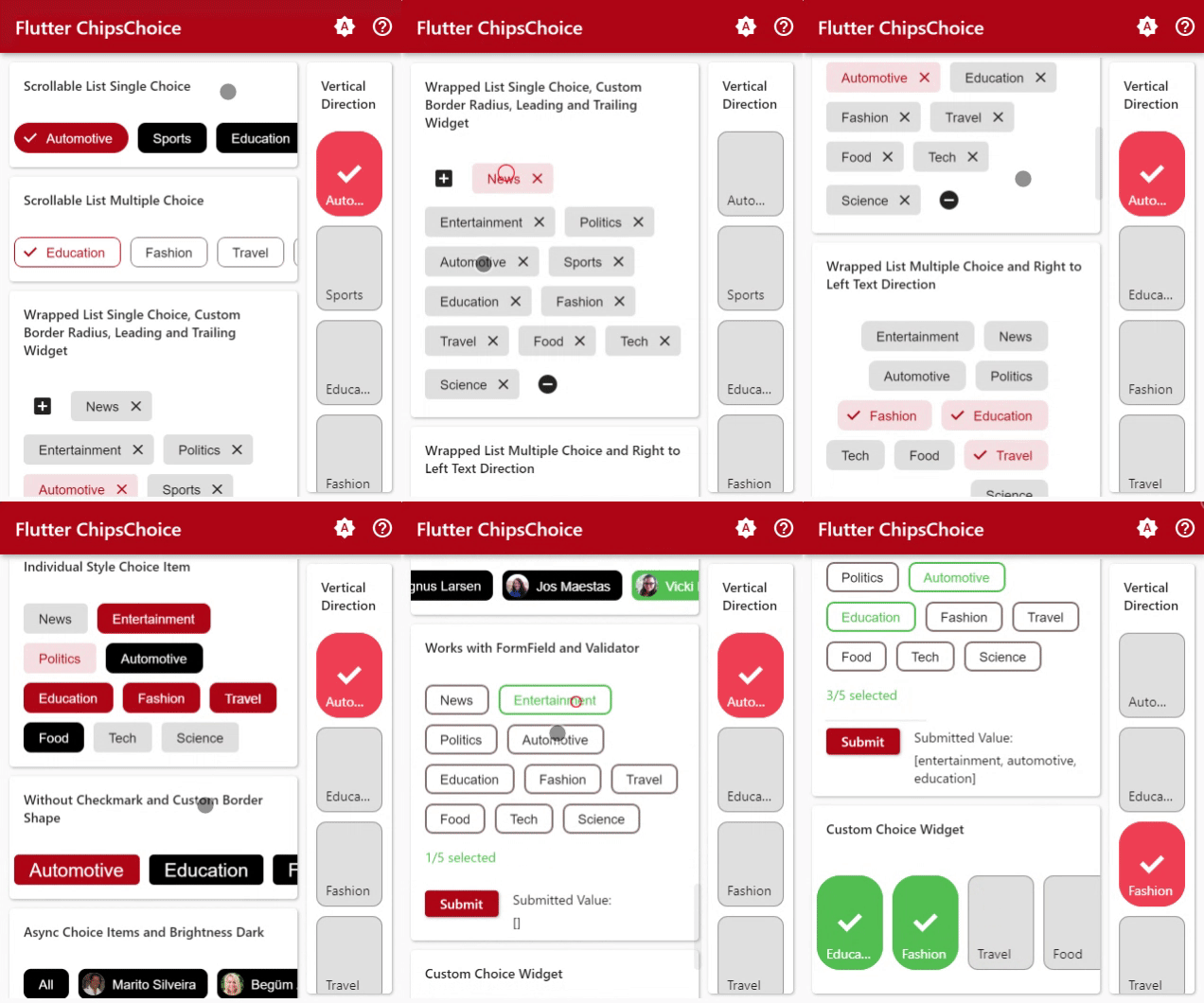
ListFor a complete usage, please see the example.
To read more about classes and other references used by chips_choice, see the API Reference.
// available configuration for single choice
ChipsChoice<T>.single({

  // The current value of the single choice widget.
  @required T value,

  // Called when single choice value changed
  @required C2Changed<T> onChanged,

  // choice item list
  @required List<C2Choice<T>> choiceItems,

  // Async loader of choice items
  C2ChoiceLoader<T> choiceLoader,

  // other available configuration
  // explained below
  ...,
  ...,

})
Simple usage
int tag = 1;
List<String> options = [
  'News', 'Entertainment', 'Politics',
  'Automotive', 'Sports', 'Education',
  'Fashion', 'Travel', 'Food', 'Tech',
  'Science',
];

@override
Widget build(BuildContext context) {
  return ChipsChoice<int>.single(
    value: tag,
    onChanged: (val) => setState(() => tag = val),
    choiceItems: C2Choice.listFrom<int, String>(
      source: options,
      value: (i, v) => i,
      label: (i, v) => v,
    ),
  );
}
// available configuration for multiple choice
ChipsChoice<T>.multiple({

  // The current value of the multiple choice widget.
  @required List<T> value,

  // Called when multiple choice value changed
  @required C2Changed<List<T>> onChanged,

  // choice item list
  @required List<C2Choice<T>> choiceItems,

  // Async loader of choice items
  C2ChoiceLoader<T> choiceLoader,

  // other available configuration
  // explained below
  ...,
  ...,

})
Simple usage
List<String> tags = [];
List<String> options = [
  'News', 'Entertainment', 'Politics',
  'Automotive', 'Sports', 'Education',
  'Fashion', 'Travel', 'Food', 'Tech',
  'Science',
];

@override
Widget build(BuildContext context) {
  return ChipsChoice<String>.multiple(
    value: tags,
    onChanged: (val) => setState(() => tags = val),
    choiceItems: C2Choice.listFrom<String, String>(
      source: options,
      value: (i, v) => v,
      label: (i, v) => v,
    ),
  );
}
See the API References, to find out all of the parameters.
// available configuration for single and multiple choice
ChipsChoice<T>.[single|multiple]({

  // other available configuration
  // explained below
  ...,
  ...,

  // Choice item style
  C2ChipStyle choiceStyle,

  // other available configuration
  // explained below
  ...,
  ...,

})
// available configuration for single and multiple choice
ChipsChoice<T>.[single|multiple]({

  // other available configuration
  // explained below
  ...,
  ...,

  // Builder for custom choice item label
  C2Builder<T> choiceLabelBuilder,

  // Builder for custom widget to display prior to the chip's [label].
  C2Builder<T>? choiceLeadingBuilder;

  // Builder for custom widget to display next to the chip's [label].
  C2Builder<T>? choiceTrailingBuilder;

  // Builder for custom choice item
  C2Builder<T> choiceBuilder,

  // Builder for spinner widget
  WidgetBuilder spinnerBuilder,

  // Builder for placeholder widget
  WidgetBuilder placeholderBuilder,

  // Builder for error widget
  WidgetBuilder errorBuilder,

  // other available configuration
  // explained below
  ...,
  ...,

})
// available configuration for single and multiple choice
ChipsChoice<T>.[single|multiple]({

  // other available configuration
  // explained below
  ...,
  ...,

  // Whether the chips is wrapped or scrollable
  bool wrapped,

  // Container padding
  EdgeInsetsGeometry padding,

  // The direction to use as the main axis.
  Axis direction,

  // Determines the order to lay children out vertically and how to interpret start and end in the vertical direction.
  VerticalDirection verticalDirection,

  // Determines the order to lay children out horizontally and how to interpret start and end in the horizontal direction.
  TextDirection textDirection,

  // if [wrapped] is [false], How the scroll view should respond to user input.
  ScrollPhysics scrollPhysics,

  // if [wrapped] is [false], How much space should be occupied in the main axis.
  MainAxisSize mainAxisSize,

  // if [wrapped] is [false], How the children should be placed along the main axis.
  MainAxisAlignment mainAxisAlignment,

  // if [wrapped] is [false], How the children should be placed along the cross axis.
  CrossAxisAlignment crossAxisAlignment,

  // if [wrapped] is [true], how the children within a run should be aligned relative to each other in the cross axis.
  WrapCrossAlignment wrapCrossAlignment,

  // if [wrapped] is [true], determines how wrap will align the objects
  WrapAlignment alignment,

  // if [wrapped] is [true], how the runs themselves should be placed in the cross axis.
  WrapAlignment runAlignment,

  // if [wrapped] is [true], how much space to place between children in a run in the main axis.
  double spacing,

  // if [wrapped] is [true], how much space to place between the runs themselves in the cross axis.
  double runSpacing,

  // Clip behavior
  Clip clipBehavior,

  // String to display when choice items is empty
  String placeholder,

  // placeholder text style
  TextStyle placeholderStyle,

  // placeholder text align
  TextAlign placeholderAlign,

  // error text style
  TextStyle errorStyle,

  // error text align
  TextAlign errorAlign,

  // spinner size
  double spinnerSize,

  // spinner color
  Color spinnerColor,

  // spinner thickness
  double spinnerThickness,

  // other available configuration
  // explained below
  ...,
  ...,

})
choiceItems property is List<C2Choice<T>>, it can be input directly as in the example below, more info about C2Choice can be found on the API Reference
ChipsChoice<T>.[single|multiple](
  ...,
  ...,
  choiceItems: <C2Choice<T>>[
    C2Choice<T>(value: 1, label: 'Entertainment'),
    C2Choice<T>(value: 2, label: 'Education'),
    C2Choice<T>(value: 3, label: 'Fashion'),
  ],
);
choiceItems also can be created from any list using helper provided by this package, like the example below
List<Map<String, String>> days = [
  { 'value': 'mon', 'title': 'Monday' },
  { 'value': 'tue', 'title': 'Tuesday' },
  { 'value': 'wed', 'title': 'Wednesday' },
  { 'value': 'thu', 'title': 'Thursday' },
  { 'value': 'fri', 'title': 'Friday' },
  { 'value': 'sat', 'title': 'Saturday' },
  { 'value': 'sun', 'title': 'Sunday' },
];

ChipsChoice<T>.[single|multiple](
  ...,
  ...,
  choiceItems: C2Choice.listFrom<T, Map<String, String>>(
    source: days,
    value: (index, item) => item['value'],
    label: (index, item) => item['title'],
  ),
);
Use choiceLoader to easily load choice items from async function
import 'package:dio/dio.dart';

String value;

Future<List<C2Choice<String>>> getChoices() async {
  String url = "https://randomuser.me/api/?inc=gender,name,nat,picture,email&results=25";
  Response res = await Dio().get(url);
  return C2Choice.listFrom<String, dynamic>(
    source: res.data['results'],
    value: (index, item) => item['email'],
    label: (index, item) => item['name']['first'] + ' ' + item['name']['last'],
    meta: (index, item) => item,
  )..insert(0, C2Choice<String>(value: 'all', label: 'All'));
}

@override
Widget build(BuildContext context) {
  return ChipsChoice<String>.single(
    value: value,
    onChanged: (val) => setState(() => value = val),
    choiceItems: null,
    choiceLoader: getChoices,
  );
}
의존성 목록 4 개
{"sdk":"flutter"}^2.8.2^1.0.7{"sdk":"flutter"}사용 목적에 따라 검색하고 개발 활동을 비교한 뒤 원본 저장소에서 요구 사항을 확인하세요.
“A repository is the most basic element of GitHub.”
GitHub Docs — About repositories ↗