
 v2.0.0
stretchy_header
이 패키지는 위젯을 스크롤할 때 좋은 효과를 얻기 위해 탄성 헤더를 만들 수 있게 해줍니다.
98좋아요 23630일 다운로드140Pub 점수
AndroidiOSWebmacOSWindowsLinux
diegoveloper/flutter_stretchy_header open-source repository details.

의존성 목록 2 개
{"sdk":"flutter"}{"sdk":"flutter"}아래는 영문 원문 스냅샷입니다. 최신 내용은 GitHub에서 확인하세요.
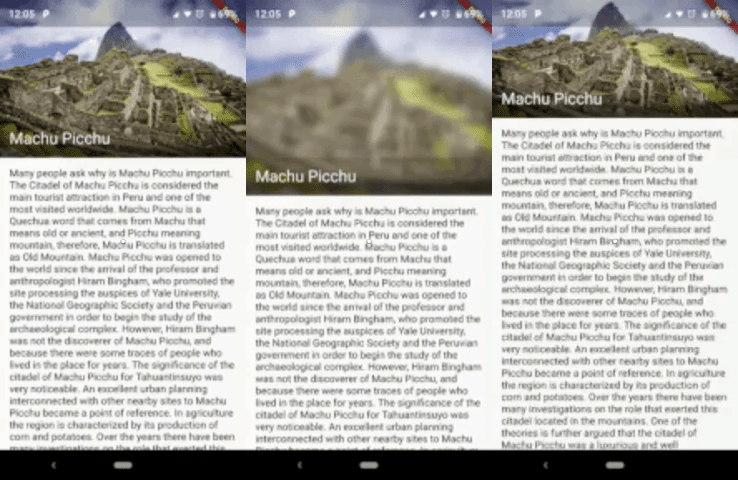
This package allows us to create an elastic header, to give a good effect when you scroll down the widget.
Sample 1
https://media.giphy.com/media/1hBwHq01CeFJOgJg8p/giphy.gif
Sample 2
https://media.giphy.com/media/f9SzoZKqo1vfdlCaT5/giphy.gif
You should ensure that you add the router as a dependency in your flutter project.
dependencies:
  stretchy_header: "^1.0.8"
You should then run flutter packages upgrade or update your packages in IntelliJ.
There is an example project in the example folder. Check it out. Otherwise, keep reading to get up and running.
import 'package:flutter/material.dart';
import 'package:stretchy_header/stretchy_header.dart';

class SampleListView extends StatelessWidget {
  @override
  Widget build(BuildContext context) {
    return Scaffold(
      body: StretchyHeader.listViewBuilder(
        headerData: HeaderData(
          headerHeight: 250,
          header: Image.asset(
            "images/chichen.jpg",
            fit: BoxFit.cover,
          ),
        ),
        itemCount: 15,
        itemBuilder: (context, index) {
          return ListTile(
            title: Text("item $index"),
            onTap: () {
              final snackBar = SnackBar(
                content: Text('item $index tapped'),
              );
              ScaffoldMessenger.of(context).showSnackBar(snackBar);
            },
          );
        },
      ),
    );
  }
}
import 'package:flutter/material.dart';
import 'package:stretchy_header/stretchy_header.dart';

class SampleCustomHeader extends StatelessWidget {
  @override
  Widget build(BuildContext context) {
    return Scaffold(
      body: StretchyHeader.singleChild(
        headerData: HeaderData(
          headerHeight: 200,
          backgroundColor: Colors.black54,
          blurColor: Colors.yellow,
          header: UserAccountsDrawerHeader(
            accountName: Text("Diego"),
            accountEmail: Text("twitter @diegoveloper"),
            currentAccountPicture: CircleAvatar(
              backgroundColor: Colors.red,
              child: Text("DV"),
            ),
            margin: EdgeInsets.zero,
          ),
          overlay: Align(
            alignment: Alignment.bottomRight,
            child: Material(
              color: Colors.transparent,
              child: InkResponse(
                onTap: () {
                  ScaffoldMessenger.of(context).showSnackBar(
                    SnackBar(
                      content: Text('onTap'),
                    ),
                  );
                },
                child: Padding(
                  padding: EdgeInsets.all(12),
                  child: Icon(
                    Icons.fullscreen,
                    color: Colors.white,
                  ),
                ),
              ),
            ),
          ),
        ),
        child: Padding(
          padding: const EdgeInsets.all(15),
          child: Text(
            "Hello World!",
            style: TextStyle(fontSize: 45, color: Colors.white),
          ),
        ),
      ),
    );
  }
}
class SampleBottomLabel extends StatelessWidget {
  @override
  Widget build(BuildContext context) {
    return Scaffold(
      body: StretchyHeader.singleChild(
        headerData: HeaderData(
          headerHeight: 250,
          header: Image.asset(
            "images/machu.jpg",
            fit: BoxFit.cover,
          ),
          highlightHeaderAlignment: HighlightHeaderAlignment.bottom,
          highlightHeader: Container(
            width: MediaQuery.of(context).size.width,
            decoration: BoxDecoration(
                gradient: LinearGradient(
                  colors: [
                    Colors.black54,
                    Colors.black54,
                    Colors.black26,
                    Colors.black12,
                    Colors.black12,
                  ],
                  begin: Alignment.bottomCenter,
                  end: Alignment.topCenter,
                )),
            child: Padding(
              padding: const EdgeInsets.all(15),
              child: Text(
                "Machu Picchu",
                style: TextStyle(color: Colors.white, fontSize: 22),
              ),
            ),
          ),
        ),
        child: Padding(
          padding: const EdgeInsets.all(15),
          child: Text(LONG_DESCRIPTION),
        ),
      ),
    );
  }
}
class SampleCenterWidget extends StatelessWidget {
  @override
  Widget build(BuildContext context) {
    return Scaffold(
      body: StretchyHeader.singleChild(
        headerData: HeaderData(
          headerHeight: 250,
          header: Image.asset(
            "images/machu.jpg",
            fit: BoxFit.cover,
          ),
          highlightHeaderAlignment: HighlightHeaderAlignment.center,
          highlightHeader: SizedBox(
            width: MediaQuery.of(context).size.width,
            child: GestureDetector(
              onTap: () {
                print("tap highlightHeader");
              },
              child: CircleAvatar(
                backgroundColor: Colors.red,
                child: Text("M"),
              ),
            ),
          ),
        ),
        child: Padding(
          padding: const EdgeInsets.all(15),
          child: Text(LONG_DESCRIPTION),
        ),
      ),
    );
  }
}
You can follow me on twitter @diegoveloper