

 v0.1.2
flutter_social_textfield
정규 표현식을 사용하여 해시태그, URL, 언급을 감지하는 TextEditingController 및 RichText / TextSpan 빌더. 또한 탭 지원도 제공합니다.
97좋아요 3천30일 다운로드150Pub 점수
AndroidiOSWebmacOSWindowsLinux
일반적인 소셜 미디어 텍스트 콘텐츠를 제공하기 위한 TextEditingController입니다.

아래는 영문 원문 스냅샷입니다. 최신 내용은 GitHub에서 확인하세요.

A Flutter plugin that helps detection of common social media contents. The current position of the cursor is used for detecting content. Current detection types are:
You can see the supported detection types from DetectedType enum
enum DetectedType{
    mention, //By Default texts starting with @sign
    hashtag,  //By default, texts starting with #hashtag
    url, //By default texts starting with http://xxx.yyy or https://aaa.bbb
    plain_text //Any other type falls into this.
}
You can change the relevant regex for that type if you want, which has been mentioned in Configuring the Text Editing Controller part.
SocialTextField is basically an improved Text Editing Controller, so you can just assign text controller to any text editing widget that you want.
_textEditingController = SocialTextEditingController();

TextField(
    controller: _textEditingController,
    expands: true,
    maxLines: null,
    minLines: null,
    decoration: InputDecoration(
    hintText: "Please Enter a Text"
    ),
)
SocialTextEditingController can be configured by calling configuration methods.
There are 2 setter methods for this.
setTextStyle: Change how detected content shown.
setTextStyle(DetectedType.mention, TextStyle(...)
setRegexp: Override the detection regexp
setRegexp(DetectedType.url, RegExp("your_own_regex_fr_this_type"))
It is recommended to set these values on initialization;
_textEditingController = SocialTextEditingController()
    ..setTextStyle(DetectedType.mention, TextStyle(color: Colors.purple,backgroundColor: Colors.purple.withAlpha(50)))
    ..setRegexp(DetectedType.url, RegExp("your_own_regex_fr_this_type"));
One of the main reasons that i want to create this plugin was that i needed to listen detection events from different widgets. So flutter_social_textfield provides a stream for detections so you can subscribe and listen events when needed.
StreamSubscription<SocialContentDetection> _streamSubscription;

@override
void initState() {
super.initState();
_textEditingController = SocialTextEditingController()
..text = "Lorem ipsum amet."
..setTextStyle(DetectedType.mention, TextStyle(color: Colors.purple,backgroundColor: Colors.purple.withAlpha(50)))
..setTextStyle(DetectedType.url, TextStyle(color: Colors.blue, decoration: TextDecoration.underline))
..setTextStyle(DetectedType.hashtag, TextStyle(color: Colors.blue, fontWeight: FontWeight.w600));

//Subscribe to events
 _streamSubscription = _textEditingController.subscribeToDetection(onDetectContent);
}

void onDetectContent(SocialContentDetection detection){
 print("Detected Contet: $detection");
}
don't forget to unsubscribe on dispose.
@override
void dispose() {
    _streamSubscription.cancel();
    super.dispose();
}
The Stream Subscriptoin returns SocialContentDetection class:
class SocialContentDetection{
    final DetectedType type; //mention, url, hashtag, plan_text
    final TextRange range; //range of detected content
    final String text; //detected content
    SocialContentDetection(this.type, this.range, this.text);

    @override
    String toString() {
        return 'SocialContentDetection{type: $type, range: $range, text: $text}';
    }
}
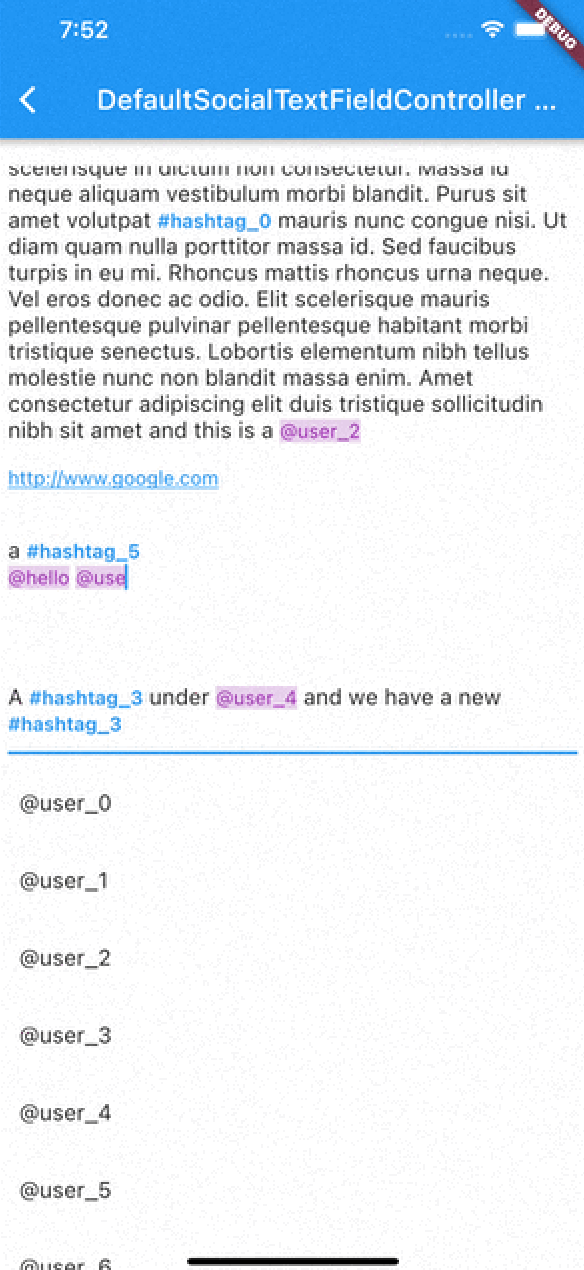
I've implemented an experimental widget for ease of use. DefaultSocialTextFieldController puts the main content inside a Stack and allows users to show relevant content when curser comes over a detected content
As with version 0.0.9 There are 2 different types of presentation of detection content:
Detection Presentation Mode
DetectionPresentationMode.split_screen : Shows detection view but moving from bottom to determined widget size. useful for full screen textfields like text editors
DetectionPresentationMode.above_text_field : Useful for showing detection view from above the textfield. The location of textfield is detected from the FocusNode automatically.
Please notice the 'scrollPhysics' property of the TextField;
DefaultSocialTextFieldController(
        detectionPresentationMode: DetectionPresentationMode.above_text_field,
        focusNode: _focusNode,
        scrollController: _scrollController,
        textEditingController: _textEditingController,
        child: Container(
          padding: EdgeInsets.all(8),
          child: Column(
            mainAxisAlignment: MainAxisAlignment.start,
            children: <Widget>[
              Expanded(
                child: TextField(
                  scrollPhysics: ClampingScrollPhysics(), //Use this for unnecessary scroll bounces
                  scrollController: _scrollController,
                  focusNode: _focusNode,
                  controller: _textEditingController,
                  expands: true,
                  maxLines: null,
                  minLines: null,
                  decoration: InputDecoration(
                      hintText: "Please Enter a Text"
                  ),
                ),
              ),
            ],
          ),
        ),
        detectionBuilders: {
          DetectedType.mention:(context)=>mentionContent(height),
          DetectedType.hashtag:(context)=>hashtagContent(height),
          DetectedType.url:(context)=>urlContent(height)
        },
      )

An example usage of the DefaultSocialTextFieldController can be seen in the example project. The main goal is to provide an easy way to implement features that have been seen in most of the social media applications.
flutter_social_textfield uses SocialTextSpanBuilder for rendering the text inside the attached textfield. So if you just want to show formatted text content instead of using inside an editor you can use it like this:
With version 0.0.3 you can also implement onTapDetection function for adding tap gestures to detected strings.
void initBuilder(){
    final Map<DetectedType, RegExp> _regularExpressions = {
        DetectedType.mention:atSignRegExp,
        DetectedType.hashtag:hashTagRegExp,
        DetectedType.url:urlRegex
    };

    final Map<DetectedType, TextStyle> _detectionTextStyles = {
        DetectedType.mention:TextStyle(...)
    };

    final TextStyle _defaultTextStyle = TextStyle();

    final _textSpanBuilder = SocialTextSpanBuilder(regularExpressions: _regularExpressions,defaultTextStyle:_defaultTextStyle,detectionTextStyles: _detectionTextStyles, onTapDetection: (detection){print("Tapped on detection: $detection");});
}

//And you can return RichText content bu calling build(context) method afterwards.
@override
    Widget build(BuildContext context) {
        var height = MediaQuery.of(context).size.height * 0.4;
        return Scaffold(
            appBar: AppBar(
                title: Text(widget.title),
            ),
        body: Container(
           child:RichText(
              text:_textSpanBuilder.build(context)
            )
        )// This trailing comma makes auto-formatting nicer for build methods.
    );
}
Thanks https://github.com/Bhupesh-V (@Bhupesh-V) for his contribution to url regex 👌
This widget's default regular expressions taken from this wonderful widget:
의존성 목록 2 개
{"sdk":"flutter"}{"sdk":"flutter"}사용 목적에 따라 검색하고 개발 활동을 비교한 뒤 원본 저장소에서 요구 사항을 확인하세요.
“A repository is the most basic element of GitHub.”
GitHub Docs — About repositories ↗