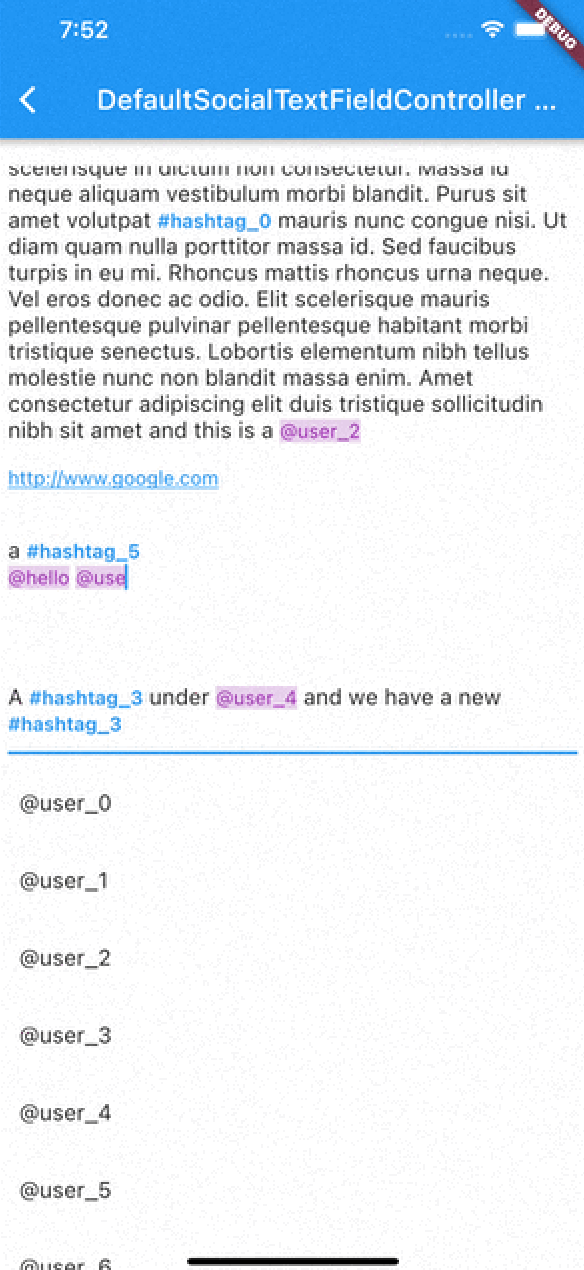
정규 표현식을 사용하여 해시태그, URL 및 언급을 자동으로 감지하고 스타일링하는 소셜 미디어 스타일 기능을 텍스트 입력에 강화하는 플러터 패키지입니다. TextEditingController와 통합되며, RichText 및 TextSpan을 통해 이러한 요소의 탭 상호작용을 지원합니다. 채팅 앱, 소셜 플랫폼 또는 인터랙티브 콘텐츠가 필요한 빈번한 텍스트 편집이 필요한 앱에 적합합니다. 모든 주요 플랫폼인 Android, iOS, Web, macOS, Windows, Linux에서 작동합니다.
사용 사례
소셜 미디어 앱 댓글
클릭 가능한 링크를 갖춘 채팅 애플리케이션
메시지 내 사용자 태그
동적 스타일링이 적용된 리치 텍스트 입력
메타데이터 강조 기능이 있는 콘텐츠 생성 도구
주요 기능
해시태그 탐지 및 스타일링
URL 및 언급 자동 링크
터치 가능한 텍스트 스팬
RichText 통합
정규 표현식 기반 구문 분석
크로스 플랫폼 호환성
적합한 대상
소셜 앱을 개발하는 개발자
풍부한 텍스트 입력이 필요한 팀
사용자 생성 콘텐츠를 포함한 앱
인터랙티브 메시징 인터페이스
사용자 정의 가능한 텍스트 편집기
고려 사항
경계 사례를 처리하기 위해 정규 표현식을 신중하게 조정해야 합니다
긴 텍스트에 대한 성능 최적화가 필요할 수 있습니다
고급 스타일 없이 기본 형식 지정에 제한됨
내장된 이모지 선택기 없음
정확성은 외부 정규식 로직에 따라 달라집니다
원본 README
연결된 소스 저장소의 README 원문 스냅샷입니다. 최신 내용은 저장소에서 확인하세요.
flutter_social_textfield
A Flutter plugin that helps detection of common social media contents.
The current position of the cursor is used for detecting content.
Current detection types are:
HashTag (#): Texts start with #
Mention (@): Text start with @ sign
Web Links: Can detect web links
Emojis: can detect emojis [thanks @moazh]
You can see the supported detection types from DetectedType enum
enum DetectedType{
    mention, //By Default texts starting with @sign
    hashtag,  //By default, texts starting with #hashtag
    url, //By default texts starting with http://xxx.yyy or https://aaa.bbb
    plain_text //Any other type falls into this.
}
One of the main reasons that i want to create this plugin was that i needed to listen detection events from different widgets.
So flutter_social_textfield provides a stream for detections so you can subscribe and listen events when needed.
The Stream Subscriptoin returns SocialContentDetection class:
class SocialContentDetection{
    final DetectedType type; //mention, url, hashtag, plan_text
    final TextRange range; //range of detected content
    final String text; //detected content
    SocialContentDetection(this.type, this.range, this.text);

    @override
    String toString() {
        return 'SocialContentDetection{type: $type, range: $range, text: $text}';
    }
}
DefaultSocialTextFieldController
I've implemented an experimental widget for ease of use. DefaultSocialTextFieldController puts the main content inside a Stack and allows users to show relevant content when curser comes over a detected content
As with version 0.0.9 There are 2 different types of presentation of detection content:
Detection Presentation Mode
DetectionPresentationMode.split_screen : Shows detection view but moving from bottom to determined widget size. useful for full screen textfields like text editors
DetectionPresentationMode.above_text_field : Useful for showing detection view from above the textfield. The location of textfield is detected from the FocusNode automatically.
Please notice the 'scrollPhysics' property of the TextField;
An example usage of the DefaultSocialTextFieldController can be seen in the example project.
The main goal is to provide an easy way to implement features that have been seen in most of the social media applications.
SocialTextSpanBuilder
flutter_social_textfield uses SocialTextSpanBuilder for rendering the text inside the attached textfield.
So if you just want to show formatted text content instead of using inside an editor you can use it like this:
With version 0.0.3 you can also implement onTapDetection function for adding tap gestures to detected strings.
void initBuilder(){
    final Map<DetectedType, RegExp> _regularExpressions = {
        DetectedType.mention:atSignRegExp,
        DetectedType.hashtag:hashTagRegExp,
        DetectedType.url:urlRegex
    };

    final Map<DetectedType, TextStyle> _detectionTextStyles = {
        DetectedType.mention:TextStyle(...)
    };

    final TextStyle _defaultTextStyle = TextStyle();

    final _textSpanBuilder = SocialTextSpanBuilder(regularExpressions: _regularExpressions,defaultTextStyle:_defaultTextStyle,detectionTextStyles: _detectionTextStyles, onTapDetection: (detection){print("Tapped on detection: $detection");});
}

//And you can return RichText content bu calling build(context) method afterwards.
@override
    Widget build(BuildContext context) {
        var height = MediaQuery.of(context).size.height * 0.4;
        return Scaffold(
            appBar: AppBar(
                title: Text(widget.title),
            ),
        body: Container(
           child:RichText(
              text:_textSpanBuilder.build(context)
            )
        )// This trailing comma makes auto-formatting nicer for build methods.
    );
}
Acknowledgements
Thanks https://github.com/Bhupesh-V (@Bhupesh-V) for his contribution to url regex 👌
This widget's default regular expressions taken from this wonderful widget: