

 v2.2.0
keyboard_attachable
소프트 키보드에 부착할 수 있는 위젯을 만들기 위한 플러터 패키지입니다.
119좋아요 5천30일 다운로드150Pub 점수
AndroidiOSmacOSWindowsLinux
소프트 키보드에 부착할 수 있는 위젯을 만들기 위한 플러터 패키지입니다.

아래는 영문 원문 스냅샷입니다. 최신 내용은 GitHub에서 확인하세요.
A Flutter package to build widgets that can be attached to the soft keyboard.

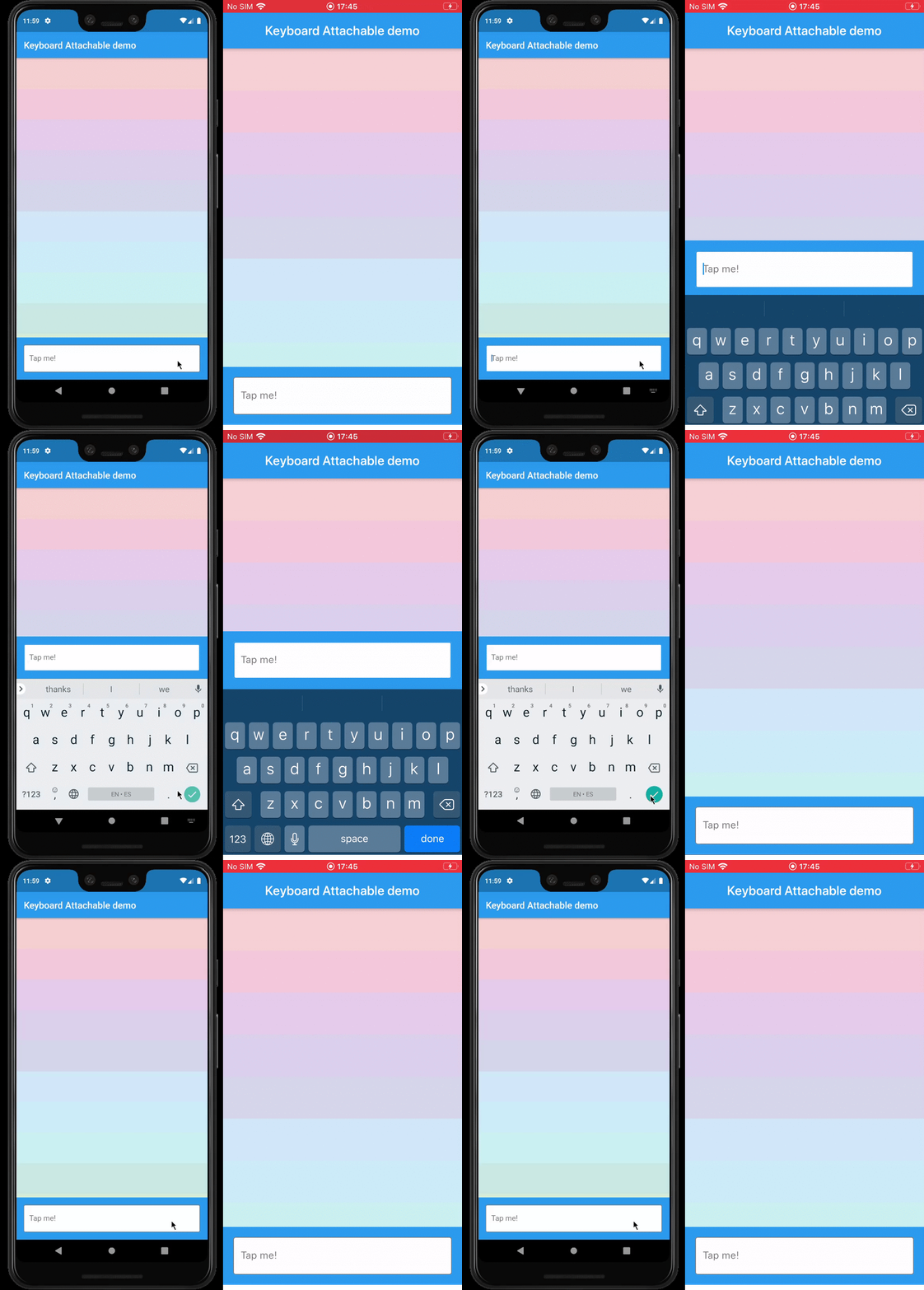
resizeToAvoidBottomInset, with animations.This package exposes a FooterLayout stateless widget and a KeyboardAttachable stateful widget.
FooterLayout is a widget that can lay out a child widget above a footer. It does that by
positioning a footer widget at the bottom of the available space first, and then positioning a
child widget in the remaining space.
    Widget build(BuildContext context) => FooterLayout(
          footer: MyFooterWidget(),
          child: PageMainContent(),
        );
KeyboardAttachable is a widget that adds space below its baseline when the soft keyboard is shown
and hidden with an animation that matches that of the platform keyboard. This widget can be used to
animate its child when the soft keyboard is shown or hidden, so that the child widget appears to be
attached to the keyboard.
You can combine these two widgets by passing a KeyboardAttachable widget as the footer of a
FooterLayout to create a page that shrinks and expands when the soft keyboard appears and
disappears, with an animation that matches the platform keyboard animation. Additionally, you can
pass a child widget to your KeyboardAttachable to have a footer in your page that attaches itself
to the soft keyboard when shown.
Warning: In order for this to work with animations, the
resizeToAvoidBottomInsetparameter of theScaffoldabove the page has to befalse. In addition to that, when there areSafeAreas involved the layout, it is recommended to set theirmaintainBottomViewPaddingproperty totruein order for the animations to run smoothly, like so:
/// Builds a [Scaffold] that lays out a footer at the bottom of the page.
class KeyboardAttachablePage extends StatelessWidget {
  @override
  Widget build(BuildContext context) => Scaffold(
        backgroundColor: Colors.blue,
        resizeToAvoidBottomInset: false,
        appBar: AppBar(title: const Text("Keyboard Attachable demo")),
        body: SafeArea(
          maintainBottomViewPadding: true,
          child: FooterLayout(
            footer: KeyboardAttachableFooter(),
            child: ColorsList(),
          ),
        ),
      );
}
In the pubspec.yaml of your flutter project, add the following dependency:
dependencies:
  keyboard_attachable: "^[LATEST_VERSION]"
Then run $ flutter pub get. In your library, add the following import:
import 'package:keyboard_attachable/keyboard_attachable.dart';
Diego Rogel - GitHub
Check the Changelog page to see what's recently changed.
This project is licensed under the MIT License - see the LICENSE file for details.
의존성 목록 3 개
{"sdk":"flutter"}^5.4.1{"sdk":"flutter"}사용 목적에 따라 검색하고 개발 활동을 비교한 뒤 원본 저장소에서 요구 사항을 확인하세요.
“A repository is the most basic element of GitHub.”
GitHub Docs — About repositories ↗