

 v2.2.1
flutter_parsed_text
텍스트를 파싱하여 여러 개의 Flutter Text 위젯으로 만드는 Flutter 패키지입니다.
270좋아요 25.8만30일 다운로드150Pub 점수
AndroidiOSWebmacOSWindowsLinux
텍스트를 분석하고 링크 가능한 텍스트 위젯으로 만드는 Flutter 패키지

아래는 영문 원문 스냅샷입니다. 최신 내용은 GitHub에서 확인하세요.
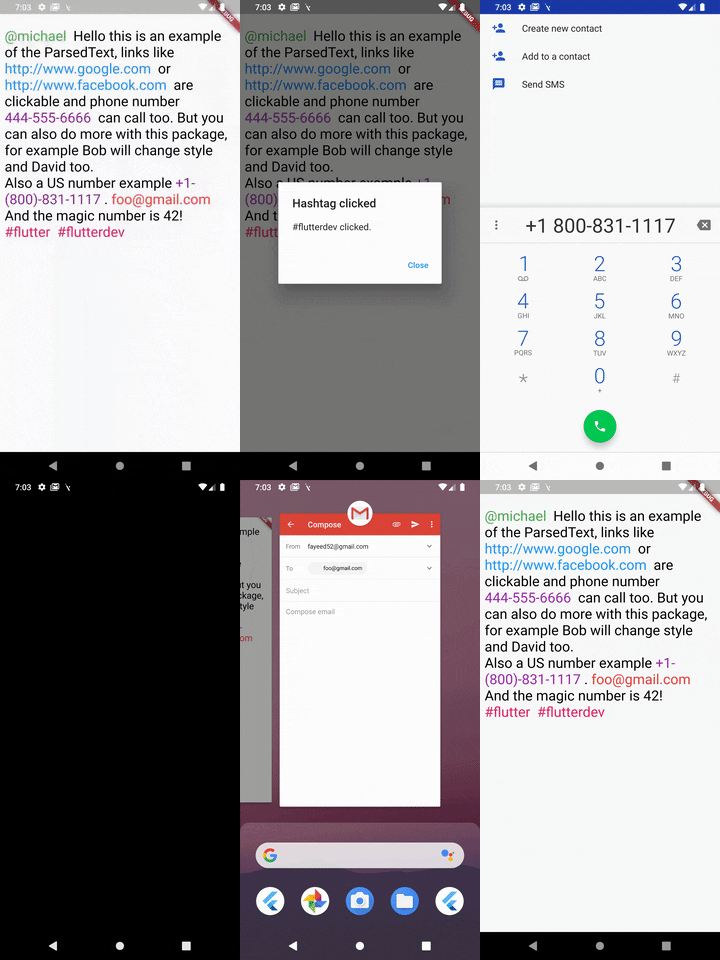
url, phone and email and also supports Regex.To use this package, add flutter_parsed_text as a dependency in your pubspec.yaml file.
import 'package:flutter_parsed_text/flutter_parsed_text.dart';
ParsedText can receive this paramters & all the RichText parameters:
text: Text that will be parsed and rendered.
style: It takes a TextStyle object as it's property to style all the non links text objects.
parse: Array of MatchText object - used for defining structure for pattern matching .
MatchText(
  type: ParsedType.EMAIL, // predefined type can be any of this ParsedTypes
  style: TextStyle(
    color: Colors.red,
    fontSize: 24,
  ), // custom style to be applied to this matched text
  onTap: (url) {
    // do something here with passed url
  }, // callback funtion when the text is tapped on
),
You can also define a custom pattern like this:
MatchText(
  pattern: r"\B#+([\w]+)\b", // a custom pattern to match
  style: TextStyle(
    color: Colors.pink,
    fontSize: 24,
  ), // custom style to be applied to this matched text
  onTap: (url) async {
  // do something here with passed url
  }, // callback funtion when the text is tapped on
)
You can also set RegexOption for the custom regex pattern like so:
MatchText(
  pattern: r"\B#+([\w]+)\b", // a custom pattern to match
  regexOptions: RegexOptions(
    multiLine : false,
    caseSensitive : false,
    unicode : false,
    dotAll : false
  ),
  style: TextStyle(
    color: Colors.pink,
    fontSize: 24,
  ), // custom style to be applied to this matched text
  onTap: (url) async {
  // do something here with passed url
  }, // callback funtion when the text is tapped on
)
A boolean that show a diffrent text and passes a diffrent text to the callback
eg: Your str is "Mention [@michel:5455345]" where 5455345 is ID of this user which will be passed as parameter to the callback funtion and @michel the value to display on interface. Your pattern for ID & username extraction : /\[(@[^:]+):([^\]]+)\]/i
Displayed text will be :
Mention ^^@michel^^
MatchText(
  pattern: r"\[(@[^:]+):([^\]]+)\]",
  style: TextStyle(
    color: Colors.green,
    fontSize: 24,
  ),
  // you must return a map with two keys
  // [display] - the text you want to show to the user
  // [value] - the value underneath it
  renderText: ({String str, String pattern}) {
    Map<String, String> map = Map<String, String>();
    RegExp customRegExp = RegExp(pattern);
    Match match = customRegExp.firstMatch(str);
    map['display'] = match.group(1);
    map['value'] = match.group(2);
    return map;
  },
  onTap: (url) {
    // do something here with passed url
  },
),
Find the complete example wiring in the Flutter_Parsed_Text example application.
A small example of the ParsedText widget.
ParsedText(
  text:
    "[@michael:51515151] Hello this is an example of the ParsedText, links like http://www.google.com or http://www.facebook.com are clickable and phone number 444-555-6666 can call too. But you can also do more with this package, for example Bob will change style and David too. foo@gmail.com And the magic number is 42! #react #react-native",
  parse: <MatchText>[
    MatchText(
      type: ParsedType.EMAIL,
      style: TextStyle(
        color: Colors.red,
        fontSize: 24,
      ),
      onTap: (url) {
        launch("mailto:" + url);
      },
    ),
  ],
)
If you found this project useful, then please consider giving it a ⭐️ on Github and sharing it with your friends via social media.
See the flutter_parsed_text.dart for more API details
If you have any suggestion for including a feature or if something doesn't work, feel free to open a Github issue for us to have a discussion on it.
의존성 목록 2 개
{"sdk":"flutter"}{"sdk":"flutter"}사용 목적에 따라 검색하고 개발 활동을 비교한 뒤 원본 저장소에서 요구 사항을 확인하세요.
“A repository is the most basic element of GitHub.”
GitHub Docs — About repositories ↗