
 v0.0.8
simple_sidebar
아이콘, 텍스트, 헤더 및 부드러움을 갖춘 매우 간단한 사이드바입니다. 구현하기 쉽고 사용하기 쉬움
5좋아요 1430일 다운로드150Pub 점수
AndroidiOSWebmacOSWindowsLinux
https://pub.dev/packages/simple_sidebar의 저장소

{"sdk":"flutter"}^4.2.0^2.0.0{"sdk":"flutter"}아래는 영문 원문 스냅샷입니다. 최신 내용은 GitHub에서 확인하세요.
Simple and quick to set up sidebar. Soft animations
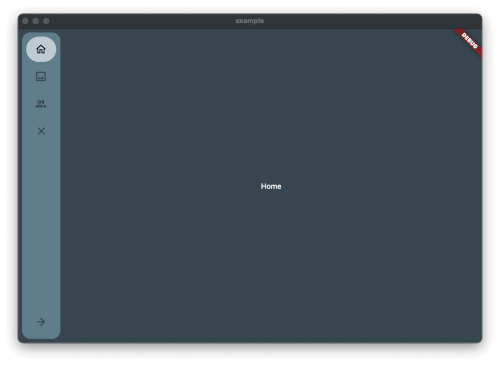
Image from the Package
Just add the package to pubspec.yaml and start using it.
Create Theme & Controller and List of the Item you want to have in the Sidebar
final SimpleSidebarTheme theme = SimpleSidebarTheme()
    ..expandedShape = const BorderRadius.all(Radius.circular(8))
    ..collapsedShape = const BorderRadius.all(Radius.circular(8));
  final List<SimpleSidebarItem> sidebarItems = [
    SimpleSidebarItem(onTap: () {}, title: "Home", leading: Icons.home_outlined),
    SimpleSidebarItem(onTap: () {}, title: "Gallery", leading: Icons.image_outlined),
    SimpleSidebarItem(onTap: () {}, title: "Users", leading: Icons.group_outlined),
    SimpleSidebarItem(onTap: () {}, title: "Extra long name for a menu item", leading: Icons.list),
  ];
  final List<SimpleSidebarItem> footerItems = [
    SimpleSidebarItem(onTap: () {}, title: "Settings", leading: Icons.settings),
    SimpleSidebarItem(onTap: () {}, title: "Logout", leading: Icons.close),
  ];
After this create the Scaffold with the lists
Scaffold(
  backgroundColor: kcBackground,
  body: Row(
    children: [
      SimpleSidebar(
        theme: widget.theme,
        initialExpanded: true,
        initialIndex: 1,
        childrens: widget.sidebarItems,
        footerItems: widget.footerItems,
        onTap: (value) {
          setState(() {
            selected = value;
          });
          log("selected value $value");
        },
      ),
      Expanded(
        child: AnimatedOpacity(
          opacity: isVisible ? 1 : 0,
          duration: const Duration(milliseconds: 300),
          child: Container(
              margin: const EdgeInsets.all(8),
              child: const <Widget>[
                Text("hallo"),
                Text("hallo2"),
                Text("hallo3"),
                Text("hallo4"),
                Text("hallo5"),
                Text("hallo6"),
              ][selected]),
        ),
      ),
    ],
  ),
);
Should there be any questions, wishes mail me: [Contact](mailto:support@glocknerstudios.at)
create an issue on GitHub for bugs. And now have fun with the sidebar