
 v2.0.3
ansicolor
터미널 로그에 색을 더하고 싶으신가요? `ansicolor`는 xterm-256 색상 지원 라이브러리로 텍스트의 전경 및 배경 색상을 변경할 수 있습니다.
171좋아요 327만30일 다운로드160Pub 점수
AndroidiOSWebmacOSWindowsLinux
google/ansicolor-dart open-source repository details.

아래는 영문 원문 스냅샷입니다. 최신 내용은 GitHub에서 확인하세요.
Feel like you're missing some color in your terminal programs? Use AnsiPen to add ANSI color codes to your log messages.
Easy to disable for production, just set color_disabled = true and all codes will be empty - no re-writing debug messages.
Note: color_disabled is a global variable for all pen colors.
Note: Be mindful of contrasting colors. If you set "bright white" foreground and don't adjust the background, you'll have a bad time with lighter terminals.
Foreground to bright white with default background:
AnsiPen pen = AnsiPen()..white(bold: true);
print(pen("Bright white foreground") + " this text is default fg/bg");
Background as a peach, foreground as white:
AnsiPen pen = AnsiPen()..white()..rgb(r: 1.0, g: 0.8, b: 0.2, bg: true);
print(pen("White foreground with a peach background"));
If color isn't working for you; try setting ansiColorDisabled = false;. We're relying on the stdio object to inform us of ANSI terminal support. Sometimes this is wrong.
Prior versions of this library just turned on color by default.
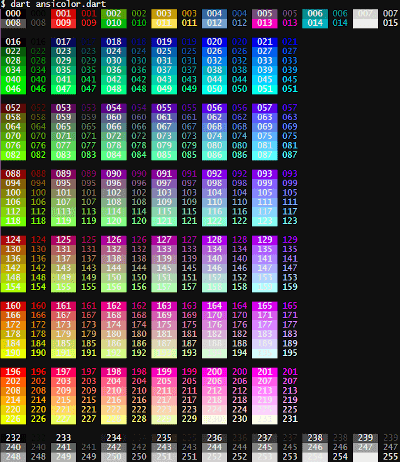
If you want a specific color, you can call the xterm() with the index listed in the rainbow below. To show the rainbow on your own terminal, pub run examples/ansicolor.dart
alt tag