
 v1.1.0
textstyle_extensions
TextStyle을 쉽게 수정할 수 있는 문법적 설탕입니다. .bold, .italic 또는 .size()와 같은 textStyle 변형을 빠르게 생성하세요.
22좋아요 1.3천30일 다운로드40Pub 점수
플랫폼 정보 없음
TextStyle을 빠르게 수정하기 위한 문법적 설탕

{"sdk":"flutter"}아래는 영문 원문 스냅샷입니다. 최신 내용은 GitHub에서 확인하세요.
Syntactic sugar for easily modifying TextStyles:
// Do this:
myTextStyle.bold.italic.size(16).letterSpace(1.6)

//Instead of this:
myTextStyle.copyWith(fontSize: 16, fontWeight: FontWeight.bold, fontStyle: FontStyle.italic, letterSpacing: 1.6,)
dependencies:
  textstyle_extensions: ^1.0.0
import 'package:textstyle_extensions/textstyle_extensions.dart';
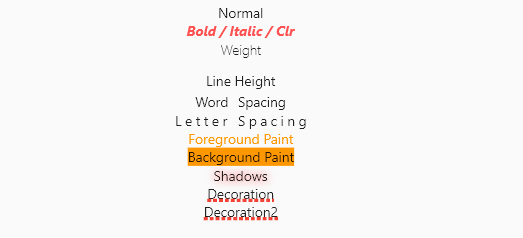
The entire TextStyle API is represented, plus a convenience method for quick scaling:
Widget build(BuildContext context) {
  Text t(String v, TextStyle t) => Text(v, style: t);
  TextStyle style = TextStyle(fontSize: 12);
  return Center(
    child: Column(
      crossAxisAlignment: CrossAxisAlignment.center,
      children: <Widget>[
        t("Normal", style),
        t("Bigger", style.scale(1.1)),
        t("Smaller Bold / Italic / Clr", style.bold.italic.textColor(Colors.redAccent).size(10)),
        t("Weight", style.weight(FontWeight.w100)),
        t("Line Height", style.textHeight(2.5)),
        t("Word Spacing", style.wordSpace(5)),
        t("Letter Spacing", style.letterSpace(3)),
        t("Foreground Paint", style.textForeground(Paint()..color = Colors.orange)),
        t("Background Paint", style.textBackground(Paint()..color = Colors.orange)),
        t("Shadows", style.textShadows([Shadow(color: Colors.redAccent, blurRadius: 4)])),
        t(
          "Decoration",
          style.textDecoration(TextDecoration.underline,
              color: Colors.red, thickness: 4, style: TextDecorationStyle.dotted),
        ),
      ],
    ),
  );
}
Shortcut method names are introduced where it makes sense. This is done both for brevity, and to reduce conflicts with the underlying TextStyle properties.
If you encounter any problems please open an issue. If you feel the library is missing a feature, please raise a ticket on Github and we'll look into it. Pull request are welcome.
MIT License