패키지, 저장소 및 앱 카테고리 검색

textstyle_extensions 표지
패키지 상세v1.1.0

textstyle_extensions

TextStyle을 쉽게 수정할 수 있는 문법적 설탕입니다. .bold, .italic 또는 .size()와 같은 textStyle 변형을 빠르게 생성하세요.

30일 다운로드
2.4천
좋아요
22
Pub 점수
40

패키지 설치

flutter pub add textstyle_extensions

패키지 개요

공개 정보를 바탕으로 생성한 선택 가이드입니다.

텍스트 스타일을 쉽게 수정할 수 있도록 도와주는 플러터 패키지입니다. .bold, .italic, .size()와 같은 직관적인 확장 기능을 통해 스타일이 적용된 텍스트 변형을 간편하게 만들 수 있으며, 텍스트 외관을 맞춤화하는 과정을 간소화합니다. TextStyle에 유연한 메서드를 확장함으로써 코드의 가독성을 높이고 반복 코드를 줄입니다. 특히 UI 중심 애플리케이션에서 자주 텍스트 스타일을 조정해야 하는 프로젝트에 적합합니다.

사용 사례

  • 빠르게 굵게 또는 기울임 글꼴 스타일 적용
  • 크기 조정된 텍스트 변형 만들기
  • 반복적인 TextStyle 수정 간소화
  • 컴포넌트 간 UI 일관성 향상
  • 텍스트가 많은 위젯에서 코드 가독성 향상

주요 기능

  • TextStyle용 플루언트 확장 메서드
  • .bold, .italic, .size() 지원
  • 텍스트 스타일링에서 반복 코드를 줄입니다
  • 코드 유지보수성 향상
  • 기존 TextStyle 객체와의 간편한 통합

적합한 대상

  • rich text를 사용하는 UI 개발자
  • 자주 텍스트 스타일링이 필요한 프로젝트
  • 클린하고 가독성 높은 코드를 우선시하는 팀
  • 동적 텍스트 형식 지정을 갖춘 Flutter 앱
  • 간결한 텍스트 조작을 원하는 개발자

고려 사항

  • 기본 TextStyle 수정에 한정
  • 확장 기능을 넘어서는 고급 스타일은 지원하지 않습니다
  • TextStyle 계층 구조에 대한 이해가 필요합니다
  • 패키지 크기가 약간 증가할 수 있습니다
  • 복잡한 텍스트 레이아웃 시나리오에 적합하지 않습니다

원본 README

연결된 소스 저장소의 README 원문 스냅샷입니다. 최신 내용은 저장소에서 확인하세요.

textstyle_extensions

Syntactic sugar for easily modifying TextStyles:

// Do this:
myTextStyle.bold.italic.size(16).letterSpace(1.6)

//Instead of this:
myTextStyle.copyWith(fontSize: 16, fontWeight: FontWeight.bold, fontStyle: FontStyle.italic, letterSpacing: 1.6,)

🔨 Installation

dependencies:
  textstyle_extensions: ^1.0.0
⚙ Import
import 'package:textstyle_extensions/textstyle_extensions.dart';

🕹️ Usage

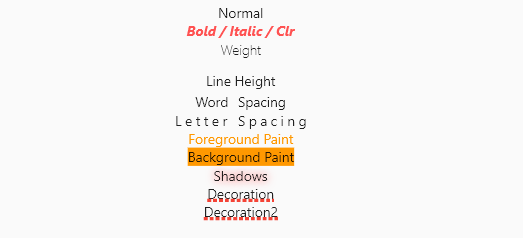
The entire TextStyle API is represented, plus a convenience method for quick scaling:

Widget build(BuildContext context) {
  Text t(String v, TextStyle t) => Text(v, style: t);
  TextStyle style = TextStyle(fontSize: 12);
  return Center(
    child: Column(
      crossAxisAlignment: CrossAxisAlignment.center,
      children: <Widget>[
        t("Normal", style),
        t("Bigger", style.scale(1.1)),
        t("Smaller Bold / Italic / Clr", style.bold.italic.textColor(Colors.redAccent).size(10)),
        t("Weight", style.weight(FontWeight.w100)),
        t("Line Height", style.textHeight(2.5)),
        t("Word Spacing", style.wordSpace(5)),
        t("Letter Spacing", style.letterSpace(3)),
        t("Foreground Paint", style.textForeground(Paint()..color = Colors.orange)),
        t("Background Paint", style.textBackground(Paint()..color = Colors.orange)),
        t("Shadows", style.textShadows([Shadow(color: Colors.redAccent, blurRadius: 4)])),
        t(
          "Decoration",
          style.textDecoration(TextDecoration.underline,
              color: Colors.red, thickness: 4, style: TextDecorationStyle.dotted),
        ),
      ],
    ),
  );
}

Shortcut method names are introduced where it makes sense. This is done both for brevity, and to reduce conflicts with the underlying TextStyle properties.

🐞 Bugs/Requests

If you encounter any problems please open an issue. If you feel the library is missing a feature, please raise a ticket on Github and we'll look into it. Pull request are welcome.

📃 License

MIT License

카테고리

소스 저장소

이 패키지를 사용하는 프로젝트