

 v0.0.4
textuality
Textuality은 그라데이션, 스트로크, 네온, 그림자 효과 등 고급 스타일링 옵션을 제공하여 Text 위젯을 향상시키는 Flutter 패키지입니다.
39좋아요 37430일 다운로드140Pub 점수
AndroidiOSWebmacOSWindowsLinux
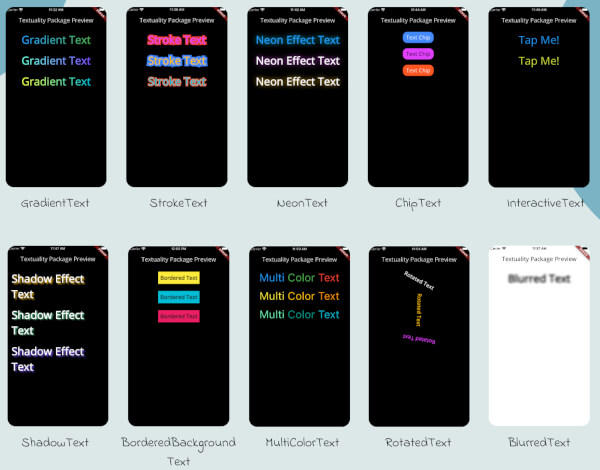
Textuality은 다양한 사용자 정의 가능한 텍스트 효과와 스타일로 텍스트 위젯의 시각적 외관을 향상시키는 강력한 Flutter 패키지입니다. 이 패키지를 사용하면 그라데이션 텍스트, 스트로크 텍스트, 네온 효과, 그림자 효과, 인터랙티브 텍스트 등을 Flutter 앱에 쉽게 추가할 수 있습니다.

아래는 영문 원문 스냅샷입니다. 최신 내용은 GitHub에서 확인하세요.
Textuality is a powerful Flutter package that enhances the appearance of text widgets with a variety of customizable text effects and styles. With this package, you can easily add gradient text, stroke text, neon effects, shadow effects, interactive text, and more to your Flutter app.
Each widget accepts various optional parameters for customization, such as style, text alignment, maxLines, overflow, and more.
To use the textuality package in your Flutter project, follow these steps:
Add the package to your pubspec.yaml file:
dependencies:
  textuality: ^0.0.1
Run the following command to install the package:
flutter pub get
💻Example
Below is an example of how to use the Textuality package in your Flutter app:
import 'package:flutter/material.dart';
import 'package:textuality/textuality.dart';

class TextualityExample extends StatefulWidget {
  const TextualityExample({super.key});

  @override
  State<TextualityExample> createState() => _TextualityExampleState();
}

class _TextualityExampleState extends State<TextualityExample> {
  @override
  Widget build(BuildContext context) {
    return Scaffold(
      backgroundColor: Colors.white,
      appBar: AppBar(
          backgroundColor: Colors.white,
          title: Text(
            'Textuality Package Preview',
            style: TextStyle(color: Colors.black),
          )),
      body: SingleChildScrollView(
        padding: EdgeInsets.all(16.0),
        child: Center(
          child: Column(
            children: [
              // Gradient Text
              GradientText(
                text: 'Gradient Text',
                giveGradient: [Colors.blue, Colors.green],
                style: TextStyle(fontSize: 40, fontWeight: FontWeight.bold),
              ),
              SizedBox(height: 20),

              // Stroke Text
              StrokeText(
                text: 'Stroke Text',
                strokeColor: Colors.red,
                strokeWidth: 8.0,
                style: TextStyle(
                    fontSize: 40,
                    fontWeight: FontWeight.bold,
                    color: Colors.purpleAccent),
              ),
              SizedBox(height: 20),
              // Neon Text
              NeonText(
                text: 'Neon Effect Text',
                glowColor: Colors.cyan,
                blurRadius: 20.0,
                style: TextStyle(
                    fontSize: 40,
                    fontWeight: FontWeight.bold,
                    color: Colors.blue),
              ),
              SizedBox(height: 20),
              // Text Chips
              ChipText(
                text: 'Text Chip',
                chipColor: Colors.blueAccent,
                style: TextStyle(fontSize: 20, color: Colors.white),
              ),
              SizedBox(height: 20),

              // Shadow Text
              ShadowText(
                  text: 'Shadow Effect Text',
                  shadows: [
                    Shadow(
                      blurRadius: 5.0,
                      color: Colors.amber,
                      offset: Offset(5, 5),
                    ),
                  ],
                  style: TextStyle(
                      fontSize: 40,
                      fontWeight: FontWeight.bold,
                      color: Colors.white)),
              SizedBox(height: 20),
               ShadowText.simple(
                  text: 'Simple Shadow Effect Text',
                  style: TextStyle(
                     fontSize: 24,
                     fontWeight: FontWeight.bold,
                     color: Colors.blue,
                  ),
                  shadowColor: Colors.red,
                  shadowBlurRadius: 8.0,
                  shadowOffset: Offset(3, 3),
               ),
               SizedBox(height: 20),
              // Multi-Color Text
              MultiColorText(
                spans: [
                  TextSpan(
                    text: 'Multi',
                    style: TextStyle(color: Colors.blue, fontSize: 40),
                  ),
                  TextSpan(
                    text: 'Color ',
                    style: TextStyle(color: Colors.green, fontSize: 40),
                  ),
                  TextSpan(
                    text: 'Text',
                    style: TextStyle(color: Colors.red, fontSize: 40),
                  ),
                ],
              ),
              SizedBox(height: 20),
              // InteractiveTextuality
              InteractiveText(
                text: 'on Tap',
                onTap: () {},
                style: TextStyle(fontSize: 20, fontWeight: FontWeight.bold),
              ),
              SizedBox(height: 20),
              // Rotated Text
              RotatedText(
                text: 'Rotated Text',
                rotationAngle: 0.5, // Rotate 90 degrees
                style: TextStyle(fontSize: 40, fontWeight: FontWeight.bold),
              ),
              SizedBox(height: 20),

              // Blurred Text
              BlurredText(
                text: 'Blurred Text',
                blurStrength: 5.0,
                style: TextStyle(fontSize: 40, fontWeight: FontWeight.bold),
              ),
              SizedBox(height: 20),

              // Bordered Background Text
              BorderedBackgroundText(
                text: 'Bordered Background Text',
                borderColor: Colors.black,
                borderWidth: 3.0,
                backgroundColor: Colors.yellow,
                style: TextStyle(fontSize: 40, fontWeight: FontWeight.bold),
              ),
            ],
          ),
        ),
      ),
    );
  }
}
GradientText
ChipText
StrokeText
InteractiveText
NeonText
ShadowText
MultiColorText
RotatedText
BlurredText
BorderedText
See the CHANGELOG.md file for updates.
This package is licensed under the MIT License.
의존성 목록 3 개
{"sdk":"flutter"}{"sdk":"flutter"}^3.0.0사용 목적에 따라 검색하고 개발 활동을 비교한 뒤 원본 저장소에서 요구 사항을 확인하세요.
“A repository is the most basic element of GitHub.”
GitHub Docs — About repositories ↗